


















































































































Save up to 73% on plans

Camera Roll AI Collage Generator
Sign In

Camera Roll AI Collage Generator

Upload an authorized reference, describe a few imagined everyday scenes and generate one phone-gallery-inspired collage. This is not an export of separate photos.

Upload an authorized reference photo*
Try a fictional reference

315 / 1,600

Copy Protection
Public VisibilityAllow this result to appear in public inspiration surfaces.

Your Single Collage Image

Image

AI output preview
One Portrait, Twelve Everyday Moments

More AI Image Models & Effects

Browse every other AI image model and effect published on this site in a continuous carousel.

Actual Input and Generated Result

One Portrait, Twelve Everyday Moments

An actual GPT Image 2 result uses one fictional adult reference for a three-column, four-row collage of cafés, streets, reading and park scenes. The output is one image. Inspect identity and hand details across the individual panels.
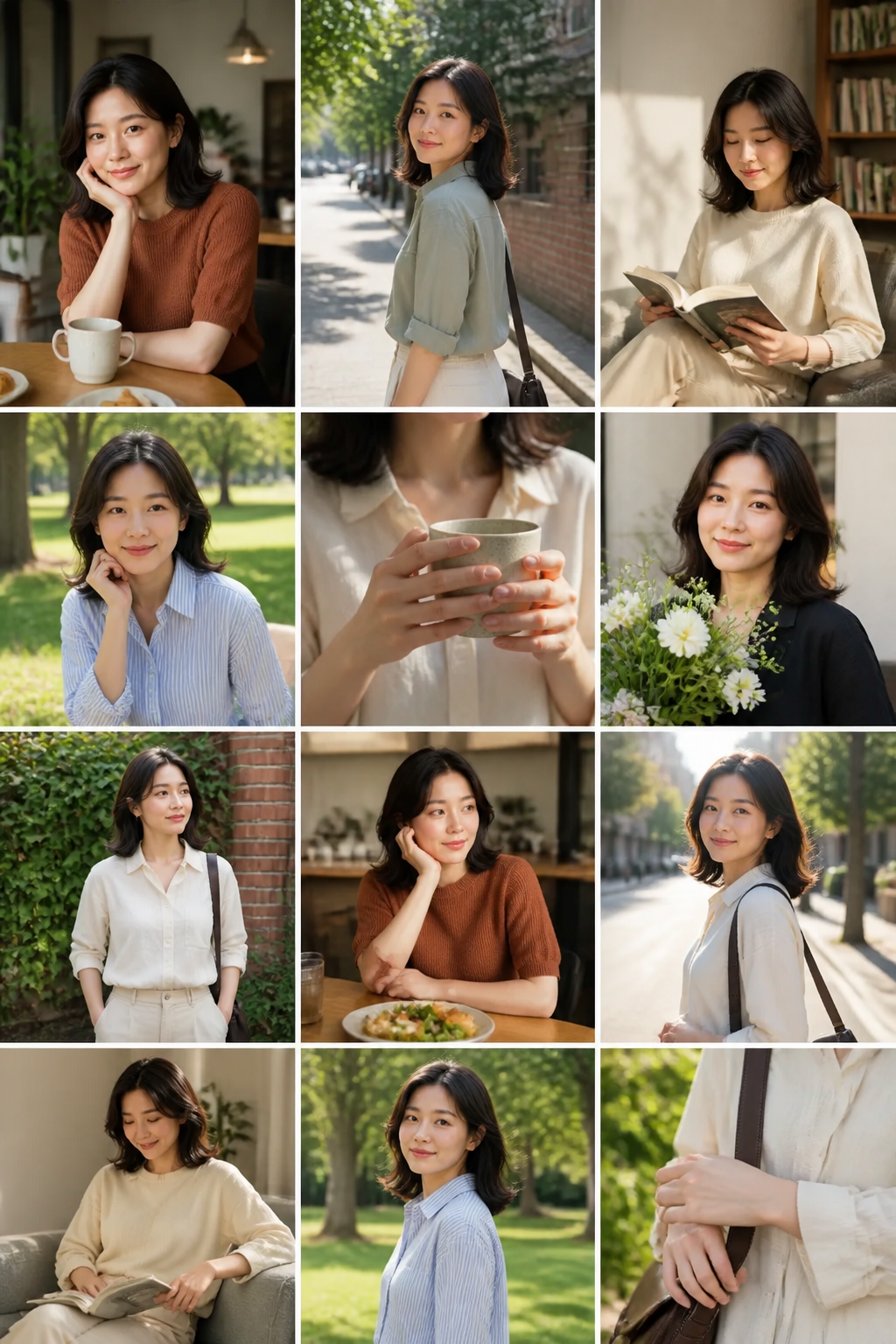
One Portrait, Twelve Everyday Moments

One Photo, One Imagined Camera Roll Collage

Camera Roll AI creates a single composed image inspired by the rhythm of a phone photo gallery. An authorized reference anchors the person's appearance while the prompt describes fictional scenes, light and layout. The result is a creative moodboard, not a recovered camera roll, a collection of real memories or a folder containing twenty-four separate photos. NanoPic does not read your phone library. You choose the one reference you want to upload.

A consistent visual anchor

The reference should clearly show the adult whose appearance should remain recognizable. A simple portrait with natural light gives the model more useful information than a tiny face in a busy screenshot. The model may still reinterpret features across tiles, so check every visible face before presenting the collage as a character or personal visual concept.

Variety within one image

A convincing collection mixes close portraits, wider environments and small details. Ask for a few connected everyday activities rather than twelve nearly identical headshots. Camera distance, viewpoint and light can change, but identity and overall color direction should remain coherent. Use the prompt to decide which elements vary and which ones stay stable.

A gallery-inspired layout, not an app clone

The output uses an original grid rather than copying official Apple Photos controls, logos or interface elements. It is not affiliated with Apple and does not create a working photo library. Avoid fabricated timestamps, location labels and status bars that could make an imagined moodboard look like a record of someone's real activities.

How to Create a Camera Roll AI Image

Treat the collage like a compact visual brief. A focused idea is easier to review than a long list of unrelated scenes.

1. Choose a clear reference

Upload your own photo or a permitted adult reference. Keep the face large enough to read, without extreme blur or occlusion. The supplied fictional reference lets you explore the controls without sharing a personal photograph. If you use a real person's likeness, make sure both the planned scenes and intended sharing context are acceptable to them.

2. Select a visual theme

Pick a coherent direction such as a relaxed weekend, a city walk, a studio day or a quiet reading afternoon. Name a small set of locations and an overall lighting style. Avoid combining mutually incompatible seasons, costume changes and documentary claims in one request. A clear theme gives the individual tiles a reason to belong together.

3. Set the grid and framing

The default asks for three columns and four rows in a tall composition. You can edit that instruction, but exact tile count is a generative request rather than a guaranteed grid engine. More tiles make each face smaller. Start with a readable layout and reserve space between panels so the image does not become an unreadable mass of repeated details.

4. Review and download one image

Open the completed collage and inspect each panel. Check identity, fingers, faces, repeated objects and the boundaries between scenes. Save the composed result when it fits your intended use. The download is one flattened image; it does not include separate full-resolution originals for each tile or a timeline of actual events.

Camera Roll Themes Worth Trying

These are prompt directions rather than claims about included real-generation examples. Keep every scenario fictional and consensual.

A quiet weekend moodboard

Build a soft everyday sequence around coffee, books, a park and a window-lit room. Mix one portrait, a wider environmental view and a few object details. Use gentle daylight and restrained color. This direction works well when the goal is atmosphere rather than a highly dramatic story or an exact reenactment of a personal event.

A city-day character study

Explore a fictional person's appearance across a pedestrian street, a café entrance and a quiet corner of a city park. Preserve recognizable facial structure while changing camera distance and head direction. Avoid recognizable private addresses and invented travel claims. The collage is a creative character board, not proof that the reference person visited those places.

A wardrobe and color concept

Use a limited palette to study how a character might look in casual layers, a clean studio portrait and a relaxed outdoor scene. Keep the outfits appropriate and make the changes explicit. Review whether the face and body remain coherent when clothing changes. The model is not predicting fit, tailoring or real garment availability.

An editorial planning board

Before a real shoot, sketch the balance of portraits, environments and still-life details you want to capture. Treat the collage as a communication aid for framing and mood. It does not replace a location plan, release form, shot list or controlled photography, but it can make a broad visual idea easier to discuss with collaborators.

Keep the Collage Readable at Phone Size

Panel count is only one part of the design. A smaller grid with varied framing often communicates more than a crowded wall of tiny repeated faces.

Start with twelve panels

Three columns and four rows leave more space for expressions and environments than a dense thirty-two-tile layout. If you ask for more panels, expect smaller details and more demanding consistency review. Do not interpret the tile count as the number of independent files or as a guarantee that each panel will have the detail of a standalone generated image.

Mix distances deliberately

Use close, medium and wide frames instead of keeping the face at the same size throughout. An object detail or empty scene can give the viewer a visual pause. Protect the complete head in portraits, leave room around hands and avoid panels that accidentally cut through a face at the edge of the collage.

Keep a simple border rule

Ask for narrow consistent gutters and no overlaid app controls. A clean frame makes the collection feel organized without pretending to be an operating system screenshot. If exact spacing and tile dimensions matter, export the concept and rebuild the final layout in a design editor with deliberate individual assets.

Camera Roll AI Prompt Examples

Change scenes and mood in the editable field while keeping the one-image boundary clear.

Soft daylight collection

Create one tall three-by-four collage of this same authorized adult in imagined everyday moments. Include a café portrait, walking in a park, reading near a window and two calm detail shots. Keep identity recognizable, lighting soft, colors muted and camera distances varied. Use narrow gutters, keep faces within their panels and omit logos, dates and official app UI.

Original editorial contact sheet

Generate one original contact-sheet-style concept with twelve panels. Preserve the reference adult while exploring a simple studio, a city wall and a quiet indoor scene. Balance portraits with environmental frames. Keep the same photographic character and natural anatomy. This is a fictional planning board, not a real phone gallery; include no timestamps or claims about actual events.

Refine a Camera Roll Collage without Losing Its Theme

A strong revision solves a specific visual issue. Keep the reference and general theme stable while changing one layout or scene instruction.

When all the tiles look alike

List a deliberate mix of framing: two close portraits, several medium views, a couple of wide environments and a few object details. Describe different actions without turning every tile into a separate elaborate story. A person reading, walking or looking out a window gives the model a more useful variation than repeatedly asking for a beautiful candid photo. Keep the same light family and palette so variety does not destroy the sense of one collection.

When the face changes too much

Simplify the source and reduce the number of face-heavy panels. A clear reference with a readable head angle is easier to use than a cropped or heavily filtered face. Ask for recognizable facial structure and avoid large changes in visible age. Identity can still drift because the model is composing many scenes at once. If exact likeness in every tile is essential, generate and review individual images in a separate workflow before arranging a manual collage.

When the grid becomes crowded

Reduce the requested row count, make the gutters slightly clearer and remove unnecessary captions or decorative elements. More panels do not automatically produce a stronger concept. Review on a phone-sized display because details that seem readable at full size can disappear after sharing. Keep the central visual story simple enough that a viewer understands it without enlarging every tile or reading a lengthy explanation.

When a scene implies something unintended

Replace the scene with an ordinary, consensual setting and remove misleading dates or locations. Imagined pictures of a real person can still affect how others perceive them. Do not create or share a collage that suggests an intimate relationship, embarrassing act or private event without clear consent. A creative label helps communicate context, but it is not a substitute for choosing appropriate content in the first place.

When you need separate deliverable images

This page is not a batch-photo exporter. Plan independent images with their own prompts and review them individually if your project needs separate originals, then arrange them in a layout editor. Cropping tiles from the flattened collage cannot recover detail that was never generated at full standalone size. Keep that distinction clear when discussing deliverables with a client or collaborator so an attractive concept is not mistaken for a finished asset library.

Check Consistency before Sharing

Open the whole image and move through the tiles in order. Compare each face with the reference rather than assuming the first panel proves the rest are correct. Look for duplicate heads, merging borders, implausible hands and scenes that became too similar. Confirm that the image contains no unrequested logos or misleading location information. A collage can look attractive overall while still needing a second pass on individual details. Do not use it as a factual record of a person's private life.

Camera Roll AI Questions

Does this create twenty-four separate photos?

No. Each generation produces one composed collage image. Its panels are not delivered as independent full-resolution photographs. You can request a denser layout, but tile count and identity consistency still require review.

Can NanoPic see the rest of my phone gallery?

This workflow uses the reference file you explicitly upload. It does not browse or recover your device's camera roll.

Is this Apple Photos or an official Apple tool?

No. NanoPic is not affiliated with Apple. The page creates an original smartphone-gallery-inspired collage, without official logos or working photo-library controls.

Are the scenes real memories?

No. They are imagined scenes based on a visual brief. Do not use the result to claim that a person took part in events or visited places that did not happen.

Why can the face vary across tiles?

The model generates a new composition rather than duplicating the same photograph. Clear references and a focused prompt help, but every panel must be checked for identity and anatomy drift.

Can I change the number of rows and columns?

Yes, describe the layout in the prompt. The model may not follow exact counts or spacing perfectly. For strict grid dimensions, use a layout editor after reviewing the creative concept.

Can I make a collage of someone else?

Use only a reference you have permission to edit and share, and keep the imagined situations appropriate and consensual. Do not make deceptive, intimate or humiliating depictions.

Related tools