








































































































Free Goth Filter Online for Photos
Sign In

Free Goth Filter Online for Photos

Sign in to receive the starter-credit offer shown for your account. When that balance covers the displayed generation cost, you can try the Goth Filter without buying credits. Upload one clear adult portrait, choose a distinct goth direction, and edit the optional style note. NanoPic asks the image-to-image model to keep the same adult identity, visible age, expression, hairstyle, pose, natural proportions, and camera perspective while changing clothing, makeup, accessories, lighting, and atmosphere.

Start with one distinct direction, then add one focused note below.

Upload an Adult Portrait*
Try a Portrait Sample

0 / 500

Public Visibility
Copy Protection
Credits required:-

Your Goth Filter Preview and Result

Image

Fictional adult East Asian woman before using the Goth Filter
Source
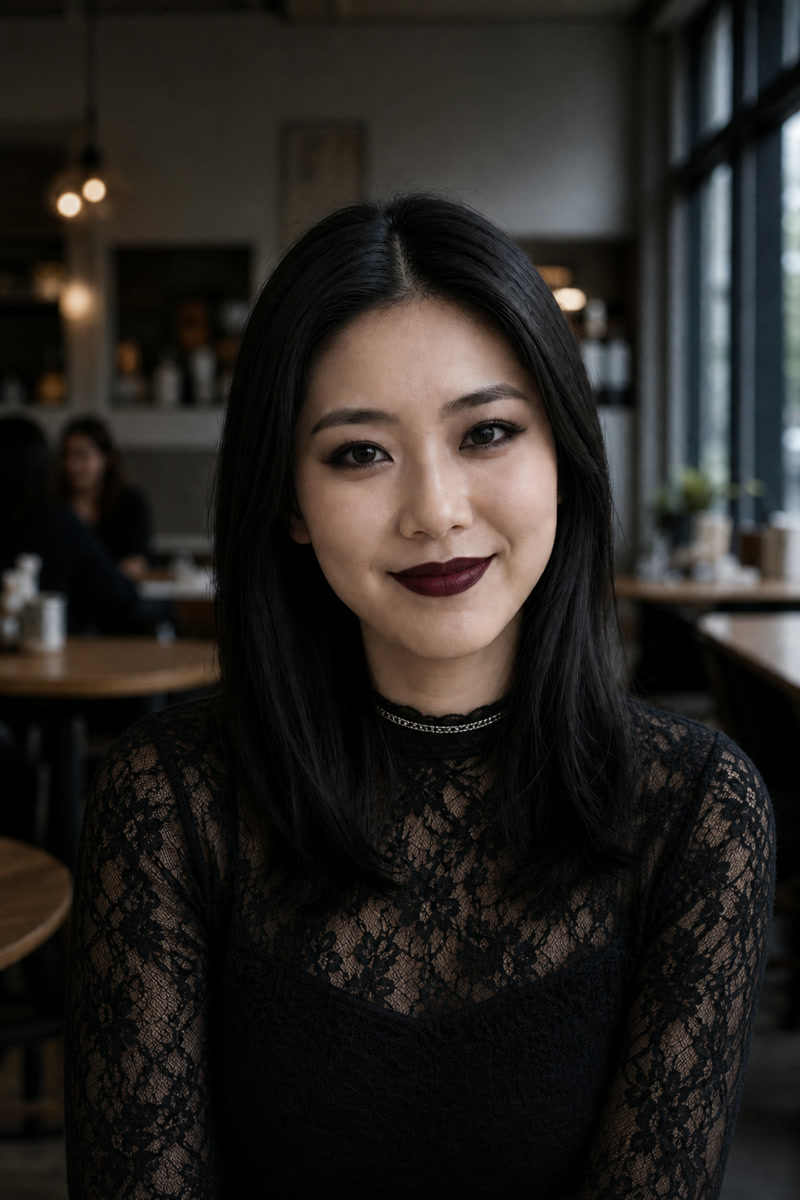
Same fictional adult restyled with black lace and Classic Goth makeup
Classic Goth
Before and after comparison of a fictional adult portrait using the Classic Goth Filter

Goth Photo Filter with Five Distinct Styles

New-user starter credits may let you try this goth photo filter without buying credits; the live balance and generation cost shown in the tool determine whether your current attempt is covered. The workflow changes more than brightness and saturation, but it should not replace the person. It directs the model toward deliberate makeup, dark-fashion materials, accessories, light, and atmosphere while protecting the portrait's identity anchors and natural proportions. The five looks are intentionally different: Classic Goth is restrained and graphic, Romantic Goth uses velvet and burgundy, Cyber Goth adds technical layers and colored rim light, Victorian Goth uses high-neck lace and a dark parlor, and Goth Baddie uses contemporary beauty-editorial styling. AI edits can still drift, so compare the result with the source before downloading or publishing.

Goth Filter Before and After: Five Original Portraits

Every source is a fictional adult portrait produced for NanoPic, and every output was generated for this page. Matching 2:3 framing makes the changes easy to inspect without social screenshots, competitor images, watermarks, or unknown likeness rights.

Classic Goth with Lace and Controlled Contrast

The cafe portrait keeps the same face, centered pose, long dark hair, window direction, and background geometry. Smoky eyeliner, berry-black lipstick, lace, and a slim silver accent create a recognizable classic direction. Darkening remains selective: the face is readable, lace texture survives, and the cafe does not disappear into a flat black background.

Use This Look

Classic Goth Filter before and after portrait with black lace and smoky makeup

Romantic Goth with Velvet and Burgundy

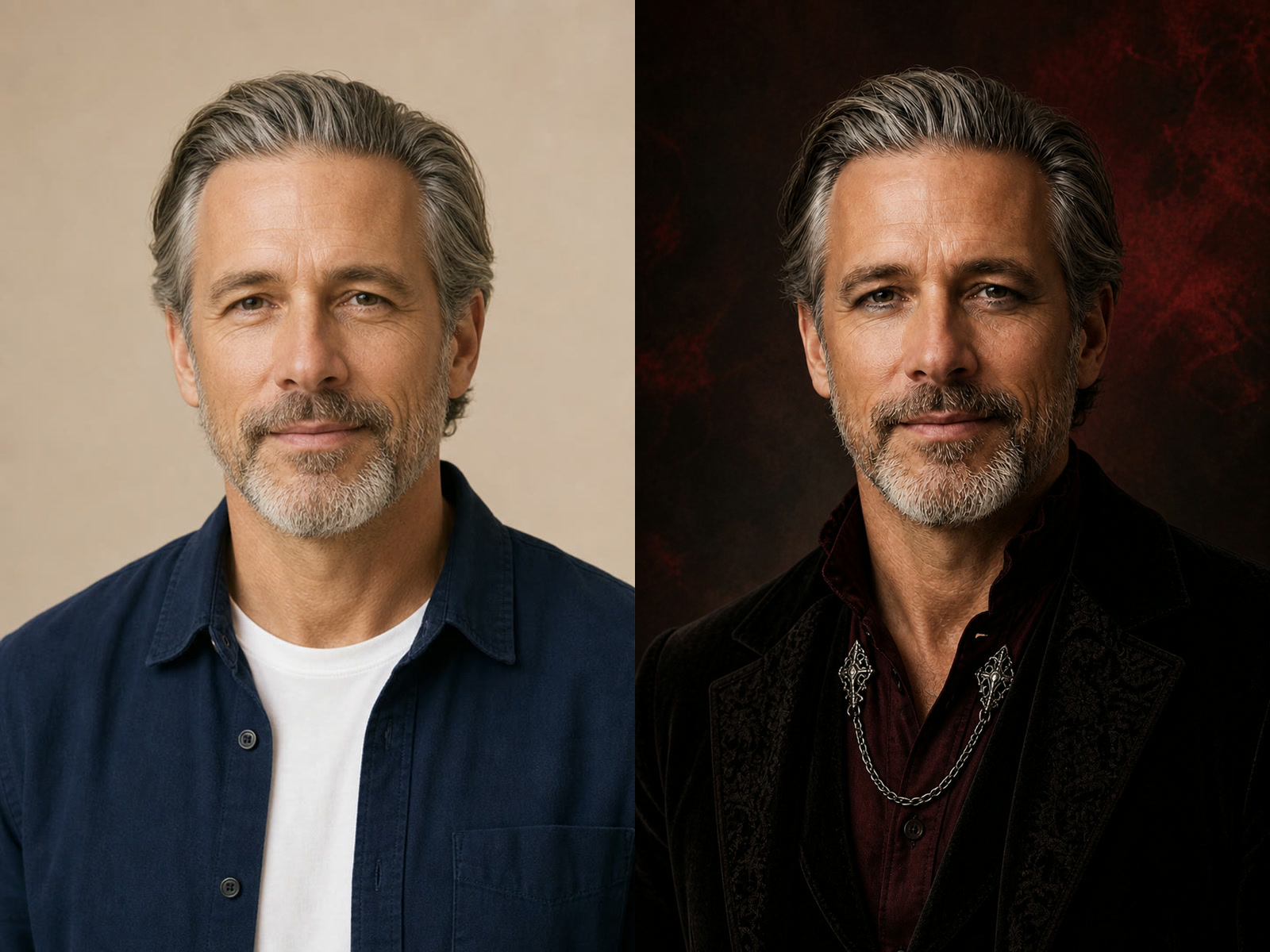
This mature menswear portrait demonstrates that goth styling is not limited to one gender or age. Black velvet, a burgundy shirt, antique-silver details, and a restrained crimson background create a dark-romantic mood. The salt-and-pepper hair, beard, visible skin texture, expression, head size, and natural shoulder proportions remain useful identity checks.

Use This Look
Romantic Goth Filter before and after mature menswear portrait

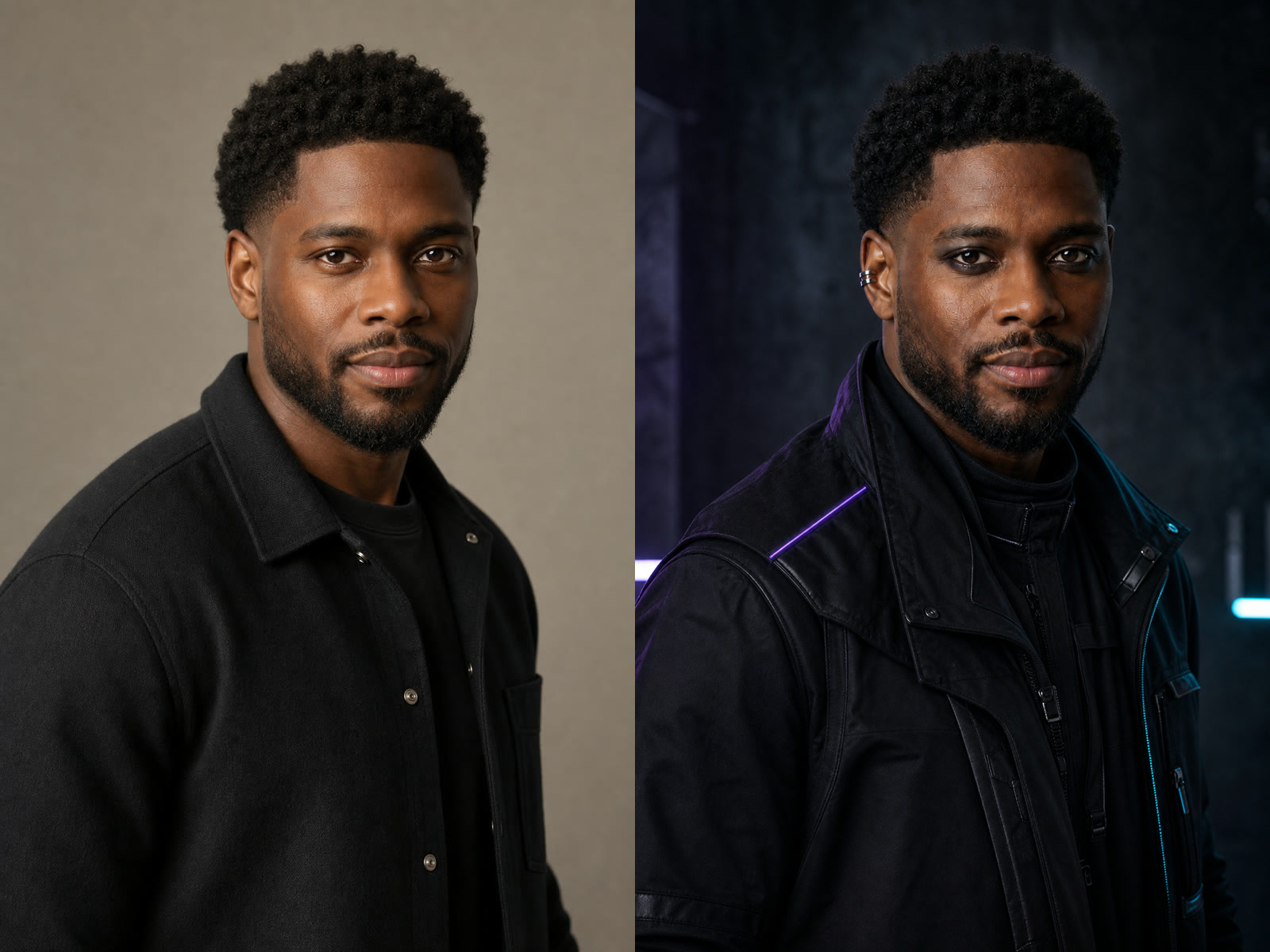
Cyber Goth Without Turning the Person into Armor

The Cyber Goth direction uses matte technical layers, a small ear cuff, and controlled violet-cyan rim light. It avoids robotic anatomy, glowing eyes, masks, and weapon-like props. The result still reads as fashion photography of the same adult, with the original hairstyle, beard, skin tone, face shape, and head-and-shoulders framing retained.

Use This Look
Cyber Goth Filter before and after portrait with technical black fashion

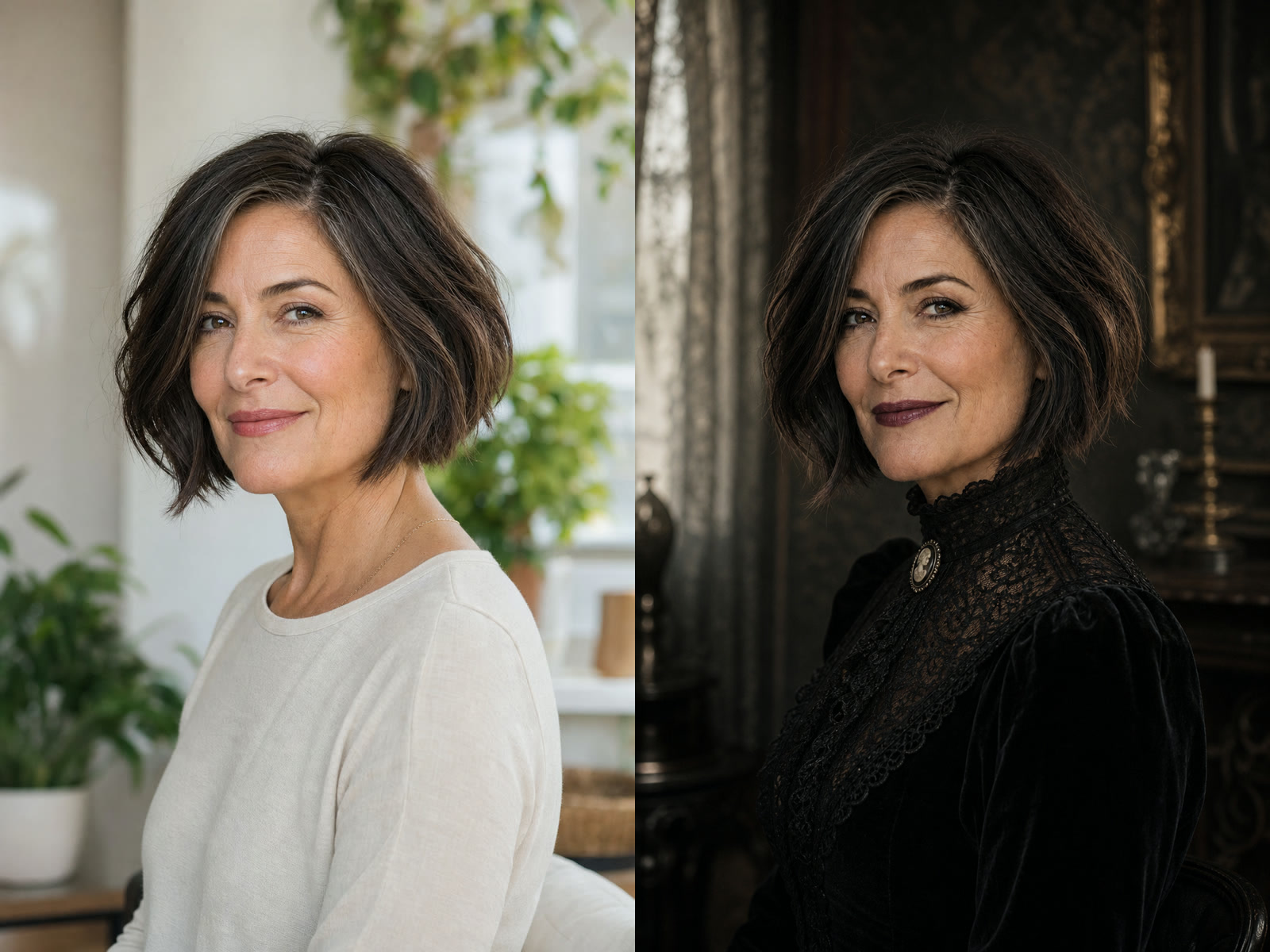
Victorian Goth that Keeps Mature Features

High-neck lace, velvet sleeves, a small cameo, and dim parlor details establish a Victorian-inspired look without claiming strict historical reconstruction. The edit keeps the original three-quarter pose, bob shape, visible age, natural lines, and calm expression. Those preserved details matter more than forcing porcelain skin or an exaggerated costume effect.

Use This Look
Victorian Goth Filter before and after mature portrait with lace and velvet

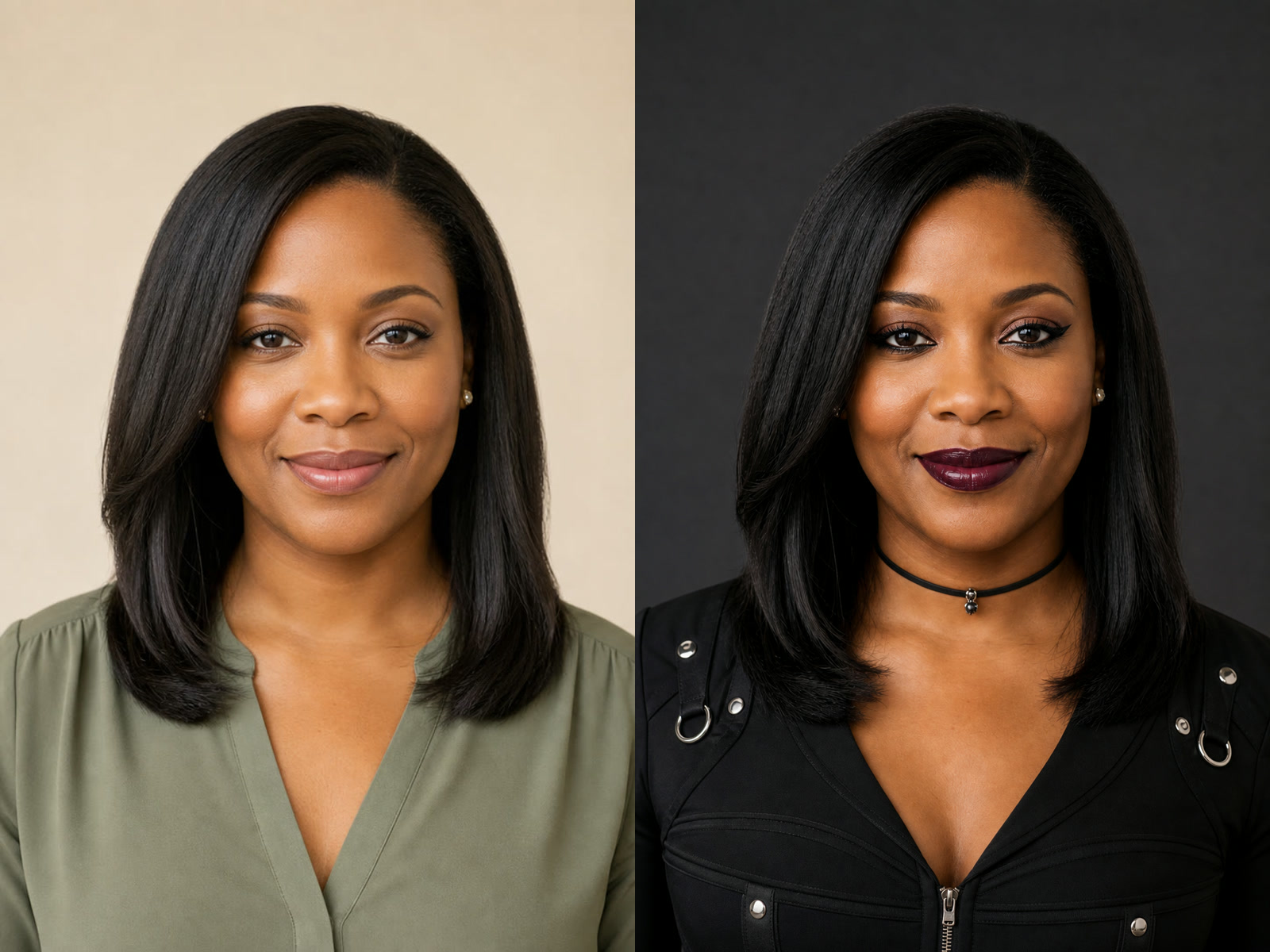
Goth Baddie as a Contemporary Editorial Direction

The Goth Baddie option is treated as a modern beauty-and-fashion look rather than a separate character generator. Winged liner, plum lip color, a structured black top, subtle metal hardware, and a clean charcoal background make the direction clear. Skin tone, hairstyle length, facial proportions, adult age, centered pose, and natural anatomy remain grounded.

Use This Look
Goth Baddie Filter before and after contemporary adult portrait

How to Use the Free Goth Filter Online

A clear source, one coherent style, and a careful comparison produce a more useful edit than a long list of conflicting goth references.

1. Upload a Clear Adult Portrait

Choose a sharp photo with the complete head, face, shoulders, and enough outfit area to show a wardrobe change. Balanced exposure helps the model preserve eye shape, skin tone, hair edges, and black fabric detail. Avoid distant group photos, clipped crowns, heavy beauty filters, hands covering the face, deep underexposure, motion blur, and subjects whose age is unclear.

Upload a Portrait
Clear fictional adult portrait suitable for a Goth Filter edit

2. Choose One Goth Style

Choose Classic, Romantic, Cyber, Victorian, or Goth Baddie based on the visual job. Use the editable note for one practical adjustment such as softer makeup, a recognizable background, less jewelry, or preservation of a jacket shape. Keeping the request focused makes it easier to judge whether the chosen style was applied without unnecessary identity drift.

Choose a Style
Cyber Goth style card for the Goth Filter

3. Generate and Compare the Result

Compare the generated image with the source before sharing it. Check face shape, eye spacing, nose, mouth, hairline, visible age, pose, shoulder width, and camera angle. Then inspect black-on-black areas such as hair, lace, velvet, and jackets. Retry with one focused correction when the face drifts, the body changes, the head is clipped, or the dark materials collapse into featureless black.

Generate and Review
Before and after Goth Filter comparison used to inspect identity and dark detail

What This AI Goth Filter Changes—and Tries to Preserve

The template turns a broad image editor into a focused portrait-restyling workflow with visible boundaries.

Identity-Aware Instructions

The prompt asks the model to preserve adult identity anchors, expression, hairstyle silhouette, pose, natural proportions, and camera perspective. Because generation is probabilistic, the page also tells you exactly what to compare afterward.

Five Distinct Goth Styles

Each preset has a separate material, palette, lighting, and fashion vocabulary. Classic, Romantic, Cyber, Victorian, and Goth Baddie are not presented as interchangeable labels for the same black outfit.

Readable Black Materials

Instructions call for detail in hair, lace, velvet, technical fabric, and metal. A goth portrait should feel dark without losing every seam, edge, curl, or surface to crushed shadows.

Editable but Focused Notes

The style preset supplies the main direction, while a short optional note handles one useful change. This reduces contradictory prompts and keeps the workflow understandable for people who do not write image prompts every day.

Adult Portrait Scope

The upload guidance and generator prompt are limited to clearly adult portraits. They exclude minors or ambiguous age, sexualized styling, body reshaping, and misleading claims that a generated scene documents a real event.

Real Before-and-After Evidence

Five matched pairs show varied adults, ages, genders, face shapes, hair, scenes, and goth directions. The examples make preservation and failure checks more concrete than generic mood-board images alone.

Goth Filter Ideas for Portraits and Editorial Looks

Treat every output as a generated visual concept that requires review, permission, and context-appropriate use.

Profile Picture Exploration

Compare a darker profile direction before selecting a final avatar. Use a portrait ratio or square output, then inspect the face, hair edges, jewelry, and background at small display size before publishing.

Fashion and Makeup Mood Boards

Explore how lace, velvet, technical layers, smoky eyes, burgundy, silver, or dark studio light work together before buying products or planning a shoot. Generated results are references, not exact product or tailoring predictions.

Character and Costume Planning

Use an authorized adult portrait to test a grounded gothic direction for a costume, performance, campaign, or fictional character. Review likeness rights and generated details before any public or commercial use.

Seasonal and Event Portrait Concepts

Create a dark editorial concept for a party, invitation, themed post, or portrait session without assuming that every goth image must use horror effects. The presets avoid blood, fangs, weapons, and supernatural anatomy by default.

Free Goth Filter FAQ

Answers about goth styles, source photos, identity preservation, generation limits, credits, and responsible use.

What does the Goth Filter change?

It uses one uploaded adult portrait as a visual reference and asks Nano Banana 2 to apply the chosen goth fashion direction. The changes may include makeup, clothing, accessories, lighting, palette, and background atmosphere. The instruction also asks the model to preserve identity, visible age, hairstyle, pose, proportions, and camera perspective, but every result still needs review.

Is this different from a regular dark photo preset?

Yes. A normal color preset mainly changes tone and contrast. This is a generative image-to-image edit that can restyle makeup, wardrobe, accessories, materials, light, and surroundings. That added flexibility also means it can alter details unexpectedly, so compare the output with the source instead of assuming perfect preservation.

Which goth styles are available?

The page includes Classic Goth, Romantic Goth, Cyber Goth, Victorian Goth, and Goth Baddie. Each preset uses a different combination of materials, color, light, and styling. They are starting directions, and the optional note can request one focused refinement without mixing every substyle together.

What is the Goth Baddie option?

Here it means a contemporary adult beauty-and-fashion direction with sharper eyeliner, plum lip color, structured black clothing, subtle silver hardware, and a clean studio mood. It is one style inside the same Goth Filter, not a separate girlfriend, dating, or character generator.

Will the Goth Filter keep my face and body proportions?

The template explicitly asks for the same facial structure, expression, visible age, hairstyle silhouette, pose, natural anatomy, body proportions, and camera angle. Generative models can still drift. Check the eyes, nose, mouth, jaw, hairline, shoulders, and framing, then retry with one direct correction if something important changes.

Which photo works best?

Use one sharp, clearly adult portrait with the complete head, face, shoulders, and some clothing visible. Balanced light and a simple readable outline help. Avoid clipped heads, distant group faces, heavy filters, deep shadow, blur, hands over the face, and source photos whose use you do not have permission to authorize.

Is the Goth Filter free to try?

NanoPic gives eligible new users starter credits after sign-in, and the amount can vary by account, region, and current offer. If your visible balance covers the displayed generation cost, you can create a Goth Filter result without buying credits. You can always inspect the page, styles, examples, and sample inputs before generating. This is a free-trial opportunity, not a promise of unlimited free generations.

Can I use the result as a profile picture or commercially?

You may use an authorized adult portrait as the source, but you are responsible for consent, likeness rights, plan terms, generated details, brand rules, and local requirements. Review the output closely before public or commercial use. NanoPic provides a creative workflow, not legal clearance or a guaranteed identity match.

Does the Goth Filter add horror elements?

Not by default. The template avoids blood, fangs, weapons, supernatural eyes, cybernetic anatomy, and sexualized styling. The focus is dark fashion, makeup, materials, light, and portrait atmosphere. You can add a focused creative note, but the generated result should still be reviewed for unwanted details.

Try the Goth Filter on One Clear Portrait

Sign in, check the starter credits and generation cost shown for your account, then upload an authorized adult portrait, choose one coherent goth direction, add an optional note, and compare the generated result with the source before saving it.