



















































































































Free AI Clothes Changer
Sign In

Free AI Clothes Changer

Upload a person photo, optionally add clothing, then generate.

Upload clothes or choose a text preset.

Upload Target Person Photo*
Try Upload Target Person Photo sample
Upload Clothing Reference Photo (Optional)

Please add the required Upload Target Person Photo before generating.

453 / 600

Public Visibility
Copy Protection
Credits required:-

Free AI Clothes Changer

Image

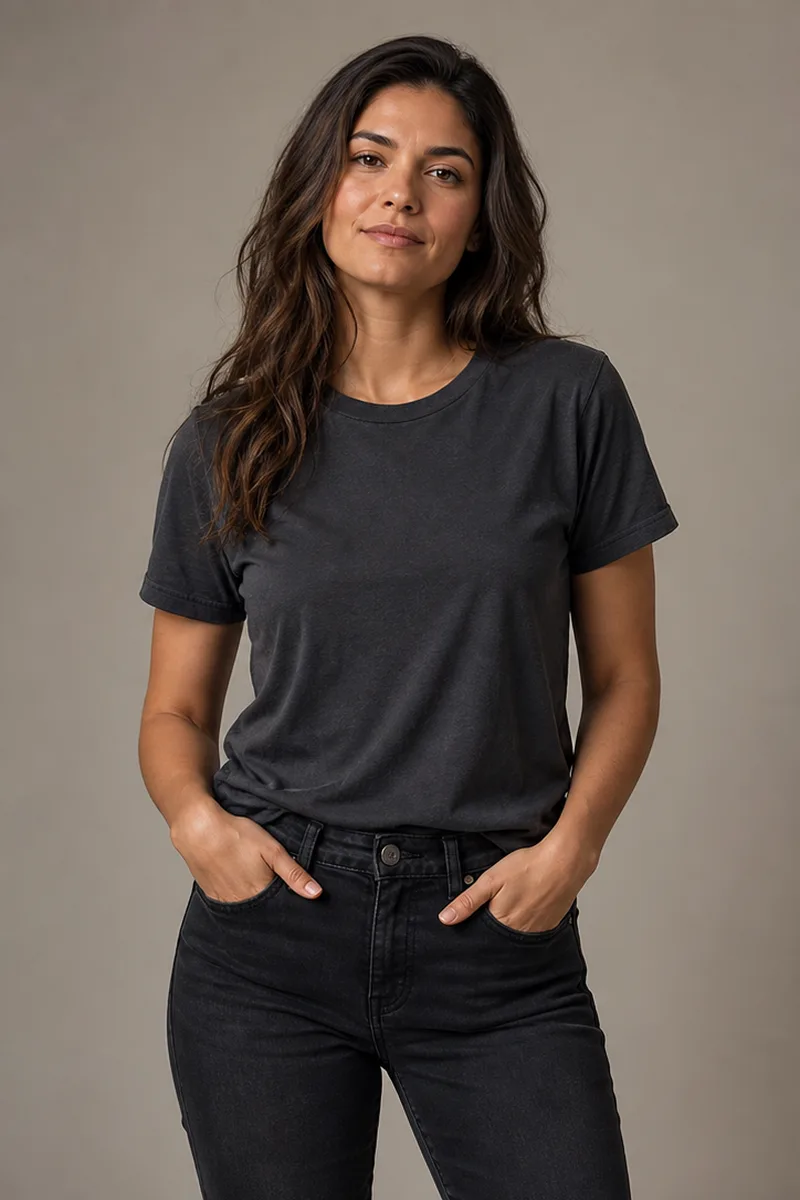
Fictional adult in a charcoal T-shirt before a controlled clothing edit
Source Photo
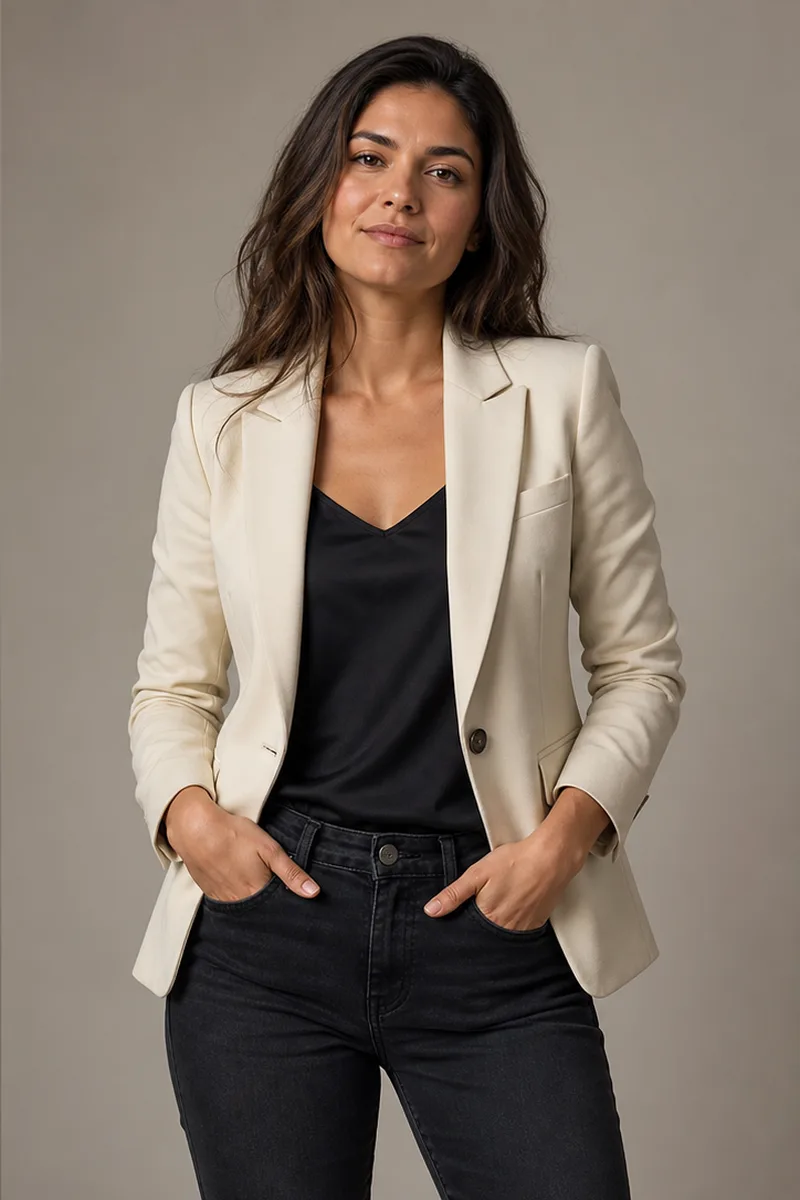
Same fictional adult wearing a cream blazer with identity and pose preserved
Clothes Changed
Same fictional adult before and after changing a T-shirt to a cream blazer

Change a Specific Garment, Not the Person or the Scene

This AI clothes changer is a controlled photo-editing workflow for an existing portrait. Upload one authorized person image, then either add a separate clothing photo or describe the replacement in the editable prompt. When a clothing reference is present, the model uses its visible garment design while ignoring that image's person and scene. The target portrait remains the reference for identity, face, hair, body proportions, hands, pose, camera angle, lighting, and background. Unlike an AI outfit generator built for open-ended styling ideas, this page replaces a bounded garment region with a specified item. Generative output can still drift, so compare the result with both references before downloading.

Six Original AI Clothes Changer Before-and-After Examples

Every example uses a fictional adult created for NanoPic. Each pair keeps the same composition and demonstrates a bounded single-garment or full-outfit instruction rather than copying a competitor, celebrity, public figure, or private person.

T-Shirt to Cream Blazer

The source face, long hair, posture, hands, black jeans, studio light, and neutral background remain stable. Only the upper clothing region changes to a cream blazer and black camisole. This is the clearest kind of request: name the garment to replace, name the replacement, and list the surrounding details that must stay fixed.

Try a Blazer Edit
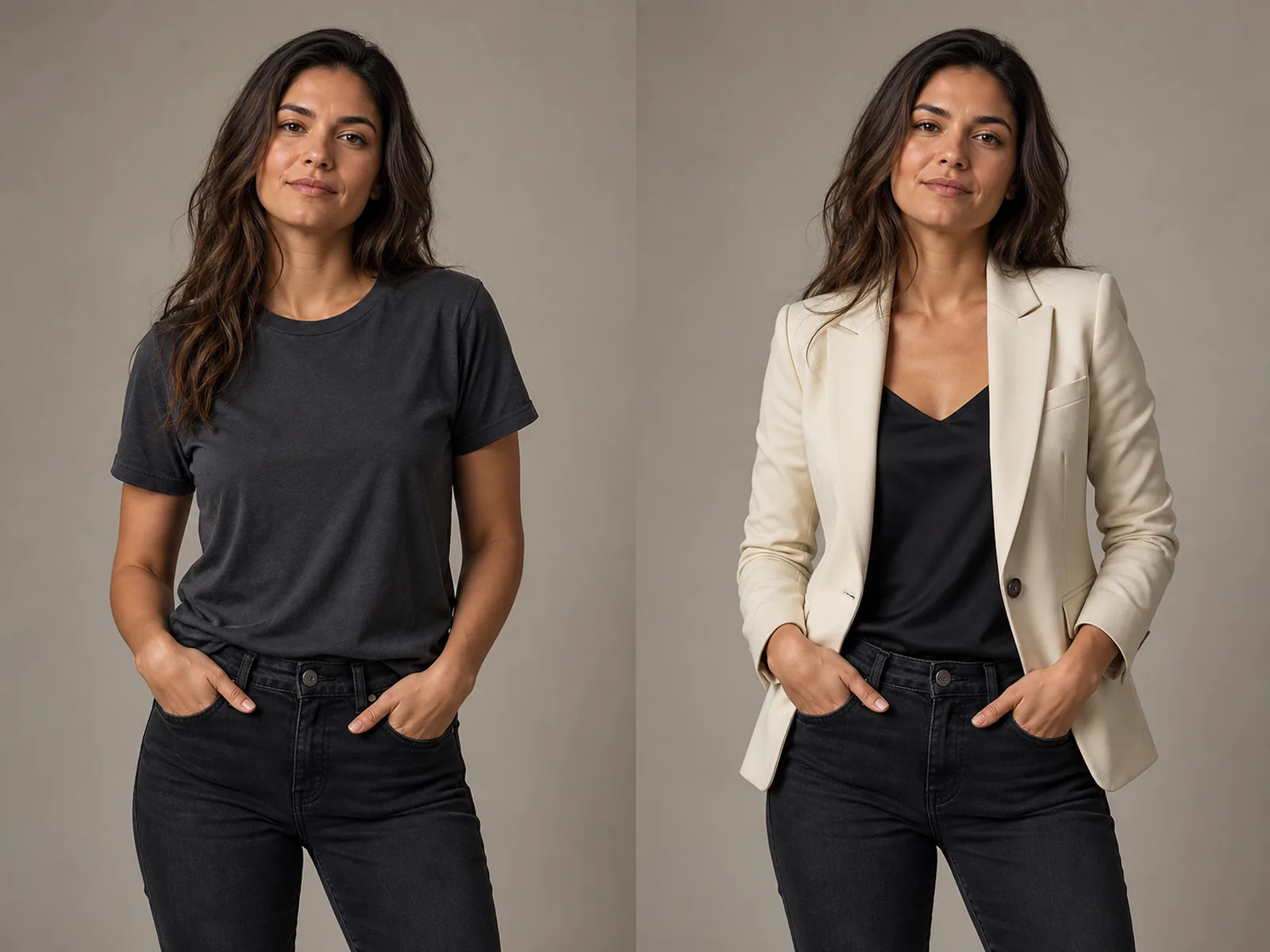
Fictional adult before and after a T-shirt is replaced with a cream blazer

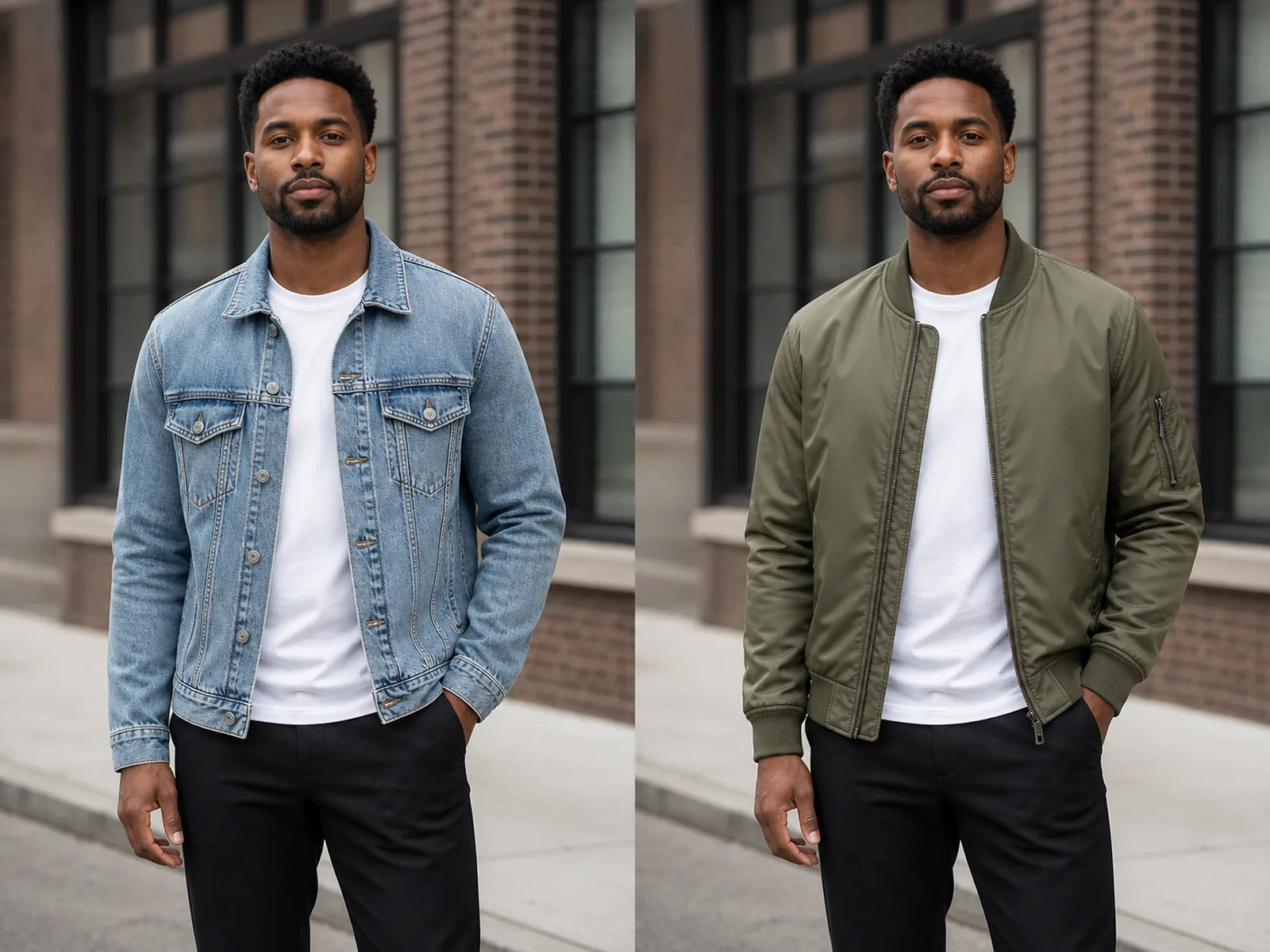
Denim Jacket to Olive Bomber

A jacket-only edit can preserve the existing shirt, trousers, shoes, hand placement, street perspective, and daylight. The replacement prompt specifies nylon texture, ribbed cuffs, zipper, seams, folds, and contact shadows so the bomber follows the original body and pose instead of floating above them.

Change One Jacket
Fictional adult before and after a denim jacket changes to an olive bomber

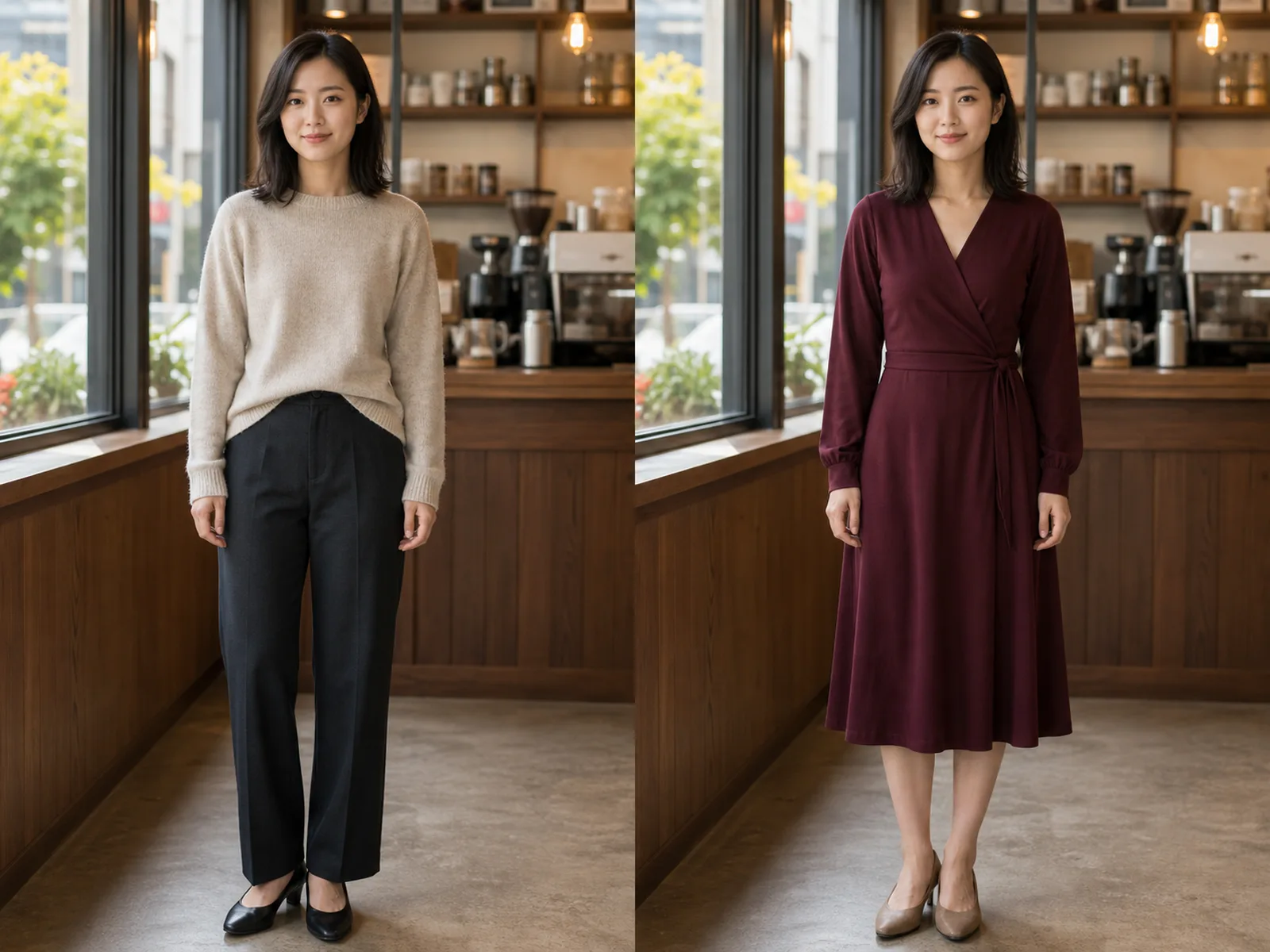
Casual Separates to Burgundy Wrap Dress

A full visible outfit replacement needs a tighter boundary. The instruction replaces the sweater and trousers with one knee-length wrap dress while protecting the person, shoes, hands, standing pose, cafe table, windows, and warm interior light. Review the waist, neckline, hem, sleeves, and hand-to-fabric edges closely.

Replace a Full Outfit
Fictional adult before and after changing casual separates to a burgundy dress

Office Casual to Charcoal Suit

This example keeps a mature adult's visible age, face, hair, body, relaxed stance, shoes, desk, window light, and office background. The requested suit adds a white shirt and restrained tie. It is a visual concept, not a sizing or tailoring guarantee, so lapels, cuffs, buttons, trouser break, and proportions still require human review.

Preview a Suit
Fictional mature adult before and after changing a casual outfit to a charcoal suit

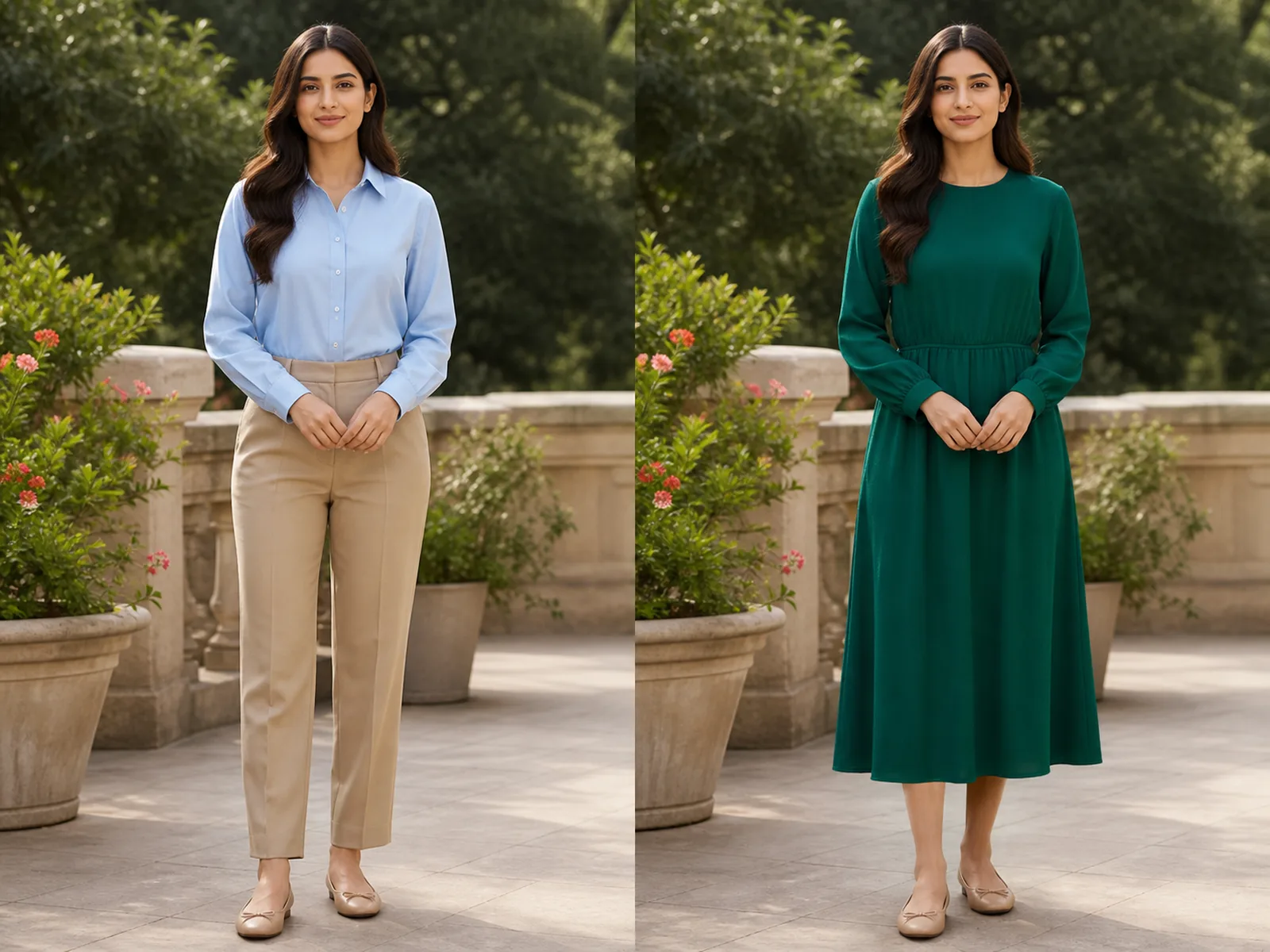
Daywear to Emerald Midi Dress

The emerald dress demonstrates a larger clothing mask while the face, hair, expression, terrace railing, sunlight, pose, shoes, and frame remain readable. A color and silhouette request can guide the model, but exact dye color, fabric behavior, brand construction, and physical fit cannot be inferred from one generated image.

Try a Dress Change
Fictional adult before and after changing daywear to an emerald midi dress

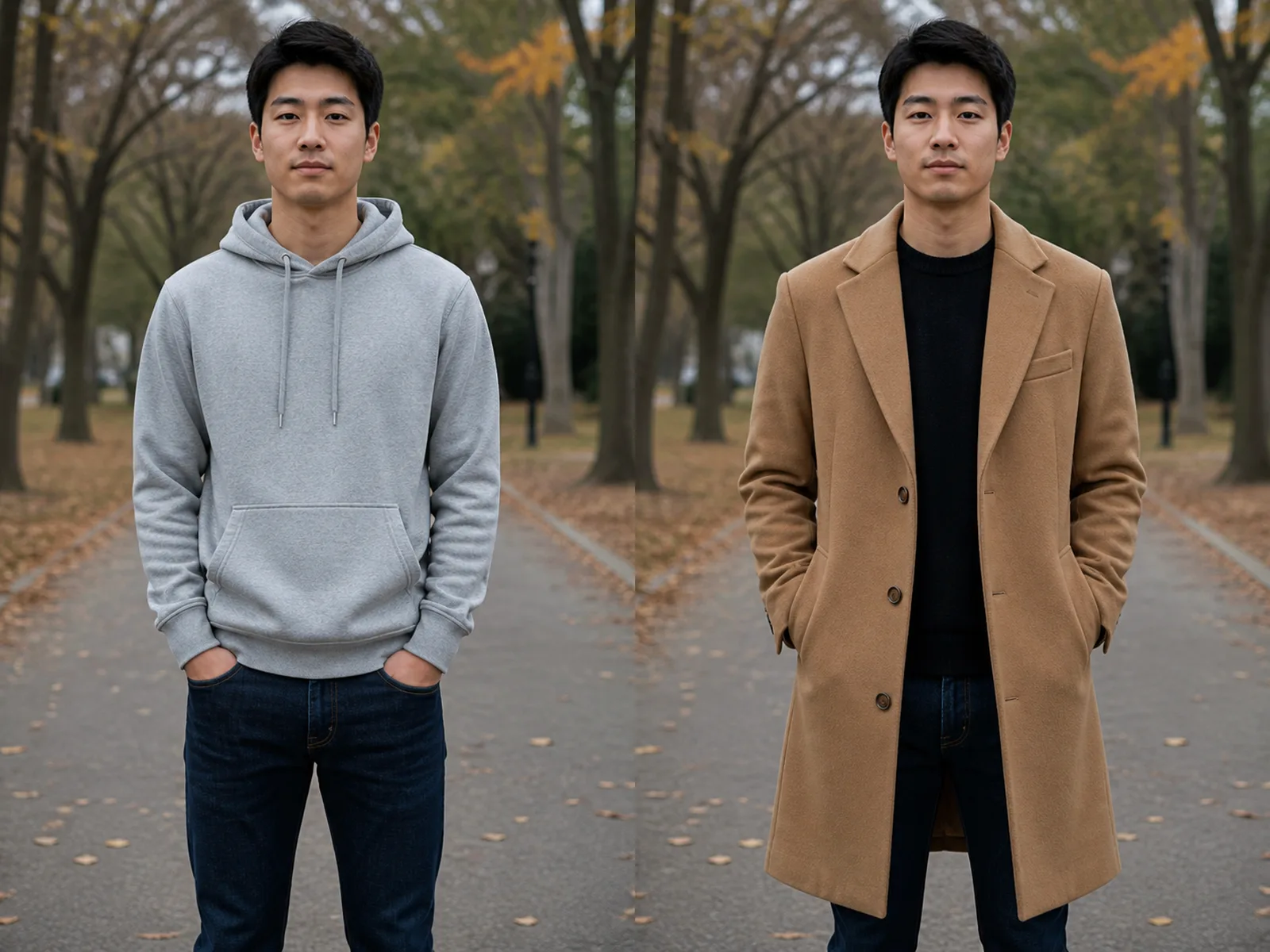
Hoodie to Camel Coat

Outerwear often overlaps the torso, hips, arms, and hands. The camel-coat instruction protects the existing trousers, footwear, face, posture, park setting, daylight, and camera angle while asking for wool texture, lapels, buttons, pockets, sleeves, drape, and natural shadows. If a hand or coat edge warps, shorten the request and regenerate.

Change Outerwear
Fictional adult before and after changing a hoodie to a camel coat

How to Change Clothes in a Photo

One clear person photo, an optional clothing reference, one bounded replacement, and a careful comparison produce a more controllable edit than a broad fashion prompt.

1. Upload One Clear, Authorized Adult Photo

Choose an image you own or have permission to edit. Keep one adult and the complete clothing area visible, including shoulders, sleeves, waist, hem, hands, and overlap with hair or accessories. Balanced light and a sharp front or three-quarter view help. Avoid children, group photos, severe crops, crossed arms hiding most of the garment, motion blur, opaque coats covering the target, and tiny full-body subjects.

Upload a Photo
Clear fictional adult source photo suitable for a controlled clothing replacement

2. Add a Clothing Photo or Define the Replacement

For a specific garment, upload one clear clothing reference as the second image. It may be a clean product photo or an authorized photo of the garment being worn; the model is instructed to use only its clothing and ignore its person and scene. Otherwise choose a text preset. In both modes, say whether to replace only the top, a jacket, an outer layer, a dress, or the complete visible outfit, and list every garment, shoe, accessory, pose, lighting detail, and background element that must remain.

Add Clothes or Edit the Prompt
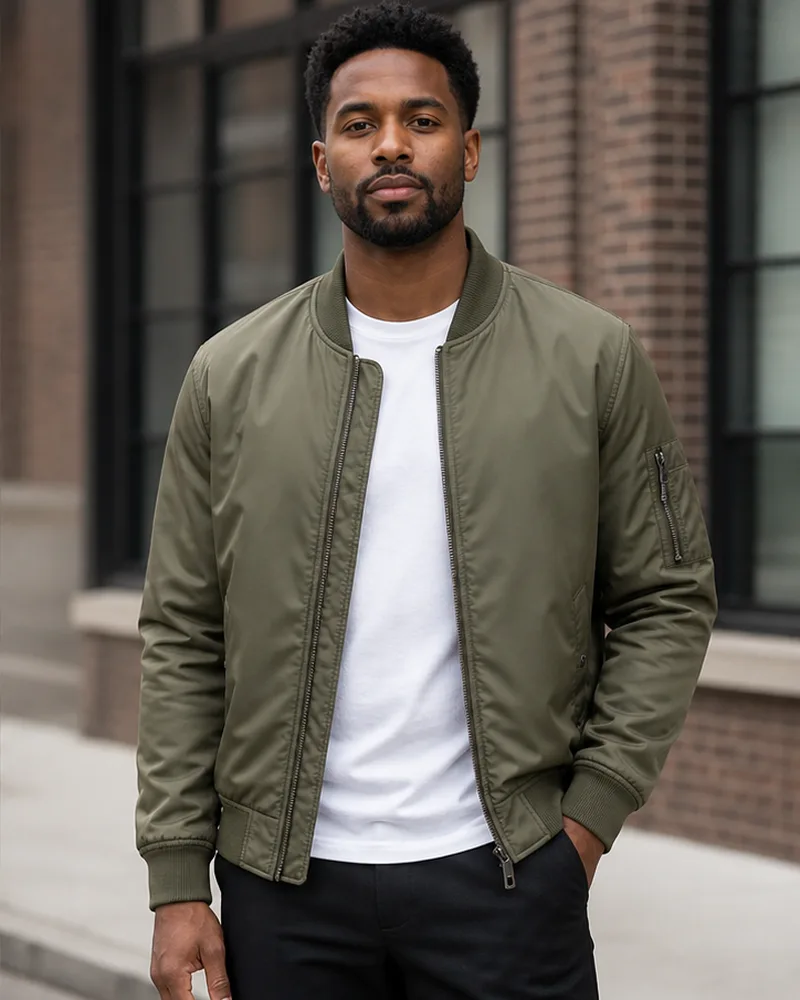
Olive bomber clothing reference illustrating a bounded jacket transfer

3. Generate, Inspect the Edges, and Download

When the image is ready, compare identity first, then inspect sleeves around hands, neckline and hair overlap, waist and belt area, buttons, pockets, patterns, hem, shoes, shadows, and the background behind the old garment. Reject results that reshape the body, alter the pose, change the face, invent logos, duplicate fasteners, fuse fingers with fabric, or repaint the scene. Try a cleaner source or shorter request when the edit is not controlled.

Generate and Review
Clothes changer comparison used to inspect identity, garment edges, and office continuity

A Focused Photo Clothes Changer

The existing NanoPic image editor is configured here for controlled garment replacement, with visible inputs and realistic limitations.

One- or Two-Reference Image Editing

The verified Nano Banana 2 image-to-image route accepts the target person first and an optional clothing reference second. The ordered slots keep the portrait responsible for identity and scene while the optional second image supplies the garment appearance.

Single Garment or Full Visible Outfit

You can ask to replace one top, jacket, coat, dress, or the complete visible outfit. The template tells the model to keep every unrequested garment, accessory, and shoe unchanged, although all generative edits still need review.

Editable Prompt with Concrete Boundaries

The prompt is filled in before you begin and remains editable. It names the target region, replacement, preserved details, material behavior, and common failure modes rather than hiding the instruction behind a one-click effect.

Identity, Pose, and Scene Protection

The template explicitly protects face, hair, skin tone, visible age, body proportions, expression, hands, pose, camera angle, lighting, shadows, background, and composition. It reduces drift but cannot promise pixel-perfect preservation.

Original Before-and-After Evidence

Six fictional source/result pairs show the intended edit boundary at matching 2:3 framing. They are examples of visual plausibility, not proof of exact size, garment availability, textile performance, or retail product accuracy.

Transparent Credit and Watermark Rules

Eligible new accounts receive 40 welcome credits valid for 7 days. The current 1K edit costs 40 credits. Free-credit-only generations include a watermark; purchased-credit generations do not include that free-credit watermark.

Practical Uses for Controlled Clothing Replacement

Use the image as a visual draft with consent and honest labeling, then verify important real-world details separately.

Personal Wardrobe Visualization

Preview how a broad garment category or color direction may look in an existing portrait before planning another photo. Treat it as a creative approximation: the result cannot measure your body, confirm comfort, predict drape, or replace trying on the real item.

Portrait and Headshot Wardrobe Concepts

Explore a blazer, jacket, shirt, or restrained suit while keeping the portrait pose and studio setup recognizable. Use the result as a reference for a photographer or stylist, not as a false claim that the depicted outfit was physically worn.

Fictional Character Costume Studies

Test one costume direction on an authorized fictional adult reference while holding identity and scene constant. This helps isolate clothing choices from unrelated changes to face, age, lighting, or environment.

Retail and Campaign Mockups

Create an early visual concept for an original garment or broad style direction when you have rights to the person, clothing design, and photo. Do not present the generated fabric, logo, fit, color, stitching, inventory, or product behavior as an exact real item without separate verification.

AI Clothes Changer FAQ

Answers about clothing boundaries, identity, photo quality, credits, watermarks, consent, fit accuracy, and the difference from outfit generation.

What does this AI clothes changer do?

It edits one authorized adult portrait through an image-to-image model. You can describe the replacement with a text preset or upload a second clothing photo. In two-image mode, the first image controls the target person and scene while the second supplies the garment reference. The template asks the model to preserve identity, face, hair, skin tone, visible age, body proportions, expression, pose, hands, camera angle, lighting, background, and every unrequested garment or accessory.

Can I upload a person photo and a separate clothing photo?

Yes. Put the authorized target portrait in the first slot and the clothing reference in the optional second slot. Use a clear product photo or an authorized garment-on-person image with the complete item visible. The prompt tells the model to transfer the garment rather than the second person's face, body, pose, or background. Generated color, logos, text, construction, fit, and drape can still differ from the reference, so compare the output carefully.

Can I change just one shirt or jacket?

Yes. State the exact source garment and replacement, such as replace only the denim jacket with an olive bomber. Add its color, fabric, cut, length, sleeves, and closures, then list the existing shirt, trousers, shoes, accessories, pose, and background that must remain. A bounded single-garment request is usually easier to review than a broad restyle.

Can I replace the complete outfit?

You can request a full visible outfit replacement, such as changing a sweater and trousers to a wrap dress or a polo and chinos to a suit. The model still needs clear boundaries and may change garment-body overlap. Inspect hands, waist, neckline, hem, footwear, body proportions, and background continuity before using the image.

Will it preserve my face, body, pose, and background exactly?

The source photo and template strongly direct the model to preserve those details, but generative edits are not pixel-locked. Identity, anatomy, body shape, hand placement, light, or scene details can drift. Compare each output with the source and regenerate with a clearer photo, one garment, and a shorter instruction when anything important changes.

Which photo works best for changing clothes?

Use one sharp adult photo with balanced light and the full target clothing region visible. Keep garment edges, shoulders, sleeves, hands, waist, hem, and overlap with hair or accessories readable. Avoid group photos, children, motion blur, severe crops, tiny subjects, heavy occlusion, crossed arms hiding the garment, and dark clothes merging into a dark background.

Is this a virtual fitting room or size predictor?

No. It produces a generative visual concept from pixels and text. It does not know real body measurements, garment measurements, inventory, stretch, fabric weight, construction, comfort, brand sizing, or return policy. Never use a result as proof that a real product will fit, drape, or match color exactly.

Is the AI Clothes Changer free?

Eligible new NanoPic accounts receive 40 welcome credits valid for 7 days. At the current displayed price, one Nano Banana 2 1K image edit costs 40 credits, so the welcome amount can fund one current try. Every generation consumes the amount shown in the live interface. Images made only with free credits include a watermark; purchased-credit results do not include that free-credit watermark. This is not an unlimited-free offer.

How is this different from an AI outfit generator?

This page is for controlled replacement inside an existing photo: upload a person, specify the exact garment or complete visible outfit to change, and preserve identity, pose, lighting, and scene. An AI outfit generator is better for open-ended styling inspiration, coordinated look creation, and exploring what to wear without a tightly bounded source-garment edit.

Can I upload another person's photo?

Only upload images you own or are authorized to edit, and obtain the depicted adult's consent where required. Do not use generated clothing edits for impersonation, harassment, sexualization, fraud, deceptive endorsements, fake evidence, or misleading claims about what someone wore. The examples on this page depict entirely fictional adults.

Can I use the result for a shop or campaign?

Use depends on your rights to the source person, photo, clothing design, marks, and intended context. Review NanoPic's current terms and applicable law. Independently verify real product color, material, construction, fit, inventory, and labeling; generated output must not misrepresent an exact item or falsely imply a person's endorsement.

What should I inspect before downloading?

Compare eyes, face shape, hair, skin tone, expression, body proportions, pose, and hands first. Then inspect neckline, shoulder seams, sleeves, cuffs, fingers, waist, closures, pockets, patterns, hem, shoes, shadows, and background edges. Reject outputs with identity drift, body reshaping, extra limbs, fused hands, floating fabric, duplicated buttons, invented logos, text, or scene changes.

Replace the Clothes, Keep the Portrait Recognizable

Upload an authorized adult portrait, optionally add a clothing reference, define the replacement boundary, and review identity, garment details, anatomy, fabric edges, and scene continuity before downloading.