













































































































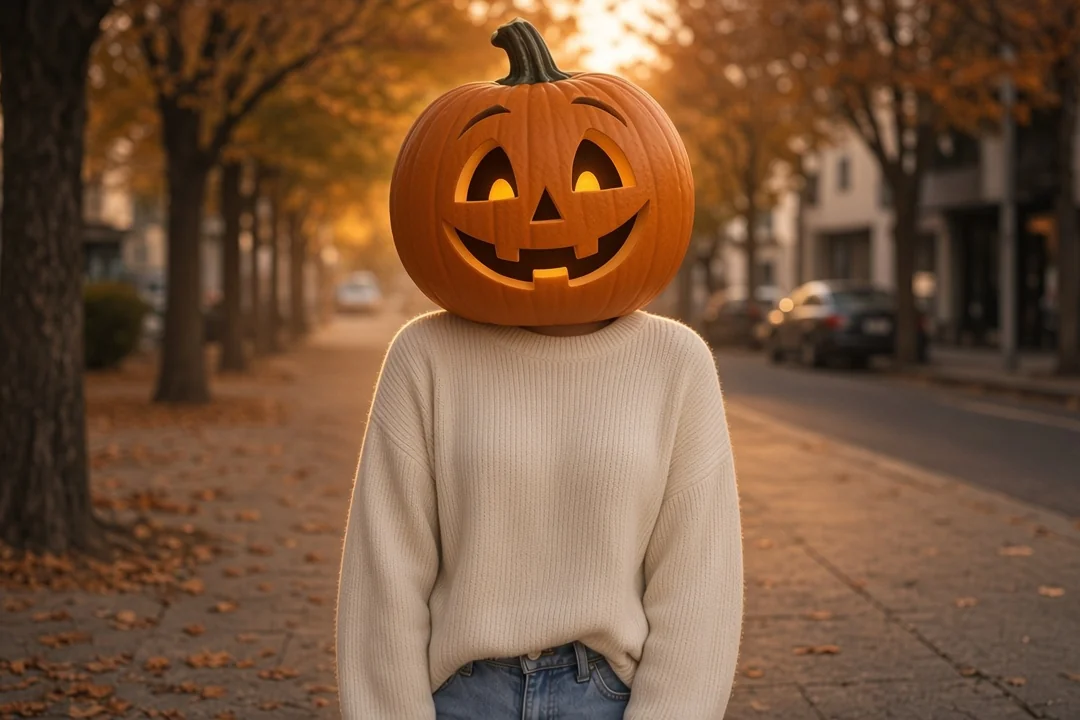
Autumn lane at dusk
The default look: fallen leaves, warm backlight and a soft haze behind a single figure. This is what you get when the style box is empty.
Save up to 73% on plans
Browse every other AI image model and effect published on this site in a continuous carousel.
The pumpkin head photoshoot became a fall tradition on social feeds: people sit on a bench or stand in a field wearing a hollowed pumpkin on their shoulders. Doing it for real means carving, lifting and balancing a heavy gourd while someone else holds the camera. This effect starts from a photo you already have and builds the same look on screen, so you can try the idea in any outfit, at any time of year, without a farm trip.
Sample results that show the kind of scene the effect builds. Each one keeps the clothing and pose of the original subject while the head becomes a carved jack-o'-lantern.
The default look: fallen leaves, warm backlight and a soft haze behind a single figure. This is what you get when the style box is empty.
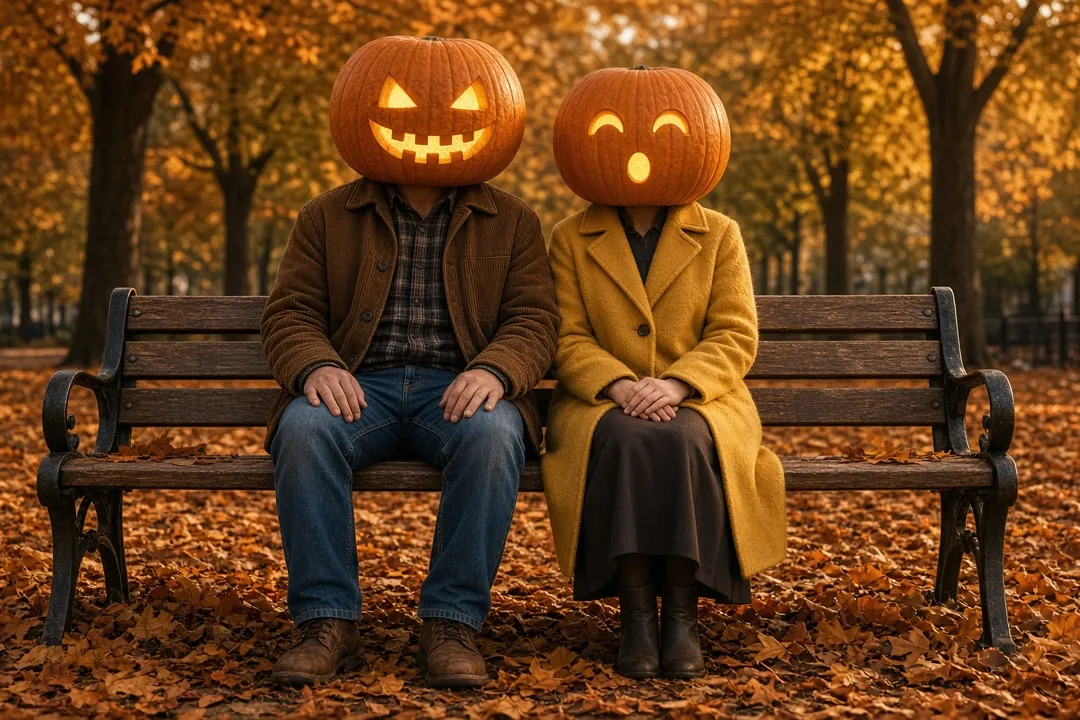
Two people in one frame, each with their own carved face. The effect keeps the people count of the original photo and gives each pumpkin a slightly different expression.
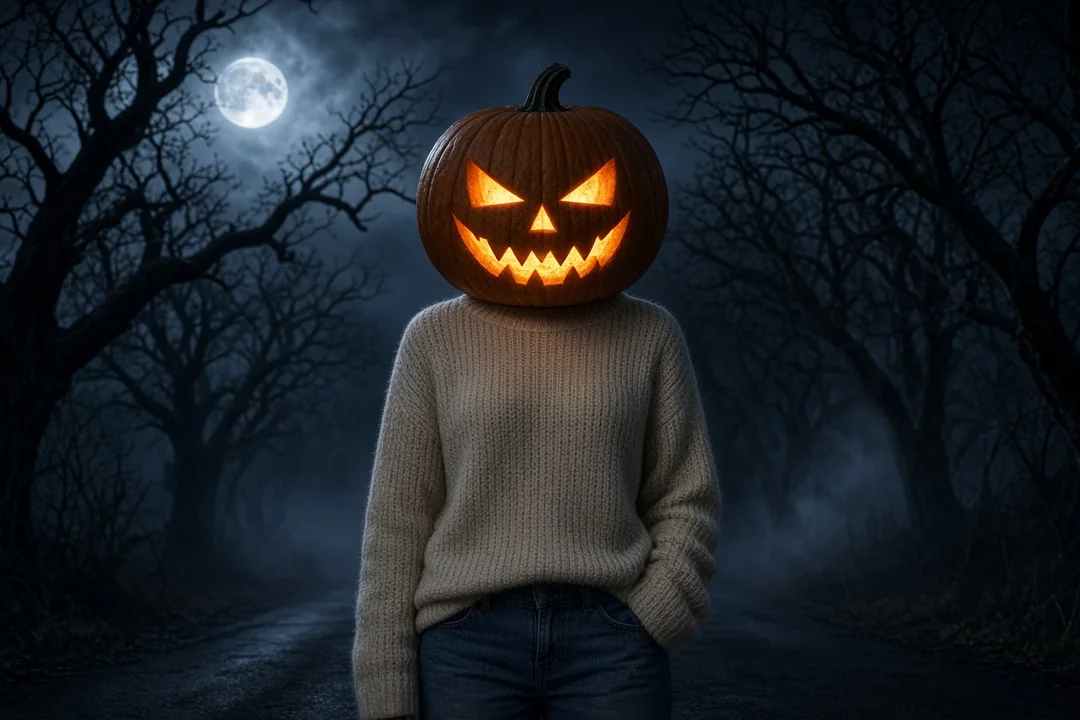
The same idea with a darker style direction: night sky, stronger amber glow from inside the carving and a moodier background.
It is an image-to-image edit. Your photo is the reference, and a fixed instruction tells the model what to change and what to keep.
Each clearly visible person gets an oversized orange jack-o'-lantern that rests on the shoulders, with a stem, a carved friendly face and contact shadows so it does not look pasted on.
Body proportions, pose, hands, clothing and accessories are meant to stay close to the original. Faces are hidden on purpose, which is part of the appeal of the trend.
Without extra direction, the scene moves to a leaf-covered lane at dusk with warm backlight. Your own words can change the mood, the place or the carving style.
The instruction asks the model to avoid floating pumpkins, human faces showing through the carving, extra heads or limbs, warped hands, gore, text, logos and watermarks.
Four steps take you from an everyday picture to a finished Halloween portrait.
Choose a picture where heads, shoulders and outfits are visible. For a couple or friends, use one image that already has everyone in it.
Drop the photo into the upload slot at the top of this page. Only one image is used per attempt.
The pumpkin head photoshoot look is built in. Type only what you want to change, such as "cozy autumn bench", "romantic couple portrait" or "glowing pumpkin head at night". Leave the box empty for the default autumn scene.
Check the carving, the neck line and the hands. If something looks off, adjust the photo or the direction and try again before you download your favorite version.
The input photo matters more than the wording you add. These habits give the model an easier job.
The pumpkin sits on the shoulders, so a waist-up or full-body framing works better than a tight face crop.
Sitting on a bench, leaning on a fence or standing with hands in pockets are classic poses. Hands covering the face or hair spread across the shoulders make the join harder.
Soft daylight or open shade keeps the outfit detailed. Strong backlight can turn clothes into dark shapes.
One to a few people works best. In a large crowd, small background figures may be skipped or treated inconsistently.
Only upload photos you took or have permission to use, and ask everyone in the picture before you share the result.
A quick review catches the problems that make an edit look fake.
The pumpkin should rest on the collar or shoulders with a shadow underneath. A gap or a floating pumpkin means another attempt is worth it.
Eyes and mouth should be cut cleanly, with a warm glow inside. No human features should show through the openings.
Hands are often the weakest part of any edited photo. Look for merged or extra fingers.
Collars, scarves, glasses on a pocket or a hat in hand should still be there. If an accessory vanished, mention it in the style direction.
The glow from the pumpkin and the light on the clothes should come from a believable direction.
The look is playful rather than scary, so it fits many October plans.
A pumpkin head photoshoot portrait makes a seasonal avatar or a carousel post without hiding the outfit you chose.
Matching pumpkins turn a normal couple picture into a shared Halloween joke, and nobody has to carry a real gourd.
Use the portrait on a printed or digital invite for a Halloween party, a pumpkin carving night or a costume contest.
Photographers and hobbyists can preview the pumpkin head photoshoot idea for a client before buying props or booking a farm location.
Grandparents, siblings or roommates can join a single photo; each person gets a different carved face.
Every pumpkin head photoshoot result is a new interpretation of your photo, so two attempts can look different.
This effect is built to cover faces. If you want to keep a face visible, use a costume or makeup effect instead.
Crowds, mirrors and posters with faces can produce extra pumpkins or missed heads. Crop to the people you want.
Asking for many moods at once, such as cozy, scary and romantic, gives a muddy scene. Pick one.
Lying down, upside-down or heavily turned heads may give a pumpkin at a strange angle. A more upright pose usually fixes it.
The instruction avoids text and logos, so add a caption or date later in your own editor.
Generating requires signing in to NanoPic. Before you start, the generator panel shows what the run needs, so you can decide before anything is created. The model name shown on this page, GPT Image 2, describes the editing engine behind the effect.
Put yourself on a flying broom beside a moving car in a short trend clip.
Make a broom rideWatch your everyday outfit change into a vampire, witch, skeleton or pumpkin costume.
Make a costume reveal
A pumpkin head photoshoot is a Halloween portrait style where a person wears a carved, often glowing jack-o'-lantern as a head. This page recreates the pumpkin head photoshoot from a normal photo instead of a real prop.
No. The pumpkin head photoshoot instruction is already built in. The optional style box is only for changes, like a different setting or a spookier mood.
The instruction asks the model to keep body proportions, pose, hands, outfit and accessories. Small details can still change, so review the result and try again if something important is missing.
Yes. Upload one photo with everyone in it. The pumpkin head photoshoot effect keeps the number of people and gives each person a distinct carved face.
Yes. Write the mood in the style direction, for example "cozy pumpkin patch at golden hour" or "foggy graveyard at night". Leave it empty for the default autumn lane.
Hiding the face is the point of a pumpkin head photoshoot. The instruction specifically avoids human features showing inside the carving.
Use a photo where the shoulders and collar are clearly visible and the head is upright, then generate again.
Each attempt uses one image. To combine people, start from a single photo that already shows all of them.
This page makes still images. For motion, try the Halloween video effects linked above, such as the costume transformation or the flying broom clip.
Check the image at full size first. If the details look clean to you, you can use it for a card or invite like any other photo you edit.
Only if you have their permission. Ask before you upload, and again before you post the finished pumpkin head photoshoot portrait.
Upload one clear photo, add a mood if you like, and make a carved jack-o'-lantern portrait for this Halloween.

80s Photo Filter adds warm, faded film color to your photo in the browser. Adjust strength, preserve clothing and framing, and download a PNG.
Open tool
AI Age Filter creates a natural older-look concept from an authorized adult portrait. Review identity, complete-head framing, light and scene after editing.
Open tool
AI Age Progression creates a target-age concept from an authorized adult portrait. Set an age interval and review identity, framing and scene after editing.
Open tool
AI Labubu Generator helps explore your own monster doll concept from an authorized reference. Create original shapes and outfits, with no official affiliation.
Open tool
Camera Roll AI turns an authorized reference photo into one lifestyle collage. Plan varied scenes and a phone-gallery-inspired layout, then save one image.
Open tool
Face in Hole Generator places an authorized face into your chosen photo or template. Upload two references, refine the blend, and save a creative portrait.
Open tool
Explore a Hotpot AI alternative with NanoPic’s independent Seedream 5.0 editor. Upload a reference, direct a visual concept, and review your image.
Open tool
Make Image Higher Resolution with real 2× or 4× browser resizing. Compare pixel dimensions and download PNG without claiming recovered detail.
Open tool
Remove Glare from Glasses in photos with an editable AI image prompt. Upload your portrait, reduce lens reflections, and review the result before using it.
Open toolTurn one authorized adult portrait into a realistic flashlight scene with a miniature stylized double. Generate, then inspect identity, hands, light, scale, and crop.
Open toolTry 12 original funny AI prompts on one authorized person or pet photo. Load, edit, generate, and review identity, anatomy, props, text, and visual coherence.
Open toolTurn one authorized photo into original blocky pixel art with six editable prompts. Generate, then review subject detail, geometry, text, rights, and composition.
Open tool