


















































































































Save up to 73% on plans

AI Labubu Generator: Original Monster Doll Ideas
Sign In

AI Labubu Generator: Original Monster Doll Ideas

AI Labubu Generator helps explore your own monster doll concept from an authorized reference. Create original shapes and outfits, with no official affiliation.

Upload your reference*

331 / 1,000

Copy Protection
Public VisibilityAllow this result to appear in public inspiration surfaces.

AI Labubu Generator: Original Monster Doll Ideas

Image

AI output preview
Input
AI output preview
Output

More AI Image Models & Effects

Browse every other AI image model and effect published on this site in a continuous carousel.

Actual Inputs and Result

An original mint-green doll

Seedream 5.0 reinterprets an original reference as a mint plush doll with rounded ears, an embroidered smile and plum overalls. This is an independent character concept, not an official Labubu character or product. Inspect the complete reference and generated design.
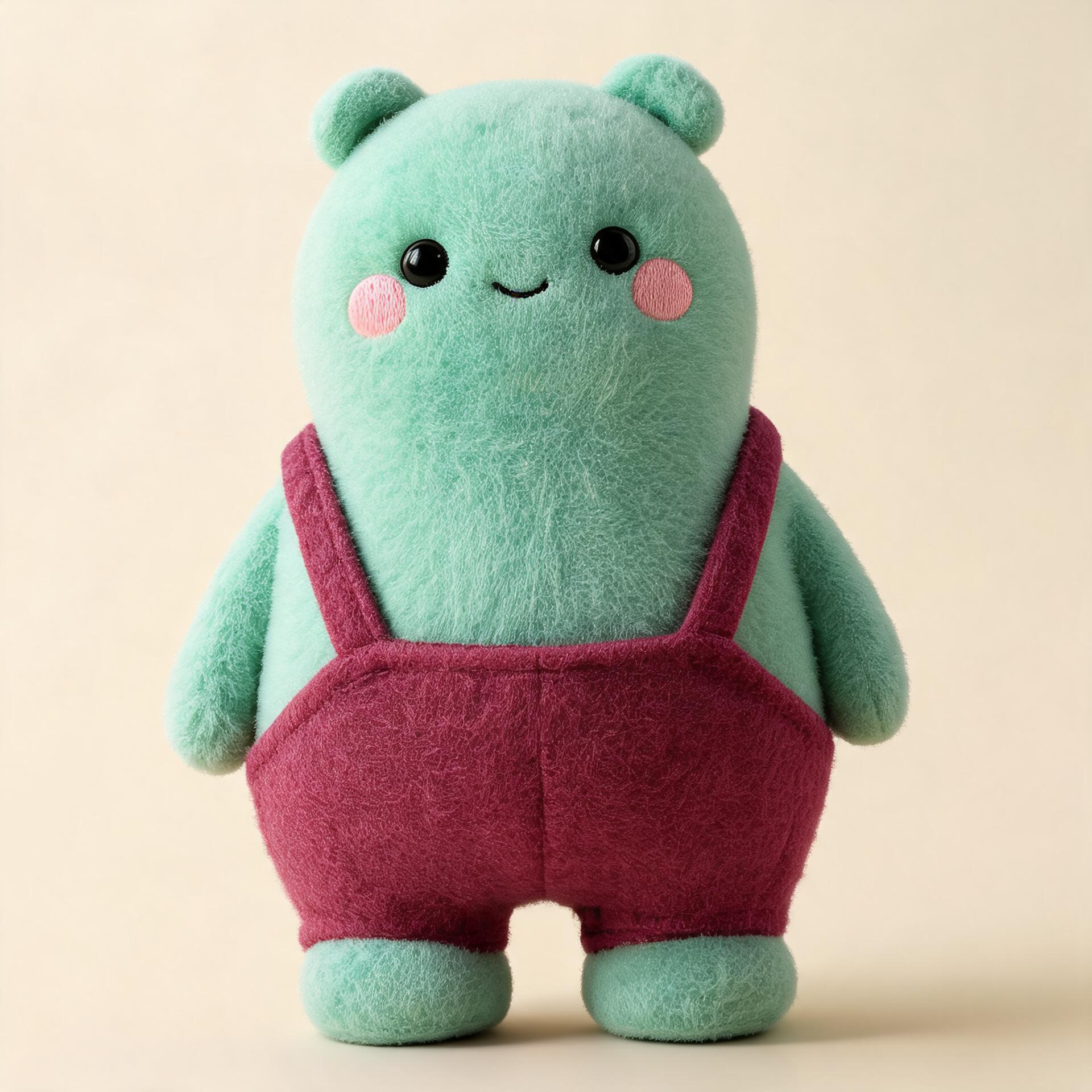
An original mint-green doll

Explore an original monster doll from your reference

People searching for an AI Labubu generator often want a playful collectible-doll look. This NanoPic page focuses on creating your own original monster-doll concept, with distinct shapes, materials, and clothing. It is an independent creative tool with no official brand affiliation.

Start with an original design direction

Use your own drawing, an authorized portrait, or a photograph of an object you are allowed to transform. The goal is a new character with a recognizable idea behind it, not a reproduction of an existing collectible. Think about a silhouette that can be described without a brand name: a pear-shaped forest creature, a round cloud companion, or a squat pebble monster. This gives the generator concrete visual information and gives you a basis for reviewing originality.

Keep the concept visibly independent

Choose your own combination of head shape, ear structure, mouth, proportions, and outfit. Changing only the fur color of a familiar branded character is not a strong original direction. The default prompt asks for short rounded ears, a closed embroidered smile, and an independently designed body. You can change those features, but keep the design brief focused on your own visual choices. Do not add official packaging, brand logos, authentication cards, or claims that the result is licensed merchandise.

Treat the output as artwork

The result is a generated image of a doll concept. It is not a physical toy, a production pattern, a 3D mesh, or a manufacturing-ready specification. Soft-looking fabric and convincing seams can communicate a design idea without establishing how the object would be built. If you want to make a real item, a designer or fabricator will need to interpret proportions, materials, construction, and practical constraints separately. Keep those later deliverables distinct from the illustration.

Build a character with a small set of deliberate choices

A memorable doll concept does not require a complicated prompt. A clear silhouette, a limited palette, and one purposeful accessory can establish more personality than a long list of unrelated decorations.

Choose the body before the costume

Describe whether the body is round, tall, pear-shaped, or broad and low. Add the size relationship between the head, torso, and feet. A clear body structure helps the model avoid a generic toy appearance. Keep the whole character in frame so you can judge those proportions. If the body changes drastically between iterations, return to a simpler reference or repeat the defining shape in the prompt before adding more detail.

Use materials to explain personality

Short velvet, curly fleece, stitched felt, matte clay, and painted wood suggest different kinds of objects. Select one main material and a small number of supporting surfaces. Ask for a believable seam or fabric texture when that detail serves the concept, but avoid treating a realistic render as a guarantee of manufacturability. A material can look attractive while being impractical for a physical toy. Review both the visual effect and the intended use of the illustration.

Keep colors purposeful

Choose two or three main colors and explain their roles: mint fur, plum overalls, and warm ivory background. This is easier to evaluate than a request for every bright color at once. If the reference contains colors you want preserved, name them explicitly. A generated result can still shift shades, so compare the output with your reference. For a product project, use separate color specifications and physical samples rather than relying on the image alone.

Use a reference without surrendering the design brief

An uploaded image can establish a palette, a recognizable object, or a personal visual cue. It does not require the generator to reproduce every feature literally.

Transform an authorized portrait thoughtfully

If you use a portrait, decide which broad cues should inform the character, such as glasses, a favorite sweater color, or a relaxed expression. A doll concept is a stylized interpretation and may not preserve identity exactly. Use a photo you have permission to process, keep the subject comfortably framed, and avoid presenting the result as an official collectible of that person. Review the face and accessories carefully before sharing a version with the subject.

Develop a sketch into a rendered concept

A simple original sketch can communicate silhouette more clearly than a long text description. Use enough contrast to separate the body from the background and keep the whole figure visible. Explain whether you want the sketch interpreted as plush, clay, or another material. Check that distinctive features survive the transformation. If the output becomes too generic, simplify the scene and emphasize the two or three features that make your drawing different.

Let an object inspire a new creature

A teapot, mushroom, leaf, or pebble can inspire a monster-doll silhouette without copying a known character. Describe the connection rather than asking for a random toy: a rounded pebble body with tiny padded feet and a soft moss collar, for example. Keep the reference object’s most useful shape cue and give the character an independent face. Avoid placing unrelated accessories everywhere; a focused concept is easier to understand at avatar size.

Write a prompt you can actually review

The prompt should describe visible choices that can be checked in the image. Broad promises such as perfect originality or exact consistency are not a substitute for specific art direction.

A full-body concept prompt

Try an original friendly creature with a pear-shaped body, short rounded ears, a closed stitched smile, mint fleece, plum overalls, and broad soft feet on an ivory background. Ask for the full doll to remain visible with space around its silhouette. This establishes shape, expression, material, palette, clothing, and framing in a compact brief. Change those choices to fit your own reference rather than assuming the default is the only available direction.

A scene prompt with a clear subject

Once the basic character works, place it in a simple setting: sitting beside a small stack of books, resting on a wooden shelf, or standing in a softly lit studio. Keep the character dominant and describe a modest amount of environment. Complex scenery can distract from the design and introduce unwanted props. Review whether the feet and ears remain visible and whether the background makes the outline easy to read.

Revise one issue at a time

If the mouth is too close to an existing character, change the mouth structure and keep the rest of the brief stable. If the outfit overwhelms the body, simplify the clothing rather than rewriting everything. This gives each iteration a clear purpose. Keep a note of what you accepted and what you rejected so you can compare versions deliberately. The generator may still alter other features, which is why every new result needs review.

Review originality and visual quality together

A pleasing image is only one part of a useful concept. Check that the design is independently directed and that the rendering communicates the intended character clearly.

Inspect the silhouette and face

Look at the head, ears, mouth, body, and feet as a combination. If the result strongly resembles a known branded toy, reject or redesign it rather than treating a different color as sufficient change. Check for extra teeth, duplicate limbs, asymmetrical accessories, and distorted seams. These defects can be easy to miss in a small preview. Open the output at a useful size and inspect the full figure before selecting it for a presentation.

Keep commercial claims separate

The image does not establish a license, official collaboration, safety approval, or production readiness. For a commercial project, review the rights to your source and the applicable terms, then obtain the specialist advice your project needs. Do not place the generated design in official-looking packaging or claim it belongs to an established series. An honest concept presentation can explain the intended materials and personality without making claims the image cannot support.

Prepare a clear design handoff

If you share the concept with a designer, include the source reference, the accepted image, and a short list of features to preserve. Describe what remains uncertain, such as the back view or seam construction. A single front-facing image does not define hidden geometry. Additional views may drift and should be reconciled manually. This makes the image useful as a conversation starter while keeping the next production steps realistic.

Choose a format that fits the intended use

Square, portrait, and landscape compositions serve different purposes. Select the available ratio before generation and judge the result in the layout where it will appear.

An avatar or profile concept

A square composition can keep one character readable at small size. Leave enough space around the ears and feet, and avoid a background filled with tiny props. Inspect a reduced preview to see whether the face and silhouette remain distinct. If the design depends on very small embroidery, it may disappear at avatar scale. A simpler concept often survives reduction more reliably than a highly decorated one.

A presentation or mood board

Use a complete figure with a quiet background so collaborators can discuss shape, color, and material. Add notes in your design application rather than asking the image model to render long labels. Keep the artwork identified as an original concept and include the relevant limitations. If several concepts are shown together, use a consistent layout so the comparison focuses on the designs rather than differences in cropping or display size.

Questions before you create

Is this an official Labubu tool?

No. NanoPic is independent and this page is not affiliated with or endorsed by the official brand. The workflow is for original monster-doll concepts. It does not provide official characters, branded packaging, or licensed collectible assets.

Can I ask for an exact branded character replica?

This page is designed around your own original creature direction. Use independent silhouettes, expressions, materials, and outfits instead of asking the workflow to reproduce a known collectible. The default prompt reinforces that boundary and avoids official logos and packaging.

Can I upload my own drawing?

Yes. A clear original drawing is a useful reference for proportions and personality. Keep the complete character visible and explain the desired material in the editable prompt. Review the output for changes to the features that make your sketch distinctive.

Will my portrait stay identical?

No exact identity preservation is promised. The result is a stylized doll interpretation, so facial structure and small details can change. Use an authorized source and inspect the generated image before sharing it. If precise identity is essential, this concept workflow may not be the right fit.

Can I order the physical toy here?

No. This tool generates an image. It does not manufacture or ship a toy, produce a sewing pattern, or export a 3D model. A physical product requires separate design, construction, and review beyond the concept illustration.

Are multiple views guaranteed to match?

No. Even with a shared reference, separate generations can vary in proportions and details. Treat additional views as concepts to reconcile rather than a ready-made turnaround sheet. Keep one accepted reference and manually check any later view against it.

What should I download and save?

Save the accepted output together with your own source reference and the prompt that produced it. Check the downloaded image at full size for unwanted marks, cropping, and resemblance. Keep a distinct filename so an unreviewed variation is not mistaken for the approved concept.

Which model generates the image?

This NanoPic workflow uses the existing Seedream 5.0 image model, not an official Labubu model. The selected model and settings in the generator describe the actual request. Review the output as an independently generated original concept.

Start with your own reference

Choose one clear goal, then inspect the result.

Related tools