









Video Models
Sign In
CreditsCost

MiniMax H3 Generator

MiniMax H3

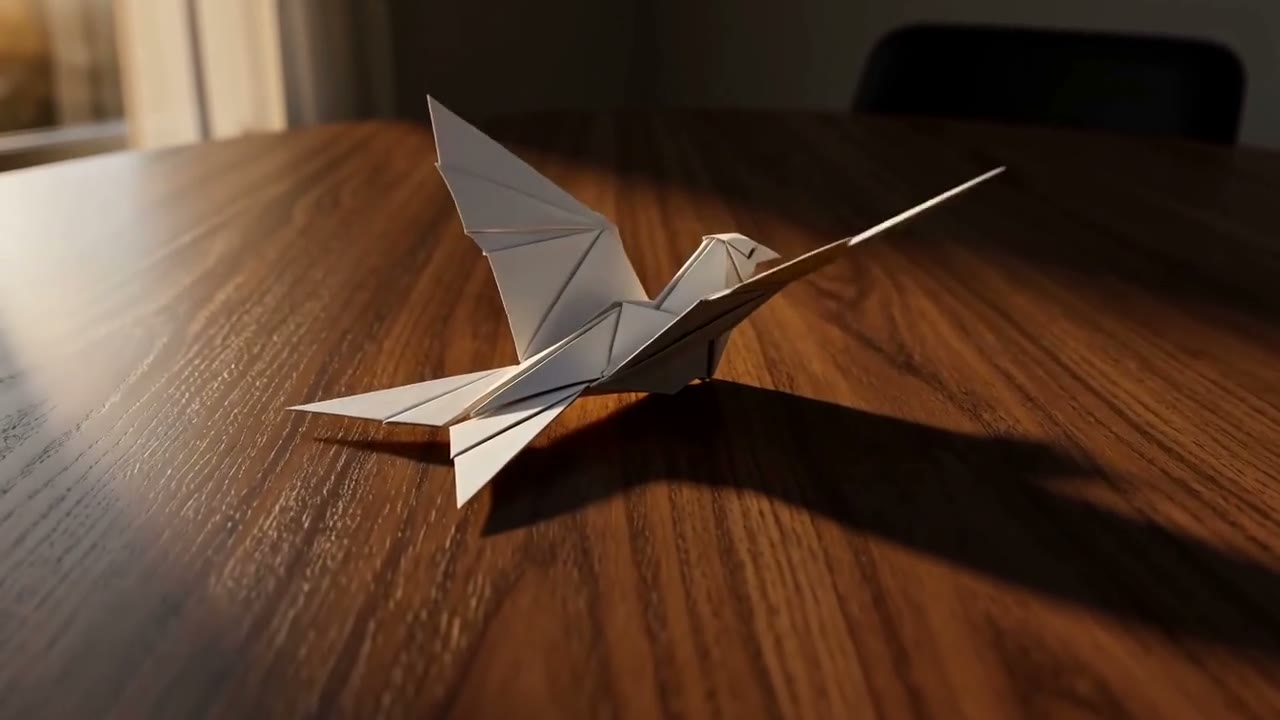
Verified MiniMax H3 paper bird output

Cinematic close-up of a folded white paper bird resting on a warm wooden table. The paper bird slowly lifts its head, unfolds both wings, and takes one graceful step forward as late-afternoon sunlight moves across the wood grain. Slow camera push-in, shallow depth of field, realistic paper texture, quiet room ambience, no text, no watermark.

Original MiniMax H3 paper bird video generated during NanoPic route verification

MiniMax H3 Generator for Multimodal AI Video

Generate with the verified MiniMax H3 routes inside NanoPic. Start from text, animate one opening frame or a controlled first-and-last-frame pair, or guide a clip with up to nine image references in the current NanoPic form. The underlying H3 reference route also accepts documented video and audio references, but those file controls are not yet exposed in this web form. H3 supports 768P and 2K output, whole-second durations from 4 to 15 seconds, common landscape, square, portrait, and cinematic aspect ratios, plus adaptive framing in reference mode. The video above is an original NanoPic verification output from the real KIE MiniMax H3 text-to-video route, not a reused competitor demo.

What the MiniMax H3 Generator Supports

NanoPic maps each visible workflow to a matching KIE MiniMax H3 model ID. The controls below reflect the current provider contract rather than guessed marketing labels.

Text-to-video with native audiovisual output

Write a prompt for the subject, action, environment, camera, dialogue, sound effects, music, and visual constraints. Text mode requires a fixed aspect ratio and uses the dedicated minimax-h3/text-to-video route.

First and last frame control

Upload one image as the opening frame, or two ordered images to define both the opening and closing states. Image mode follows the source frame geometry and therefore does not expose a separate aspect-ratio control.

Multimodal reference-to-video

The current NanoPic form exposes up to nine image references for character appearance, camera language, materials, or style. The verified provider route also accepts up to three video clips and three audio clips within the documented limits; those two upload controls are planned rather than presented as live form options.

4-15 second duration controls

Choose any whole-second duration from 4 through 15. A four-second 768P render is the lowest-cost validation pass; extend only after motion, framing, and audio direction look correct.

768P and 2K resolution

Use 768P for faster, lower-cost prompt testing and 2K for a higher-resolution result after the concept is stable. Resolution and duration both change the displayed credit cost before generation.

Six fixed ratios plus adaptive framing

Text mode supports 21:9, 16:9, 4:3, 1:1, 3:4, and 9:16. Reference mode can also use Adaptive. Image-to-video derives its framing from the uploaded first frame.

How to Generate a MiniMax H3 Video

Treat the first render as a controlled test. H3 can accept a long prompt, but a clear shot plan is easier to evaluate and revise than an overloaded paragraph.

1. Choose the workflow that matches your source material

Use text-to-video when the scene should be invented from the prompt. Choose image-to-video when an opening composition must remain recognizable, and provide a second frame only when the ending state matters. In the current NanoPic form, choose reference-to-video when the model should borrow subjects, materials, or visual language from several images. The provider contract additionally supports video and audio references, while first/last-frame inputs and reference inputs remain separate workflows that should not be mixed.

Open the Generator

2. Write a production-readable prompt

Describe the subject and environment first, then specify the action, camera path, shot progression, lighting, visual treatment, dialogue, and sound. Name which reference supplies which property instead of asking H3 to infer every relationship. Keep spoken lines short enough for the selected duration, identify the speaker, and state unwanted elements such as overlays, logos, subtitles, or watermarks as constraints.

Read the Official Prompt Guide

3. Validate at 4 seconds and 768P

The default NanoPic setup uses the lowest-cost documented combination: 4 seconds, 768P, and 16:9. Review whether the subject remains stable, the action starts soon enough, the camera move is readable, and the audio matches the visible event. If the result drifts, revise one variable at a time before paying for a longer or 2K render.

Run a 4-Second Draft

4. Scale the proven direction

After a short render works, increase duration to give dialogue, choreography, or a transition more room. Switch to 2K only when the composition and movement are already useful. Save successful prompts and references with the task history so later versions can be compared against the settings that produced them.

Return to the Generator

MiniMax H3 Prompt Structure

A useful H3 prompt reads like a compact production brief. These fields can be written as natural sentences or organized shot by shot when the clip contains several beats.

Subject and continuity

Identify each subject, visible attributes, wardrobe, materials, and what must remain consistent across the clip. For references, state which uploaded asset defines each subject.

Action and timing

Describe one clear action for a short draft. For longer clips, order the beats and keep dialogue or movement realistic for the available 4-15 second duration.

Camera and shot language

Name the framing and camera move: locked close-up, slow dolly, handheld follow, overhead reveal, orbit, rack focus, or another deliberate instruction. Avoid contradictory camera directions.

Light, style, and environment

Define time of day, key light, palette, lens character, material response, weather, and background behavior. Use references when a look must be copied more precisely than text can express.

Dialogue, sound, and music

Name the speaker before a line and describe sound effects at the action that causes them. Use an audio reference when voice, rhythm, or ambience needs a concrete source.

Constraints and exclusions

State what should not change and what should not appear. Common constraints include stable identity, readable anatomy, no duplicate subjects, no added captions, no logos, and no watermark.

MiniMax H3 Generator Use Cases

H3 is most useful when a brief benefits from coordinated visual and audio direction. NanoPic currently exposes text, first/last-frame, and multi-image reference controls, while the verified provider contract also defines video and audio reference inputs for later interface expansion.

Cinematic concepts and previsualization

Draft camera movement, lighting, performance, dialogue, and atmosphere before committing to a live shoot or larger production pipeline.

Product and campaign motion

Animate product stills, key art, packaging, and campaign boards with controlled opening frames, closing frames, material references, and sound cues.

Character and style continuity tests

Use reference images and clips to test whether a character, costume, movement vocabulary, or visual language can remain recognizable across a short scene.

Social video in channel-ready ratios

Create horizontal, square, portrait, or ultrawide drafts for ads, reels, shorts, launch teasers, and landing-page motion without relying on heavy recropping later.

Dialogue and sound-driven scenes

Plan a compact exchange, performance, sound effect, music cue, or environmental ambience together with the visible action instead of assembling silent footage first.

Reference-guided editing experiments

Use multimodal references to explore changes in subject, background, camera language, motion, or audio direction while preserving the parts of the brief that must remain stable.

MiniMax H3 Pricing and Credit Planning

NanoPic shows the required balance before submission. Current KIE pricing is 22.5 KIE credits per output second for 768P and 36.5 KIE credits per output second for 2K; NanoPic converts those provider credits into site credits at the configured $0.001-per-credit accounting rate.

Start at 450 credits for a 4-second 768P test

A 4-second 768P generation costs 450 NanoPic credits at the current route price. The same 4-second request at 2K costs 730 credits. A 15-second output costs 1,688 credits at 768P or 2,738 credits at 2K after whole-credit rounding. Reference video duration is billed in addition to output duration, and reference images after the first five add provider cost.

Check Current Controls

Provider prices can change

Treat the generator's displayed cost as the submission-time source of truth. NanoPic rejects a generation when it cannot resolve an exact configured price for the chosen duration and resolution rather than silently charging a generic fallback.

View MiniMax Pricing

MiniMax H3 vs Other NanoPic Video Models

Choose H3 when the core job is unified text, image, video, and audio direction. Compare another model when its specific workflow or cost profile is a better fit.

Choose MiniMax H3 for multimodal direction

H3 combines text prompting, first/last-frame control, and reference images, video, and audio across three explicit routes. It is a strong choice for compact audiovisual scenes that need clear source roles and a production-readable prompt.

Generate with H3

Compare speed, style, and specialist workflows

Use the NanoPic video-model hub to compare H3 with Kling, Seedance, Veo, Sora, HappyHorse, and LTX pages. Keep the same core brief, then compare motion stability, prompt adherence, audio, input modes, duration, and credit cost rather than assuming one model wins every project.

View All Video Models

Compare H3 with Seedance 2.0 Mini

Seedance 2.0 Mini is a useful neighboring workflow when you want a lower-resolution draft path, optional audio generation, or a like-for-like 4-15 second prompt test before choosing a final model.

Open Seedance 2.0 Mini

Compare H3 with Kling 3.0

Kling 3.0 is another neighboring model page for creators comparing motion, shot structure, duration, and prompt adherence across current video generators.

Open Kling 3.0

MiniMax H3 Generator FAQ

Answers based on the official MiniMax H3 API contract and the verified NanoPic KIE integration.

Is MiniMax H3 really connected on NanoPic?

Yes. NanoPic maps MiniMax H3 to the verified KIE model IDs minimax-h3/text-to-video, minimax-h3/image-to-video, and minimax-h3/reference-to-video. Before this page was built, the text route completed a real 4-second 768P provider task and returned the original paper-bird video shown on the page.

What inputs does MiniMax H3 support?

The current NanoPic form supports a text prompt, one first frame with an optional last frame, or up to nine reference images. The verified provider contract additionally accepts up to three reference videos and three reference audio files within its format, duration, dimension, and file-size limits; NanoPic does not yet display video or audio reference upload controls on this page.

What resolution, duration, and aspect ratios are available?

H3 supports 768P and 2K output with whole-second durations from 4 to 15. Text mode supports 21:9, 16:9, 4:3, 1:1, 3:4, and 9:16. Image mode follows the uploaded frame ratio. Reference mode supports those fixed ratios plus Adaptive.

How much does a MiniMax H3 video cost?

At the current KIE route price, output costs 22.5 KIE credits per second at 768P and 36.5 KIE credits per second at 2K. That converts to 450 NanoPic credits for the default 4-second 768P task or 730 credits for 4-second 2K. Input reference video is also billed by duration, while the first five reference images are included and additional images add cost.

Does MiniMax H3 create audio with the video?

MiniMax H3 is an audio-video model and can generate audiovisual output from the prompt and references. For better control, identify the speaker, keep dialogue realistic for the selected duration, describe sound effects at the action that causes them, and use an audio reference when a specific voice, rhythm, or ambience matters.

What is the best first MiniMax H3 setting?

Start with text-to-video at 4 seconds, 768P, and 16:9. Describe one subject, one action, one camera move, the light, the audio direction, and the main constraints. Review that low-cost result before extending duration, moving to 2K, or adding multimodal references.

Create a MiniMax H3 Video

Start with the verified 4-second 768P workflow, then move to first/last frames or multimodal references when the source material needs tighter control.