












































































































Face-Preserving Hair Edit
The template asks the model to keep facial structure, age, skin tone, expression, eyebrows, eyes, nose, mouth, ears, clothing, and pose unchanged. Only the hairstyle should move toward the selected short look.
Save up to 73% on plans
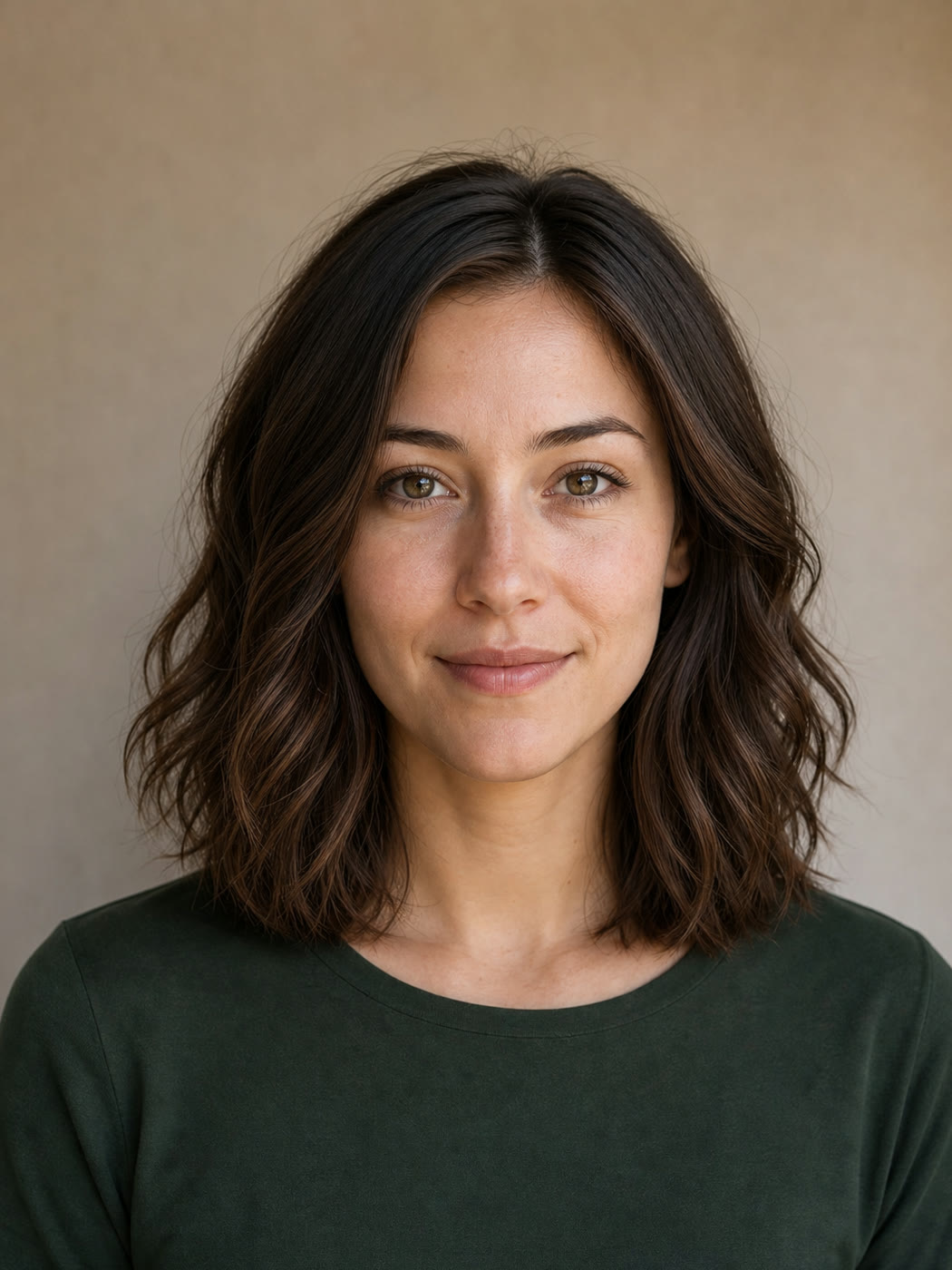
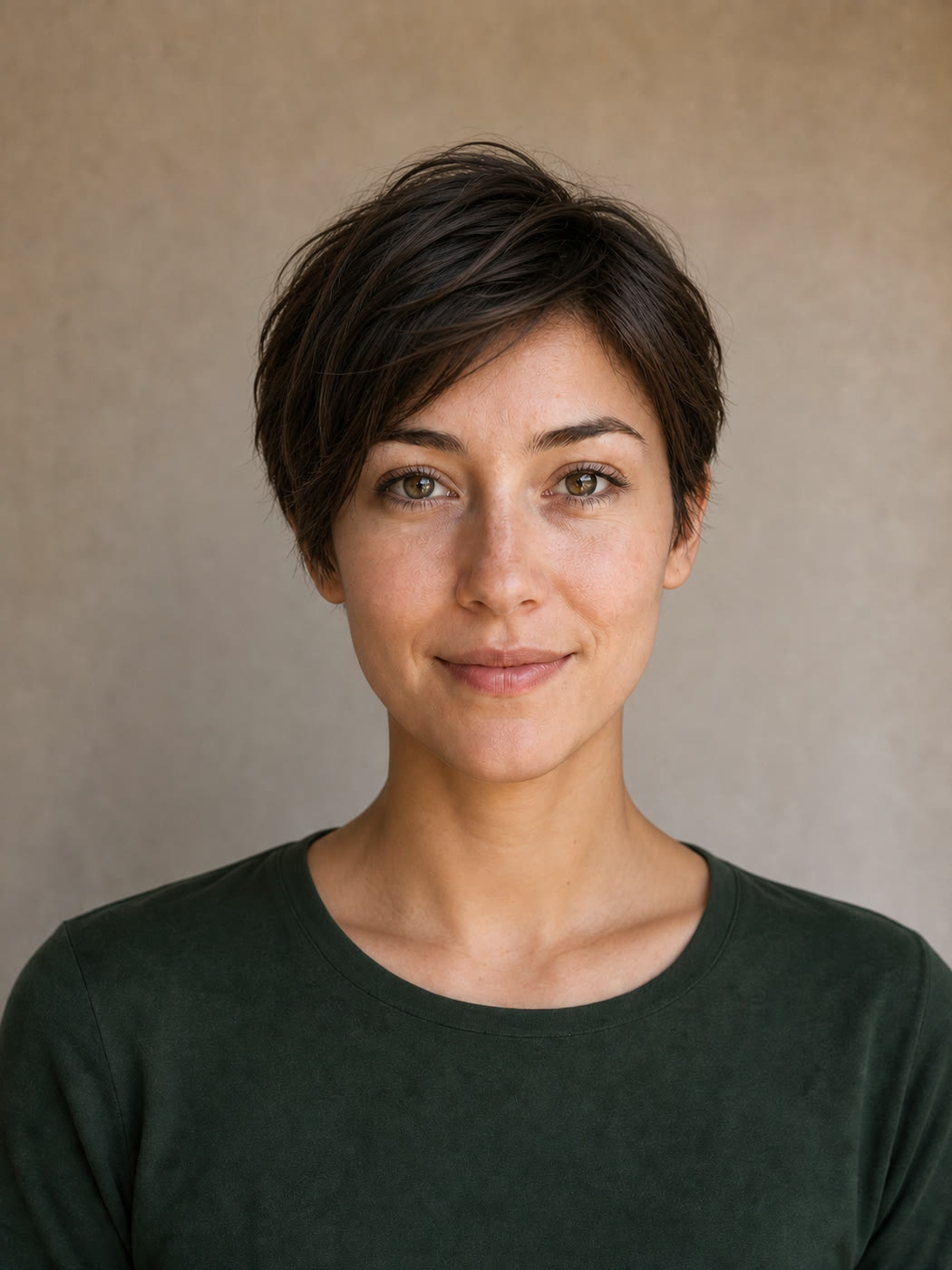
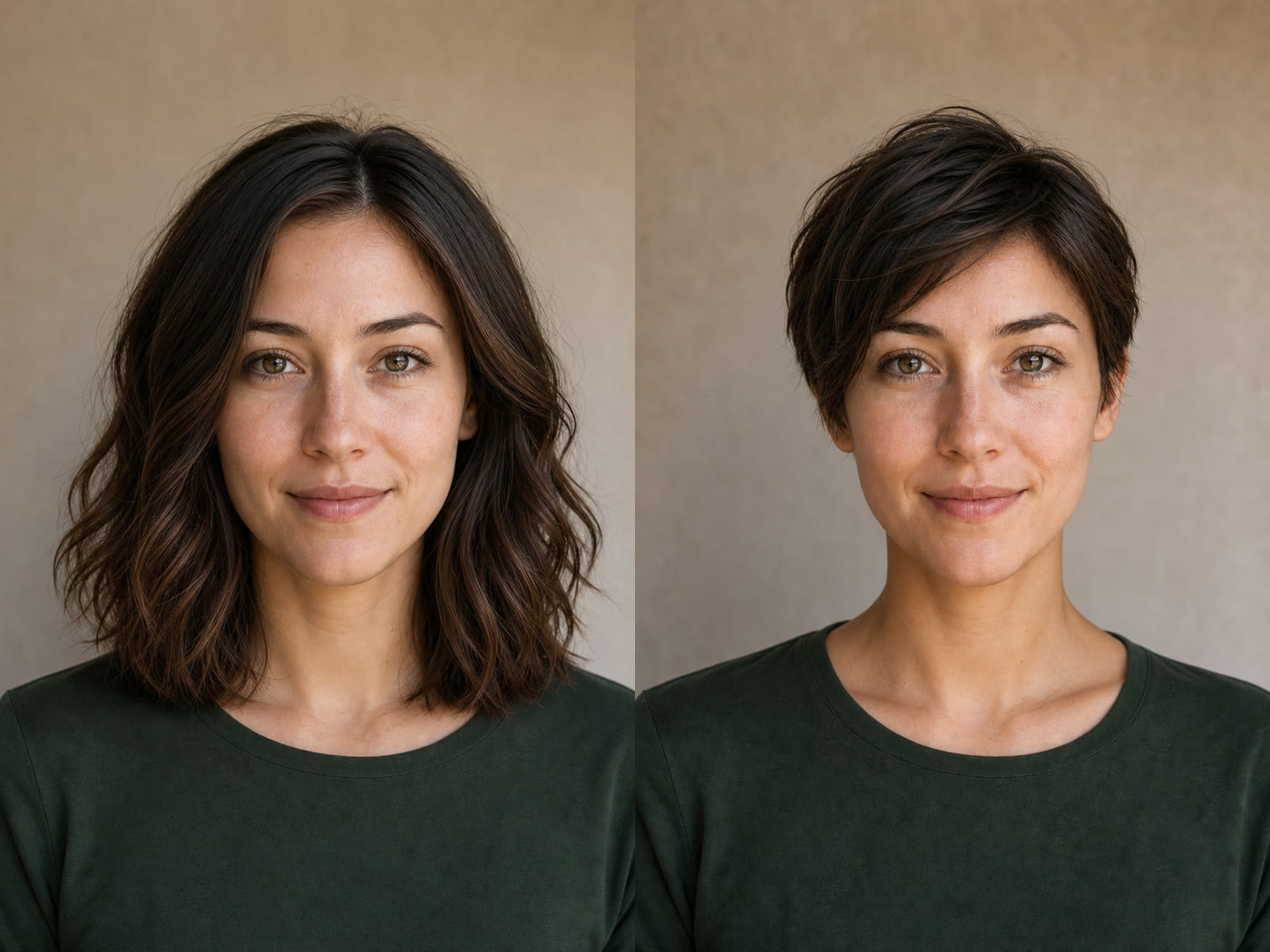
A short haircut can change how the face, jawline, ears, and overall silhouette read, which makes it difficult to judge from a catalog photo alone. NanoPic uses your portrait as the visual reference and changes the hairstyle instead of generating an unrelated model. Choose a textured pixie, French bob, textured crop, or short shag, then compare the result with your original photo. The saved editing instructions protect facial identity, original hair color, expression, clothing, camera angle, light, and background while asking for a believable hairline, individual strands, natural scalp coverage, and matching shadows. The result is a concept preview, not a promise of an exact salon outcome: real hair density, texture, growth pattern, styling technique, and face-to-hair proportions still affect a physical cut.
The tool combines a real portrait reference, four distinct haircut directions, and practical constraints that reduce unrelated edits.
The template asks the model to keep facial structure, age, skin tone, expression, eyebrows, eyes, nose, mouth, ears, clothing, and pose unchanged. Only the hairstyle should move toward the selected short look.
Pixie, French bob, textured crop, and short shag presets describe different lengths, layer patterns, fringe behavior, and neckline shapes instead of offering four vague labels for the same haircut.
Every preset asks for a believable hairline, scalp coverage, strand direction, volume, flyaways, and shadows that fit the original light. It also rejects bald patches, pasted-on edges, and cropped heads.
Start with a saved style prompt, then add one practical preference such as keeping natural waves, adding light fringe, or leaving more crown volume. You do not need to write the full editing instruction yourself.
A useful haircut preview starts with a readable portrait and ends with a careful comparison, not just a quick generation.
Choose a front-facing or gently angled photo with the full head inside the frame. Even light, a sharp face, and visible hair edges help the model understand your current hairline and head shape. Avoid hats, hands covering the hair, severe motion blur, tiny screenshots, beauty filters that reshape the face, or crops that remove the crown. If possible, use a photo where both ears and the neckline are readable because short cuts expose those areas.
Upload a PortraitUse Textured Pixie for a close tapered silhouette with side-swept movement, French Bob for a polished ear-to-jaw line, Textured Crop for airy short layers, or Short Shag for relaxed layers and wispy fringe. Begin with one preset so the output has a clear structure. Add an optional note only for a real preference, such as retaining waves, avoiding bangs, showing more ear, or keeping extra crown volume.
Choose a Haircut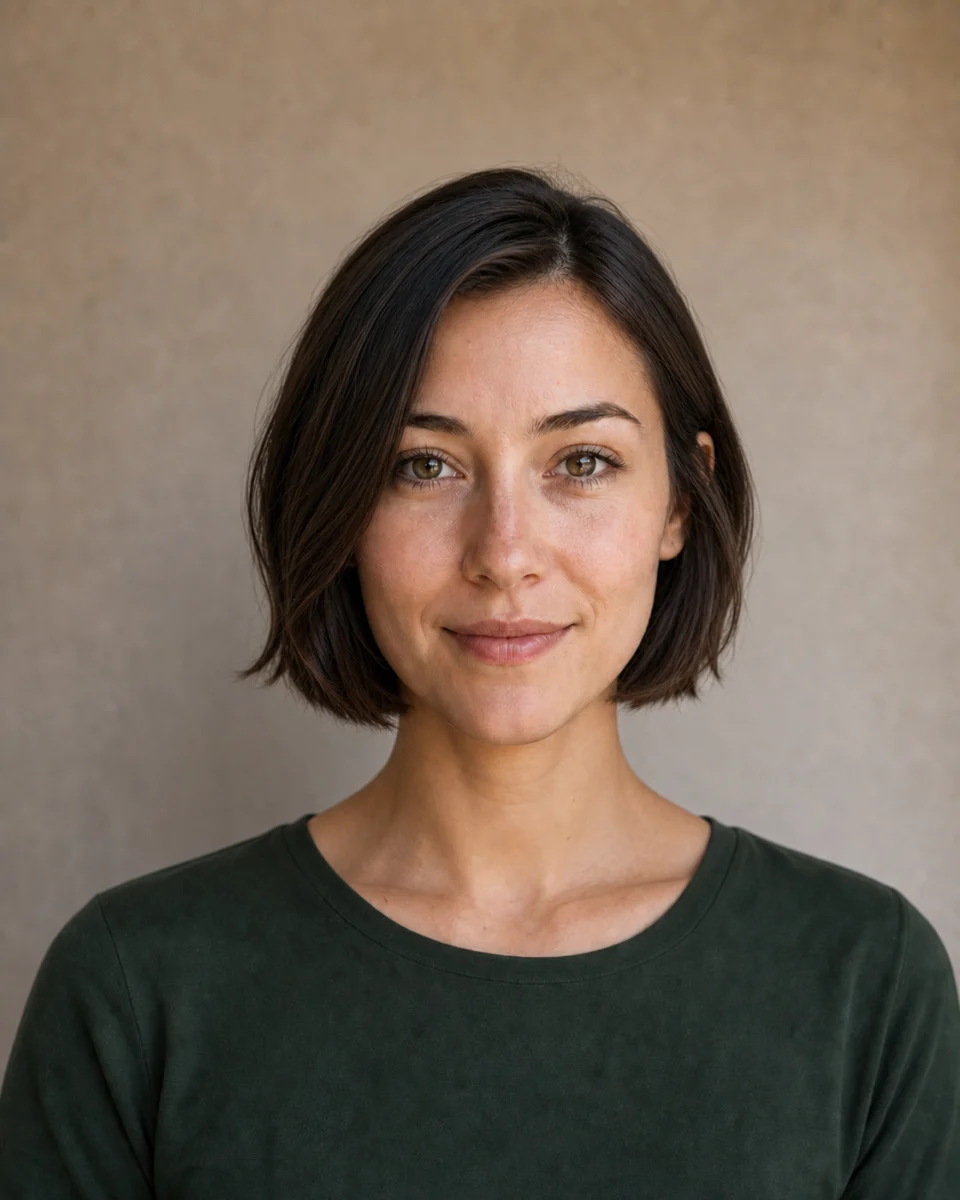
Place the result beside the original and check the face, jawline, ears, hairline, crown, neckline, and lighting. Confirm that the person still looks recognizable and that the hair sits on the head rather than looking like a pasted wig. If one detail is wrong, keep the same source and preset and add one concise correction. Use the preview as a conversation reference for a stylist, not as an exact prediction of density, shrinkage, maintenance, or how a real cut will grow out.
Generate and CompareTreat each output as a visual direction you can compare, refine, and discuss before committing to a real-world change.
Compare a few short silhouettes on your own face before a consultation. Save the original and preferred preview together so a stylist can see the direction, then discuss what your density, texture, cowlicks, and routine can realistically support.
Explore how a shorter hairstyle changes the outline of a profile picture, creator portrait, or personal brand image. Generate the concept first, then plan a real haircut or photoshoot instead of presenting the preview as documentary photography.
Test whether a pixie, bob, crop, or shag supports a fictional character, costume, or campaign direction while preserving the original clothing and scene. Keep the generated preview labeled as a concept when sharing it with collaborators.
Use the same portrait for several presets so the haircut is the main variable. Comparing one consistent face and background is more useful than comparing unrelated catalog models with different features, poses, and lighting.
Practical answers about source photos, haircut previews, identity preservation, cost, and responsible use.
It is an image-to-image editing workflow that uses your uploaded portrait as a reference and changes the hairstyle toward a short cut. This page provides four saved haircut directions while asking the model to preserve the same face, expression, clothing, pose, light, and background.
You can open the page, upload a sample, and configure the generator without charge. Creating an image uses NanoPic credits. Images made with free credits include the standard free-credit watermark, while paid-credit generations do not include that watermark.
Use a sharp portrait with even light, a visible hairline, the complete crown inside the frame, and limited obstruction around the ears and neck. Avoid hats, heavy blur, extreme angles, clipped hair, and aggressive face filters.
The template explicitly protects facial structure, age, skin tone, expression, eyebrows, eyes, nose, mouth, and ears. Generative edits can still drift, so compare the result carefully and regenerate with one focused correction when a feature changes.
The built-in presets cover a textured pixie, French bob, textured crop, and short shag. Each preset describes a different length, layering pattern, fringe treatment, and neckline. Optional notes can refine natural texture or volume without replacing the safety constraints.
No. It is a visual concept, not a physical simulation or professional haircut recommendation. Real outcomes depend on density, strand texture, curl pattern, cowlicks, shrinkage, styling, maintenance, and the stylist's technique. Bring the preview and original photo to a qualified stylist for practical advice.
The default workflow keeps the original hair color so haircut shape remains the main change. You can add a color request in the optional notes, but evaluating cut and color separately often makes comparison easier and reduces unintended changes.
Use only images you own or have permission to edit. Do not use the tool to impersonate someone, mislead viewers, or make sensitive claims. Label generated concepts appropriately when context could otherwise be confusing.
Upload one clear portrait, pick a distinct short hairstyle, and compare the generated concept with your original before making a real change.

80s Photo Filter adds warm, faded film color to your photo in the browser. Adjust strength, preserve clothing and framing, and download a PNG.
Open tool
AI Age Filter creates a natural older-look concept from an authorized adult portrait. Review identity, complete-head framing, light and scene after editing.
Open tool
AI Age Progression creates a target-age concept from an authorized adult portrait. Set an age interval and review identity, framing and scene after editing.
Open tool
AI Labubu Generator helps explore your own monster doll concept from an authorized reference. Create original shapes and outfits, with no official affiliation.
Open tool
Camera Roll AI turns an authorized reference photo into one lifestyle collage. Plan varied scenes and a phone-gallery-inspired layout, then save one image.
Open tool
Face in Hole Generator places an authorized face into your chosen photo or template. Upload two references, refine the blend, and save a creative portrait.
Open tool
Create still images with the Hotpot AI Image Generator on NanoPic. Write a clear scene, generate with Nano Banana 2, refine the look, and download the picture you like.
Open tool
Make Image Higher Resolution with real 2× or 4× browser resizing. Compare pixel dimensions and download PNG without claiming recovered detail.
Open tool
Remove Glare from Glasses in photos with an editable AI image prompt. Upload your portrait, reduce lens reflections, and review the result before using it.
Open toolTurn one authorized adult portrait into a realistic flashlight scene with a miniature stylized double. Generate, then inspect identity, hands, light, scale, and crop.
Open toolTry 12 original funny AI prompts on one authorized person or pet photo. Load, edit, generate, and review identity, anatomy, props, text, and visual coherence.
Open tool
Run a magnific ai image generator style enhance on NanoPic: upload one photo, rebuild edges and textures toward 4K, then download after a full-size check.
Open toolCopy free mera prompt AI photo prompts for boys, girls, couples, festivals and cricket, then turn your own selfie into a viral edit on NanoPic.
Open toolTurn one authorized photo into original blocky pixel art with six editable prompts. Generate, then review subject detail, geometry, text, rights, and composition.
Open toolPrompt seen girl portraits from your own selfie: upload one photo, describe the outfit, setting and light, and keep your face looking like you.
Open tool
Pumpkin head photoshoot from one photo: swap heads for carved jack-o'-lanterns while keeping your outfit and pose, with an optional autumn or spooky mood.
Open tool
Make sorry i lied ai costume reveal photos from one authorized childhood costume shot: Perfect, First Apology, Almost Honest, then your real original last.
Open tool
Vikas Editor AI image generator: turn your own photo into a Vikas edit style portrait online, with editable prompts that keep your face recognizable.
Open tool