Save up to 73% on plans

1980s Photo Prompts
Sign In

1980s Photo Prompts

Copy and edit 1980s Photo Prompts, then upload your portrait and generate the selected look on this page.

Upload your photo*

644 / 2,400

Copy Protection
Public VisibilityAllow this result to appear in public inspiration surfaces.

Photo preview

Image

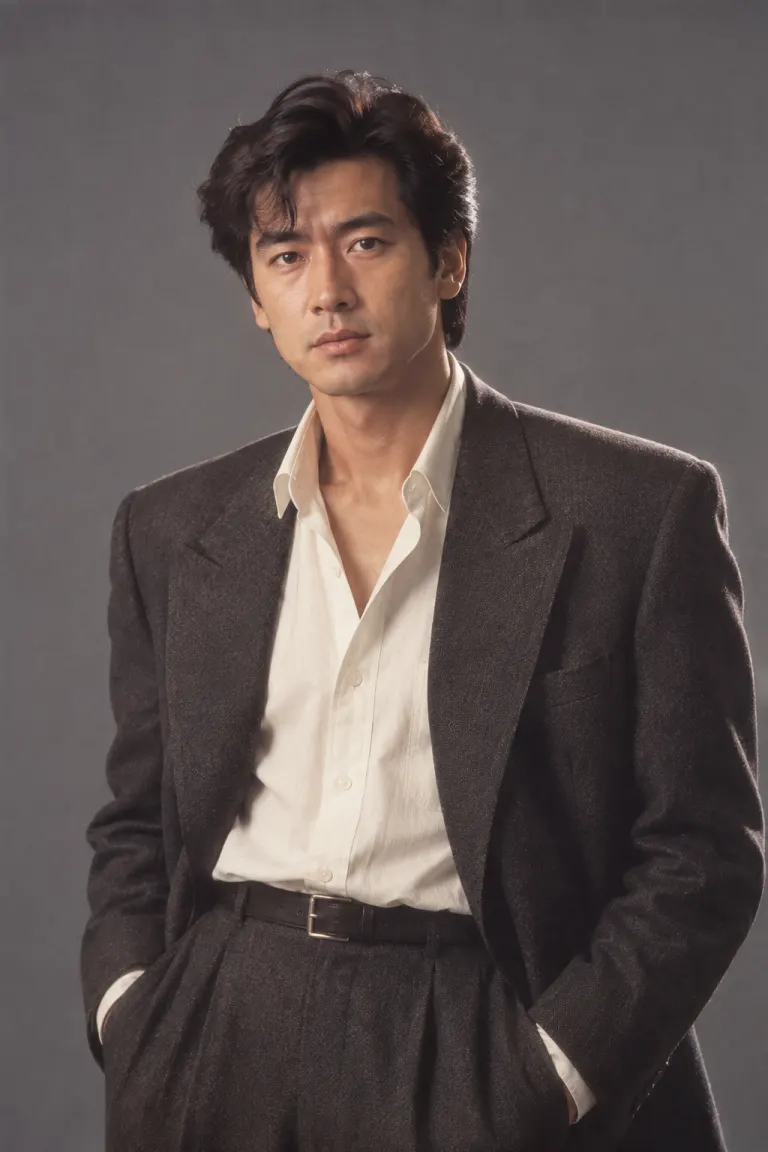
A man in a structured charcoal suit in a softly lit 1980s studio portrait
AI-created theme example · A man in a structured charcoal suit in a softly lit 1980s studio portrait
A woman in a tailored jacket with warm cinematic window light
AI-created theme example · A woman in a tailored jacket with warm cinematic window light

Choose a complete photo prompt

Use in generator loads the complete prompt above for editing. Upload your reference and generate here; generation uses the credits shown in the tool.

Structured editorial portrait

Use the uploaded photograph as the identity reference. Keep the same recognizable person, visible age, skin tone, facial proportions and full head. Retain natural skin texture. Create a 1984 fashion editorial photograph. Use a charcoal shoulder-structured blazer, an ivory blouse or shirt, a restrained geometric earring if appropriate, and a slate seamless backdrop. Light with a large soft key and a subtle rim. Use medium-format detail with gentle print warmth; do not replace the face with a fashion model. No smartphones, smartwatches, contemporary branding, text, watermarks, extra people or collage panels. Render one photographic image.


Monsoon cinema mood

Use the uploaded photograph as the identity reference. Keep the same recognizable person, visible age, skin tone, facial proportions and full head. Retain natural skin texture. Create an original 1980s Indian cinema-inspired portrait on a shaded veranda after rain. Use a deep-teal draped silk outfit, small gold-tone accessories, warm side light, soft background greenery and restrained film halation. Preserve the person rather than imitating a named actor. Keep the face sharp. No smartphones, smartwatches, contemporary branding, text, watermarks, extra people or collage panels. Render one photographic image.

Analog campus portrait

Use the uploaded photograph as the identity reference. Keep the same recognizable person, visible age, skin tone, facial proportions and full head. Retain natural skin texture. Create a 1987 campus portrait of the same adult beside a brick library. Use a striped cotton shirt, a simple canvas shoulder bag and high-waisted trousers. Keep a natural stance. Use overcast daylight, muted red and navy colors and fine negative-film grain. No smartphones, smartwatches, contemporary branding, text, watermarks, extra people or collage panels. Render one photographic image.

Direct-flash party portrait

Use the uploaded photograph as the identity reference. Keep the same recognizable person, visible age, skin tone, facial proportions and full head. Retain natural skin texture. Create a 1988 indoor party portrait with a dark plum backdrop, an unbranded satin jacket and one simple metallic accessory. Use direct camera flash with a small shadow behind the shoulders and warm photographic print colors. Keep facial details readable without plastic smoothing. No smartphones, smartwatches, contemporary branding, text, watermarks, extra people or collage panels. Render one photographic image.

More AI Image Models & Effects

Browse every other AI image model and effect published on this site in a continuous carousel.

A writing toolkit for a specific portrait

These 1980s Photo Prompts are built for people who want to choose the details of a portrait rather than accept one fixed look. An editorial headshot can suit a personal profile; a campus scene can become a nostalgic birthday image; a rain-softened veranda can support a cinematic mood board. The decade alone is not a complete instruction. Pick a situation, decide what the person wears and choose how the photograph should feel. The cards provide complete starting text that you can revise before generating.

Build the prompt in six clear parts

Start your 1980s Photo Prompts with the uploaded person as the identity reference. Next specify framing, then wardrobe, then the setting. Finish with a lighting direction and one restrained film treatment. This order makes individual changes easier to understand. For example, keep a waist-up composition and slate backdrop while replacing a charcoal blazer with a cream knit sweater. Leave the face instructions intact. An extra line excluding phones, modern logos and text can reduce distracting objects, but it cannot guarantee that every unwanted detail disappears.

Choose editorial structure or cinema atmosphere

The editorial card combines tailored shoulders, a simple backdrop and broad soft light. Its appeal comes from clean geometry, so adding a busy street or dramatic rain changes the brief substantially. The cinema card uses draped fabric, greenery and warm side light to create atmosphere without asking for a famous actor. These 80s photo prompts describe different visual choices, not historical documentation. Keep culturally specific clothing descriptions accurate to your intended scene, and replace accessories that do not suit the reference person or your own styling preference.

Use campus daylight or party flash deliberately

Campus portraits work with an ordinary stance, cotton clothing and quiet architecture. A plain library wall gives the model fewer competing details than a crowd of students. Party portraits use frontal flash and a darker setting; that light can make fabric shine and place a small shadow behind the shoulders. When adapting 1980s Photo Prompts, choose between these lighting systems instead of combining them. A request for flat overcast daylight, deep nighttime shadows and soft studio lighting in the same frame leaves the intended result unclear.

Select a reference that leaves room for clothing

Use a photograph you are allowed to upload, with a clear face and the whole head visible. A chest-up or waist-up source helps when the outfit matters; a tightly cropped selfie gives little information about shoulders or posture. Avoid strong beauty filters, sunglasses covering the eyes and colored light that hides natural skin tone. These 1980s Photo Prompts request recognizable identity rather than guaranteed face preservation. A single-person reference is the clearest starting point here. For two people with separate clothing assignments, use the linked couple workflow.

Fix a conflicting instruction before another attempt

If the result looks too modern, name the specific problem: remove the phone, replace the logo with plain fabric or simplify the background. If the face becomes overly polished, ask for natural skin texture and remove beauty-retouching language. Do not solve every problem by adding more adjectives. Reusable 80s photo prompts are easier to improve when one variable changes per attempt. Keep the previous text so you can compare revisions. Each new generation uses the credit cost displayed by the tool, including an attempt that does not match your preference.

Inspect the image beyond its retro color

Review your 1980s Photo Prompts result at full size before sharing it. Compare the face, age cues, skin tone and hairstyle with the source. Then check that the jacket closes plausibly, earrings attach naturally and hands have sensible shapes. Look for unintended writing on signs or clothes. Warm color alone does not make an image convincing: light, fabric and background should agree. If the composition works but one accessory fails, remove that accessory from the prompt instead of changing the whole scene and losing a useful direction.

Questions about editing and results

Are 80s and 1980s different styles?

They name the same decade. This page focuses on editable writing patterns and four different portrait briefs. The linked 80s generator offers a quick starting transformation. Choose by workflow rather than treating the two names as different historical periods.

Can I keep my current hairstyle?

Yes: replace any hair-styling instruction with a request to retain the source hairstyle, hairline and length. Keep wardrobe and background instructions separate. The model may still alter fine details, so inspect the finished image rather than assuming the wording guarantees a match.

How do I copy a card and generate it here?

Copy prompt places the card text on your clipboard. Use in generator loads it into the editable field on this page. Upload your reference, revise the text, sign in and review the displayed credit cost before generating. Copying the text itself does not consume generation credits.

Explore the retro photo collection

80s AI Photo Generator

A quick photo-to-photo starting point for a warm 1980s studio portrait. Upload a photo and edit the look below.

Open tool

80s Couple Photo Prompts

Use one clear photo containing both people. Copy a couple prompt or load it above, then generate both people together here.


Open tool

90s Photo Prompts

Build a distinct 1990s look with disposable-camera flash, understated streetwear or minimalist studio light. Copy or generate each prompt here.

Open tool