



















































































































Free AI Character Portrait Generator
Sign In

Free AI Character Portrait Generator

Upload one adult portrait, choose an original character direction, and edit the brief. Generate your portrait when the role, outfit, and setting feel right.

Choose a focused direction, then edit the brief to define the role and world.

Upload One Portrait*
Try a Fictional Portrait

288 / 700

Public Visibility
Copy Protection
Credits required:-

Your Character Portrait Preview and Result

Image

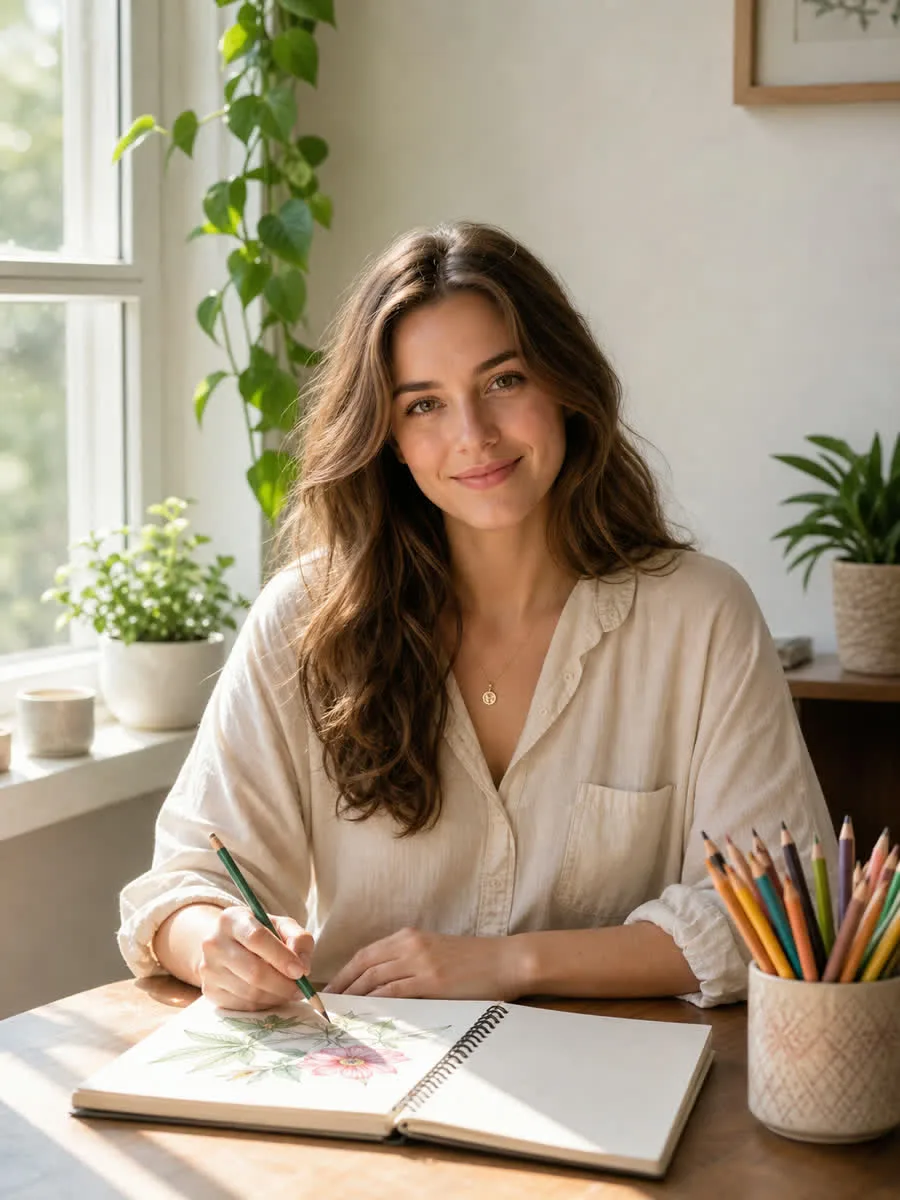
Fictional adult woman in a natural portrait before character generation
Photo
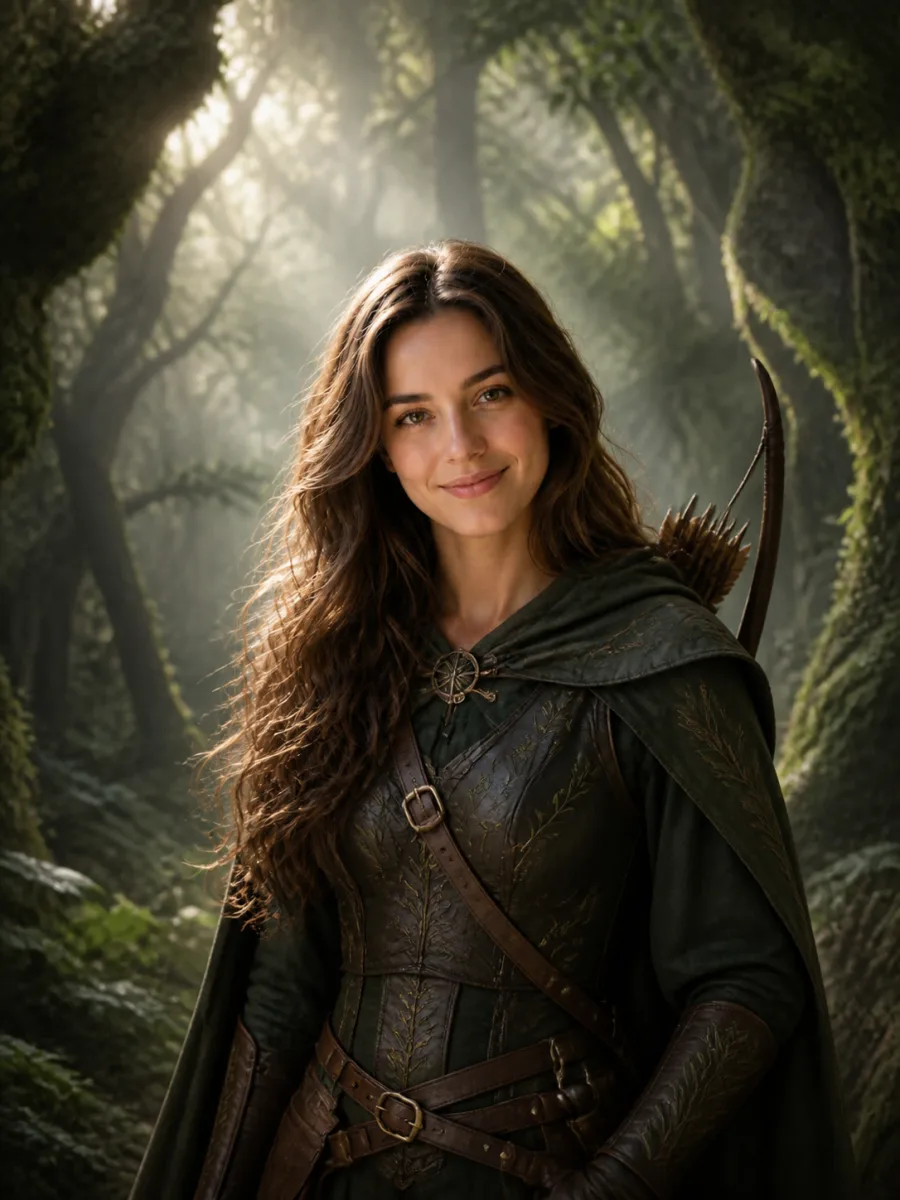
Original fantasy ranger portrait preserving the woman’s identity and full head
Fantasy Ranger

Turn Your Photo into an Original Character, Not a Generic Filter

A useful character portrait begins with a person and adds a believable role, world, wardrobe, material language, and mood. NanoPic keeps the uploaded face as the visual anchor while the editable brief directs the transformation toward fantasy, game, anime, or cinematic concept art. The result is designed for character ideation and personal creative projects—not for copying a celebrity, actor, franchise costume, or protected character.

Character Portrait Examples Built Around a Role and World

The examples use fictional adults created for NanoPic. They vary age, gender presentation, skin tone, and visual language so you can judge whether the role design changes while the person remains recognizable.

Natural Portrait to Forest Fantasy Ranger

The ranger direction changes clothing, materials, color palette, and setting while keeping the source woman’s eye shape, curls, skin texture, expression, head angle, and full-hair framing readable. Practical layers and botanical details make the portrait feel like an original role design rather than a costume pasted over a face.

Create a Fantasy Role
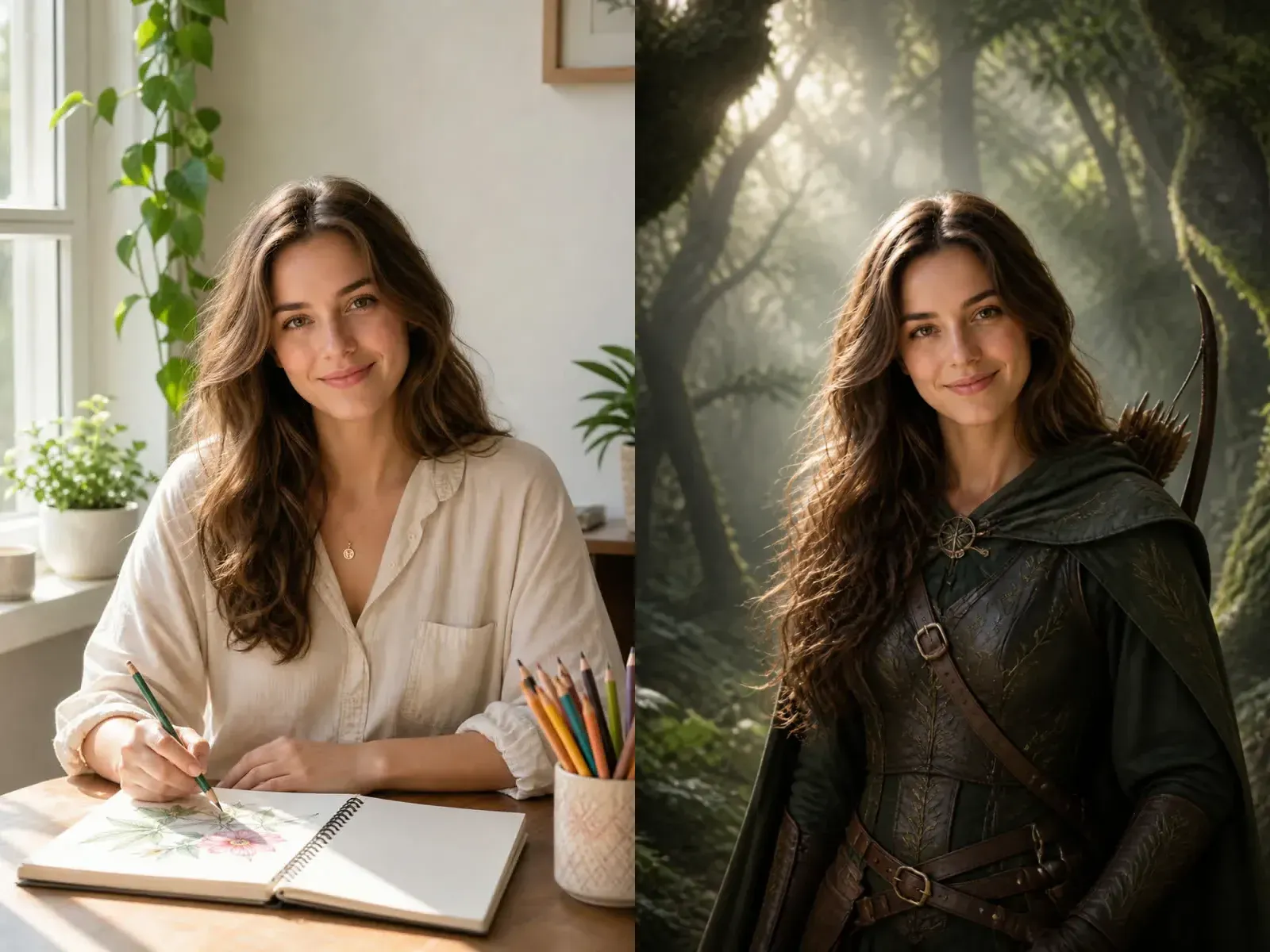
Natural adult portrait beside an identity-preserving fantasy ranger character portrait

One Portrait, Four Distinct Character Directions

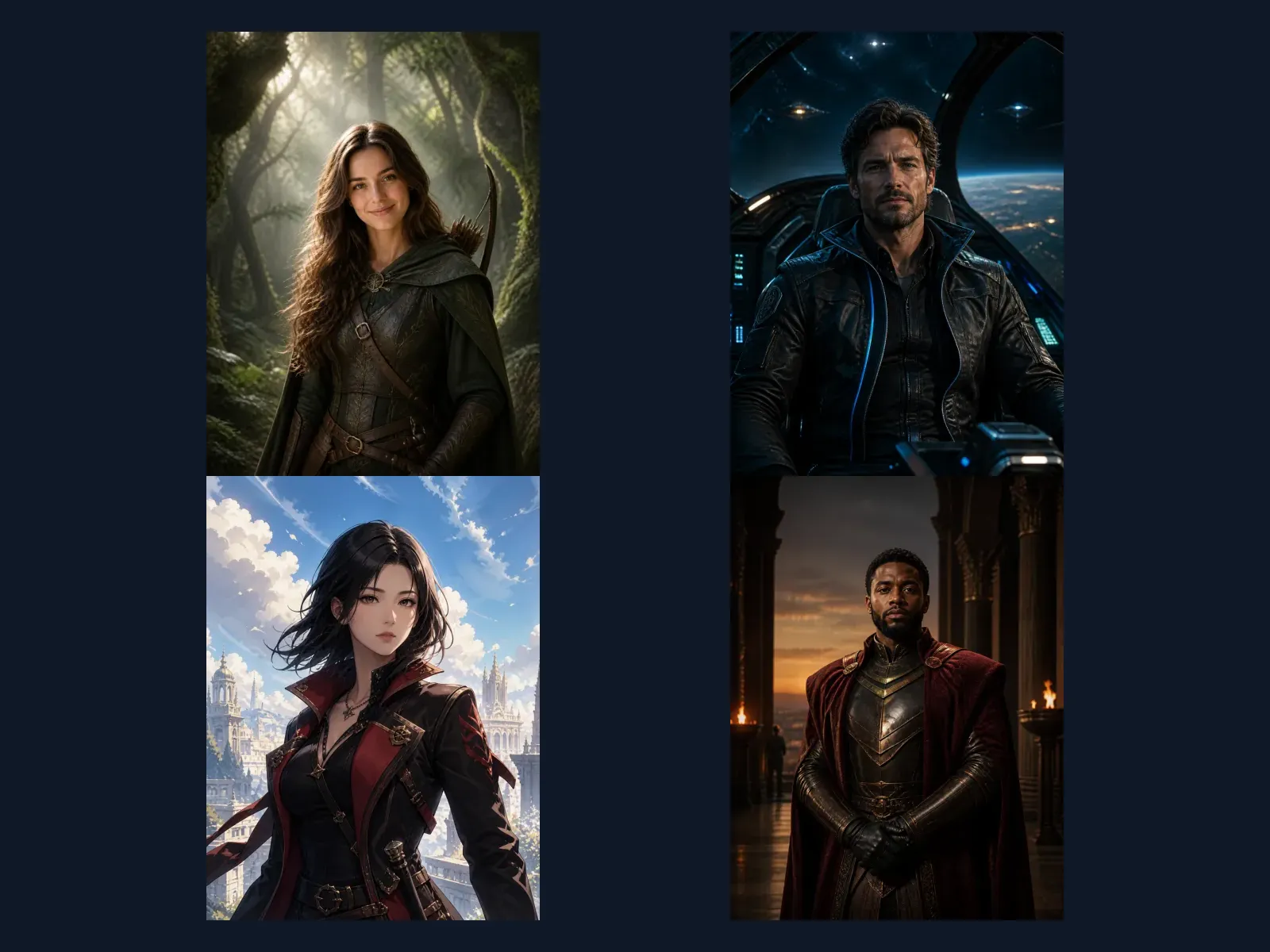
Fantasy Ranger focuses on organic travel gear and woodland light. Cinematic Sci-Fi uses practical flight materials and orbital color. Anime Hero relies on controlled linework and cel lighting without copying a series. Royal Guardian uses ceremonial armor and warm game-cinematic atmosphere. These are role-and-world directions, not the general illustration treatments offered by the AI Cartoon Image Generator and not the exaggerated facial proportions used by the AI Caricature Generator.

Compare Character Directions
Four original character portrait directions including fantasy, science fiction, anime, and royal guardian

How to Use the Free AI Character Portrait Generator

Start with the provided welcome credits, then make each generation deliberate so the displayed credit cost goes toward a clear character concept.

1. Upload a Clear Adult Portrait

Choose a photo where one adult face, the complete head, hair, neck, and shoulders are easy to see. Neutral or simple backgrounds work well, but a meaningful pose or accessory can stay if it supports the character idea. Use only a photo you are authorized to transform.

2. Choose a Direction and Edit the Brief

Pick Fantasy Ranger, Cinematic Sci-Fi, Anime Hero, or Royal Guardian. The prompt is already visible and editable. Add the role, era, world, outfit materials, colors, expression, lighting, and setting you want; remove any detail that does not fit your character. Avoid named actors, artists, franchises, and copyrighted characters.

3. Generate, Review, and Refine One Variable

Check identity, visible age, skin tone, hair, complete-head framing, hands, and accessories before downloading. If the concept is close, change one variable—such as the wardrobe material or background mood—instead of rewriting every detail. Generation consumes the displayed credits, and welcome-credit results carry the NanoPic watermark.

Controls for a Recognizable, Original Character Portrait

The page combines identity-aware photo transformation with a role-focused brief and clear originality boundaries.

Identity Stays the Anchor

The base instruction asks the model to retain facial structure, visible age, skin tone, hair, expression, camera angle, and natural proportions. AI can still drift, so review the result rather than promising a perfect likeness.

Role Design Goes Beyond a Cartoon Filter

The editable brief controls role, wardrobe, materials, palette, atmosphere, and setting. That makes the page suitable for character concepts instead of generic photo illustration.

Original Worlds, Not Copied Franchises

The template rejects named celebrities, protected characters, franchise costumes, logos, and official insignia. Describe genre, materials, era, and mood in your own words.

Portrait Shapes for Avatars and Concepts

Choose 3:4, 4:5, 2:3, or square. The default 3:4 frame gives the face, hair, shoulders, and costume details enough space for a readable role portrait.

Useful Ways to Make an AI Character Portrait from a Photo

Treat generated portraits as visual development, personal avatars, or creative references and review usage rights before commercial publication.

Tabletop and RPG Character Portraits

Visualize an original ranger, scholar, pilot, guardian, or other player character while using your own authorized portrait as the facial anchor.

Novel and Story Mood Boards

Writers can explore wardrobe, era, palette, and setting before briefing an illustrator or refining a character description.

Original Game or Film Concept Pitches

Create a focused visual direction for an original role without borrowing a studio character, actor likeness, game logo, or protected costume.

Personal Avatars and Profile Art

Use square or portrait output for a fantasy, anime, science-fiction, or cinematic profile concept after checking the face, crop, and watermark.

AI Character Portrait Generator FAQ

Answers about photos, styles, identity, originality, credits, watermarks, and suitable uses.

Free AI Character Portrait Generator—what is actually free?

Eligible new NanoPic users currently receive 40 welcome credits, enough for one 40-credit 1K Nano Banana 2 image at the current displayed cost. Every actual generation uses NanoPic credits. Images generated with welcome credits include the NanoPic free-credit watermark; generation with purchased credits removes it. Free means you can begin with gifted credits, not unlimited generations or zero-cost use forever.

What does the AI character portrait generator do?

It transforms one authorized adult portrait into an original role portrait. The source face anchors identity, while the editable brief changes wardrobe, materials, palette, atmosphere, and setting toward a fantasy, game, anime, science-fiction, or cinematic concept.

How is this different from the AI Cartoon Image Generator?

The cartoon page primarily translates a photo into an illustration style such as storybook, clean comic, clay 3D, or retro anime. This character page goes further into role and world design: it asks what the person is, what they wear, what materials define the costume, and what setting supports the character.

How is this different from the AI Caricature Generator?

The caricature workflow intentionally enlarges or simplifies selected proportions for a warm humorous effect. The character portrait workflow asks for natural adult proportions and avoids giant eyes, oversized heads, or comic exaggeration. Its goal is an original role portrait, not a joke or likeness exaggeration.

Will the generated character look exactly like the uploaded person?

No AI transformation can guarantee a perfect likeness. The template asks Nano Banana 2 to preserve facial structure, visible age, skin tone, hair, expression, and pose, but lighting, costume, and style can still cause drift. Review the output carefully before using it as a profile image or reference.

What photo works best?

Use one sharp adult portrait with the complete head and hair visible, a readable face, natural lighting, and enough room around the shoulders. Avoid tiny faces, heavy blur, masks, extreme side angles, cut-off hair, strong beauty filters, watermarks, or photos you are not authorized to edit.

Can I create a copyrighted movie, anime, or game character?

This template is designed for original character directions. Do not request a named character, actor, celebrity, franchise costume, studio logo, or protected insignia. Describe the genre, era, role, materials, colors, and mood in original terms instead, and review applicable rights before publishing commercially.

Can I edit the character prompt?

Yes. The default prompt is placed directly in the editable Character Brief field. Keep identity-preservation instructions, then change the role, outfit, material details, palette, lighting, and setting. Specific concrete nouns usually produce a clearer design than a long list of conflicting adjectives.

Which aspect ratio should I choose?

Use 3:4 for a balanced head-and-shoulders character portrait, 4:5 for profile art and social posts, 2:3 for a taller costume view, and 1:1 for an avatar. Keep enough space around the head so changing the crop does not remove hair or costume details.

Can I use the output for a game, novel, or film pitch?

You can use an original result as concept exploration or a creative reference subject to NanoPic terms and any laws or third-party rights that apply. Do not assume exclusivity or legal clearance merely because an image was generated by AI, especially when the prompt or source resembles protected material.

Build an Original Character Portrait from Your Photo

Upload one authorized portrait, choose a focused character direction, edit the visible brief, and spend the displayed credits only when the role and world are clear.