Save up to 73% on plans

90s Photo Prompts
Sign In

90s Photo Prompts

Copy 90s Photo Prompts for flash, grunge or studio portraits. Upload your photo and generate the chosen look here.

Upload your photo*

682 / 2,400

Copy Protection
Public VisibilityAllow this result to appear in public inspiration surfaces.

Photo preview

Image

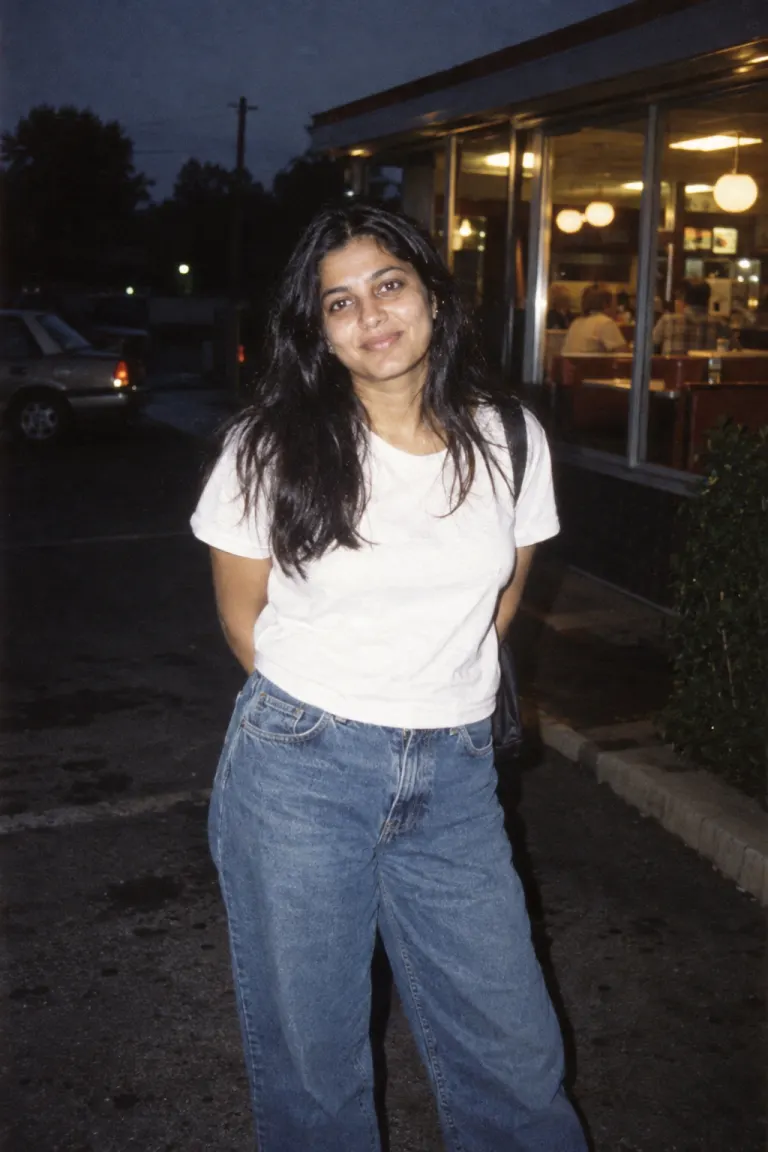
A woman in a white tee and loose denim outside a diner with 1990s direct flash
AI-created theme example · A woman in a white tee and loose denim outside a diner with 1990s direct flash
A man in plaid flannel against a brick wall in muted 1990s street style
AI-created theme example · A man in plaid flannel against a brick wall in muted 1990s street style

Choose a complete photo prompt

Use in generator loads the complete prompt above for editing. Upload your reference and generate here; generation uses the credits shown in the tool.

Disposable-camera evening

Use the uploaded photograph as the identity reference. Keep the same recognizable person, visible age, skin tone, facial proportions and full head. Retain natural skin texture. Create a 1997 casual evening snapshot outside a small diner. Use a plain white T-shirt and loose indigo denim. Apply direct point-and-shoot flash, rapid falloff into a dark background, slightly cool shadows, coarse consumer-film grain and imperfect candid framing while keeping the full head visible. Avoid 1980s shoulder pads, neon studio lighting and glamour diffusion. No smartphones, smartwatches, contemporary branding, text, watermarks, extra people or collage panels. Render one photographic image.


Overcast grunge street

Use the uploaded photograph as the identity reference. Keep the same recognizable person, visible age, skin tone, facial proportions and full head. Retain natural skin texture. Create a 1993 candid street photograph beside a weathered brick wall. Use an open muted-plaid flannel shirt over a dark plain tee and loose jeans. Light with flat overcast daylight. Use desaturated greens, charcoal shadows and understated 35mm texture. Keep hair and skin natural, without teased 1980s styling or polished beauty lighting. No smartphones, smartwatches, contemporary branding, text, watermarks, extra people or collage panels. Render one photographic image.

Minimal studio portrait

Use the uploaded photograph as the identity reference. Keep the same recognizable person, visible age, skin tone, facial proportions and full head. Retain natural skin texture. Create a 1995 minimalist studio portrait with a plain off-white backdrop and a simple black crew-neck top. Use clean window-like directional light, restrained contrast and fine-grained black-and-white film. Keep natural facial asymmetry and a quiet expression. Avoid retro props, neon, ornate jewelry and warm sepia. No smartphones, smartwatches, contemporary branding, text, watermarks, extra people or collage panels. Render one photographic image.

Afternoon skate-shop snapshot

Use the uploaded photograph as the identity reference. Keep the same recognizable person, visible age, skin tone, facial proportions and full head. Retain natural skin texture. Create a 1998 casual portrait outside an unbranded skate shop. Use a loose color-block windbreaker and relaxed trousers, pale concrete surroundings and hard afternoon sunlight. Give it a consumer 35mm snapshot feel with slightly punchy primary colors and mild grain. Keep the source face, head and proportions; avoid modern logos and phones. No smartphones, smartwatches, contemporary branding, text, watermarks, extra people or collage panels. Render one photographic image.

More AI Image Models & Effects

Browse every other AI image model and effect published on this site in a continuous carousel.

Choose a photographic language, not just a year

These 90s Photo Prompts separate four directions that are often mixed together: nighttime flash, overcast grunge, minimalist studio portraiture and sunny skate-shop snapshots. They can support a casual profile picture, a music-inspired mood board or a nostalgic party invitation image. Decide which kind of photograph you want before editing clothing. A low-key black-and-white portrait should not also look like a colorful disposable-camera party shot. The cards contain complete text, so you can start with the closest direction and change only the details that matter to you.

Make direct flash visible in the light falloff

The flash card describes a bright subject against a darker diner setting. The important relationship is the quick falloff from the illuminated face to the background, rather than simply making the whole frame brighter. Use a plain tee and loose denim to keep attention on the snapshot treatment. When adapting 90s Photo Prompts, retain a complete head and clear eyes even if the framing feels casual. Avoid asking for heavy motion blur or extreme grain at the same time; both can hide the identity details supplied by your photograph.

Keep grunge grounded in fabric and weather

The grunge card uses a muted plaid flannel shirt, loose jeans, brickwork and flat cloudy daylight. It does not need a dramatic concert stage or a pile of props. These 1990s photo prompts work through a small number of compatible cues. Choose subdued greens and charcoal shadows if you want a quiet street portrait; remove polished glamour lighting that fights the everyday setting. Keep the source hairstyle unless a change is intentional. Clothing and weather can establish the mood without exaggerating the person into a costume character.

Separate minimalist portraits from skate snapshots

The studio option uses a plain light backdrop, a dark crew-neck top and fine-grained black-and-white treatment. Its restraint makes expression and facial structure more noticeable. The skate-shop option instead uses hard afternoon sun, relaxed clothing and stronger everyday color. In 90s Photo Prompts, these are alternatives rather than a checklist to combine. Choose the studio direction for a quieter headshot; choose the sunny snapshot for a casual outdoor mood. An unbranded setting also avoids relying on a model to reproduce legible shop names or recognizable product logos.

Use a source with readable eyes and natural texture

Choose an authorized single-person photograph with the full head visible, useful detail around the eyes and no strong beauty filter. Soft, even source light gives a cleaner reference than a face half hidden in darkness. A waist-up photograph offers more guidance for a windbreaker or flannel shirt than a close selfie. These 90s Photo Prompts ask the model to retain recognizable identity, but individual features can change. If you want two people, use the couple tool and specify both positions instead of adding an unnamed companion to a single-person prompt.

Edit one variable and remove competing effects

Start by changing a single field: the shirt color, the wall texture or the time of day. Keep the rest of the prompt stable so the next result answers a useful question. If your 90s Photo Prompts result looks too much like an 80s studio portrait, remove glamour diffusion, broad shoulder tailoring and neon lighting from the instructions. If it looks too modern, ask for plain unbranded clothing and remove phones or watches. More period objects are not always better; too many props can distract from the actual portrait.

Check the face, the flash and the frame together

Open the finished image at full size and compare the face, skin tone, apparent age and hair with the original. Then check the chosen photographic treatment: flash should not erase facial detail, black-and-white should retain useful shadow information, and a casual crop should not cut through the head. Well-written 1990s photo prompts still need result inspection. Look for distorted collars, fingers or background writing. Save the wording that produced a useful direction before adjusting it. A new attempt consumes the displayed generation credits even when the previous image was disappointing.

Questions about editing and results

Does every 90s portrait need a date stamp?

No. A date stamp is optional styling, and generated lettering may be inaccurate. The prompts prioritize lighting, clothing and film texture instead. If a precise date matters, add it later using a text editor after you have selected the photograph.

Why does heavy grain make the result less convincing?

Large grain and strong blur can cover the eyes and flatten skin detail. Reduce the texture instruction before changing the face description. A restrained consumer-film effect usually leaves more useful information for comparing the result with your reference, although the final appearance remains model-dependent.

Can I switch from color to a monochrome portrait?

Yes. Load the minimalist card, keep the identity instructions and remove competing requests for punchy colors or warm sepia. Upload your source, sign in and review the displayed credit cost. Copying or editing 90s Photo Prompts is free of generation charges; creating an image uses credits.

Explore the retro photo collection

80s AI Photo Generator

A quick photo-to-photo starting point for a warm 1980s studio portrait. Upload a photo and edit the look below.

Open tool

1980s Photo Prompts

Copy a complete portrait prompt or load it into the generator above. Upload your photo and generate the corresponding 1980s look on this page.

Open tool

80s Couple Photo Prompts

Use one clear photo containing both people. Copy a couple prompt or load it above, then generate both people together here.


Open tool