Save up to 73% on plans

80s Couple Photo Prompts
Sign In

80s Couple Photo Prompts

Upload one shared photo, edit a couple prompt and generate your retro portrait here.

Upload one couple photo*

773 / 2,400

Copy Protection
Public VisibilityAllow this result to appear in public inspiration surfaces.

Photo preview

Image

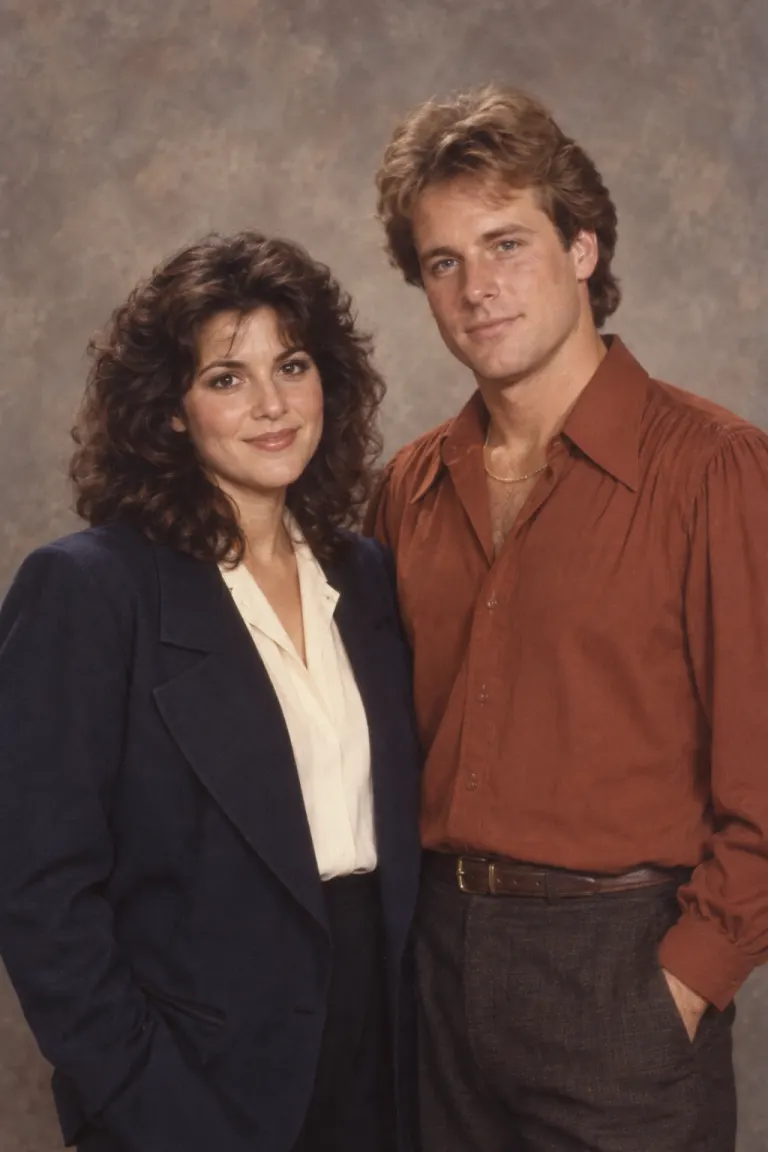
Two adults in navy and rust clothing against a warm mottled studio backdrop
AI-created theme example · Two adults in navy and rust clothing against a warm mottled studio backdrop
Two women in denim and knitwear outside a brick record shop
AI-created theme example · Two women in denim and knitwear outside a brick record shop

Choose a complete photo prompt

Use in generator loads the complete prompt above for editing. Upload your reference and generate here; generation uses the credits shown in the tool.

Two-person studio print

Use the uploaded couple photograph as the reference for exactly two adults. Keep the left person on the left and the right person on the right, retaining each distinct face, visible age, skin tone, relative height, pose and distance between them. Do not merge or swap faces. Create a 1986 studio couple portrait. The left person wears a navy wide-lapel jacket over a cream shirt; the right person wears a rust-colored puff-sleeve blouse with a subtle gold-tone necklace. Use a mottled warm-gray backdrop and soft frontal flash. Keep both faces equally sharp and both complete heads visible. Add fine grain and restrained warm print fading. No smartphones, smartwatches, contemporary branding, text, watermarks, extra people or collage panels. Render one photographic image.


Denim street pair

Use the uploaded couple photograph as the reference for exactly two adults. Keep the left person on the left and the right person on the right, retaining each distinct face, visible age, skin tone, relative height, pose and distance between them. Do not merge or swap faces. Create a 1988 street photograph beside a brick record store. Give the left person a light denim jacket and white shirt; give the right person a dark denim jacket and burgundy shirt. Keep their original hand positions and spacing. Use late-afternoon side light with gentle fill on both faces, natural shadows and subtle 35mm grain. No smartphones, smartwatches, contemporary branding, text, watermarks, extra people or collage panels. Render one photographic image.

Quiet anniversary album

Use the uploaded couple photograph as the reference for exactly two adults. Keep the left person on the left and the right person on the right, retaining each distinct face, visible age, skin tone, relative height, pose and distance between them. Do not merge or swap faces. Create a 1983 home portrait beside warm wood furniture and patterned curtains. The left person wears an oatmeal cable-knit sweater; the right person wears a teal cardigan. Keep their relative height, body orientation and original expressions. Use soft window light across both faces, a slightly faded warm palette and realistic print texture. No smartphones, smartwatches, contemporary branding, text, watermarks, extra people or collage panels. Render one photographic image.

More AI Image Models & Effects

Browse every other AI image model and effect published on this site in a continuous carousel.

Two identities, one shared composition

Describe each person before the shared scene

A useful couple prompt gives each person a separate wardrobe assignment before describing the shared setting. Fix left and right, relative height, pose and distance. Balanced light helps both faces remain readable; a single vague clothing instruction can blend the two looks. Review each face independently, then compare positions, hands and clothing assignments with the source.

Pick a reference that gives both people a fair chance

Keep both faces readable

Choose a photograph where both faces have similar detail and balanced exposure. Avoid one person facing the camera while the other is hidden behind a shoulder, or one face disappearing into a deep shadow. If the reference describes only one person clearly, the model may reinvent the other. Good 80s couple photo prompts start with useful visual information; a longer paragraph cannot reliably recover features that are not visible.

Use the source as a position map

Left and right mean the viewer’s left and right in the photograph. Name the person on each side, then ask to retain their relative height and the space between them. Do not also ask them to swap places or turn toward a completely different camera angle. Those directions compete. An 80s couple photo prompt should use the original arrangement as a map unless changing the pose is the specific goal of the edit.

Prefer simple hands and natural poses

Interlaced fingers, arms across faces and complicated embraces make an edit harder to review. Prefer clearly visible hands or a composition that naturally keeps them outside the frame. Avoid asking the model to invent an elaborate pose while also replacing clothing and scenery. If you need a full-body composition, begin with a full-body reference rather than stretching a tight selfie into a new scene.

Assign separate outfits in 80s couple photo prompts

Give each person a separate wardrobe sentence

Write one wardrobe sentence for the left person and another for the right. Color, fabric and collar shape help keep the assignments distinct: a navy jacket and cream shirt on one side, a rust top and a simple necklace on the other. “Both wear retro clothes” leaves much more to chance. These 1980s couple photo prompts can be adapted to any consenting adult pair; clothing choices do not require changing who stands where.

Decide what should stay before adding accessories

If a hairstyle or pair of glasses is important to recognition, say that it should stay. Do not replace every distinctive feature simply to increase the period styling. Keep accessories simple and check that a necklace, earring or pair of glasses belongs to the intended person. Small details can duplicate or deform. An attractive overall color palette is not enough to establish that the two-person edit worked.

Write the shared setting last

After both people are described, add one shared setting, one lighting direction and the film finish. Use a gray backdrop with soft flash for a studio portrait, brickwork and afternoon light for a street photograph, or wood furniture and window light for an album look. The strongest 80s couple photo prompts give both faces usable illumination instead of mixing incompatible environments in the same frame.

Review the couple portrait in three passes

First pass: inspect each face independently

Compare the left person’s eyes, nose, mouth, skin tone and apparent age with the source while ignoring the other face. Repeat for the right person. Watch for both subjects acquiring similar features or one becoming noticeably younger. Two appealing faces are not the same as two recognizable people. If either identity drifts, reduce the makeover or choose a clearer reference before generating another result.

Second pass: compare spacing and assignments

Check whether the people swapped sides, their relative heights changed or the space between them collapsed. Look for unusual arms and fingers, then verify each clothing color and accessory assignment. If there is one clear problem, revise that instruction while keeping the rest of the brief stable. Review the displayed credit cost before each retry instead of submitting a series of uncontrolled variations.

Third pass: inspect the period setting

Inspect the background for modern phones, watches, invented shop lettering and distracting objects. Film grain should not bury facial detail or turn skin into a painted surface. Use the image only after all three passes are satisfactory. The 80s couple photo prompts and original theme examples offer starting directions; they are not evidence that every uploaded pair will receive an equally accurate result.

Start with your reference photo

1. Upload

Use one shared photograph with both faces clear. Avoid one person hiding behind the other.

2. Refine the prompt

Keep the identity instructions and change one element at a time: wardrobe, light or setting.

3. Generate and compare

Sign in, review the displayed credit cost and generate. Open the result to inspect faces and clothing details.

Explore the retro photo collection

80s AI Photo Generator

A quick photo-to-photo starting point for a warm 1980s studio portrait. Upload a photo and edit the look below.

Open tool

1980s Photo Prompts

Copy a complete portrait prompt or load it into the generator above. Upload your photo and generate the corresponding 1980s look on this page.

Open tool

90s Photo Prompts

Build a distinct 1990s look with disposable-camera flash, understated streetwear or minimalist studio light. Copy or generate each prompt here.

Open tool

Questions about 80s Couple Photo Prompts

Can I upload two separate portraits here?

This page uses one shared photograph containing both people. That gives the model a reference for position, relative height and spacing as well as identity. It is not a verified two-reference compositing workflow for separate portraits. Use an authorized shared image and review both identities after generation.

Do the outfit examples depend on gender?

No. Left and right are position labels, not gender rules. Replace a jacket, shirt, dress or sweater with the outfit each person wants. The important part is assigning each description to a specific subject without contradicting the position instructions. Use photographs of consenting adults that you are authorized to edit.

Will both faces remain exactly unchanged?

No. The instructions request identity consistency for both people, but either face can change. Inspect them independently. One accurate-looking face should not distract from changes in the other, and successful clothing or color choices do not establish identity accuracy.



How is this different from a single-person prompt?

A single-person prompt describes one identity and its styling. A couple prompt also protects the relationship between two subjects: who is on the left, who is taller, how far apart they stand and which outfit belongs to whom. Repeating a solo prompt twice does not communicate those relationships clearly.

Can I copy a prompt and generate without leaving this page?

Yes. Use in generator loads the complete instructions into the editable field. Adjust clothing or scenery, upload your shared photograph, sign in and review the credit cost before submitting. Copying or loading a card does not itself start generation or consume generation credits; submitting again creates a new request.