Save up to 73% on plans

80s AI Photo Generator
Sign In

80s AI Photo Generator

Upload your photo, edit the prompt and create an 80s portrait here.

Upload your photo*

547 / 2,400

Copy Protection
Public VisibilityAllow this result to appear in public inspiration surfaces.

Photo preview

Image

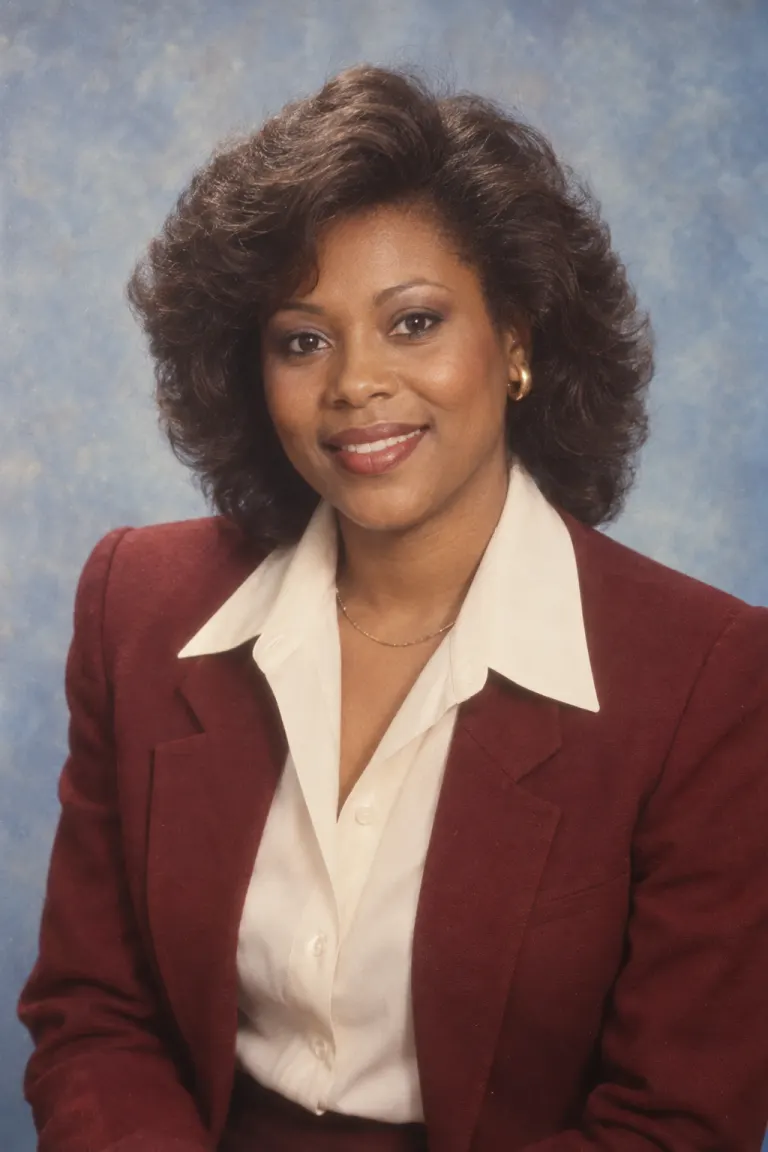
A woman in a burgundy jacket against a soft blue 1980s studio backdrop
AI-created theme example · A woman in a burgundy jacket against a soft blue 1980s studio backdrop
A man in light denim outside a record shop in warm afternoon light
AI-created theme example · A man in light denim outside a record shop in warm afternoon light

Choose a complete photo prompt

Use in generator loads the complete prompt above for editing. Upload your reference and generate here; generation uses the credits shown in the tool.

Warm studio print

Use the uploaded photograph as the identity reference. Keep the same recognizable person, visible age, skin tone, facial proportions and full head. Retain natural skin texture. Create a 1985 studio portrait with a softly mottled blue backdrop, broad soft light, a cream wide-collar shirt and a structured burgundy jacket. Add restrained optical diffusion, warm print tones and fine film grain. Keep eyes in focus. No smartphones, smartwatches, contemporary branding, text, watermarks, extra people or collage panels. Render one photographic image.


Weekend denim

Use the uploaded photograph as the identity reference. Keep the same recognizable person, visible age, skin tone, facial proportions and full head. Retain natural skin texture. Create a late-1980s outdoor portrait beside an unbranded record shop. Dress the person in a light-wash denim jacket over a plain cotton shirt. Use late-afternoon light, slightly faded colors and subtle 35mm grain. Preserve the source expression. No smartphones, smartwatches, contemporary branding, text, watermarks, extra people or collage panels. Render one photographic image.

Family-album afternoon

Use the uploaded photograph as the identity reference. Keep the same recognizable person, visible age, skin tone, facial proportions and full head. Retain natural skin texture. Create a candid 1980s living-room photograph beside wood furniture and patterned curtains. Use a textured knit sweater, warm window light, a relaxed pose and gently faded photographic print colors. Avoid exaggerated neon or heavy blur. No smartphones, smartwatches, contemporary branding, text, watermarks, extra people or collage panels. Render one photographic image.

More AI Image Models & Effects

Browse every other AI image model and effect published on this site in a continuous carousel.

What makes an 80s portrait feel photographic?

Choose one believable photographic direction

Start with one clear photograph and one visual direction. An 80s studio look can come from tailoring, backdrop and softly warm print colors without exaggerated neon. The prompt is already filled in: keep your original hairstyle if desired and change only clothing and background. For more writing control, use the 1980s prompt collection; for two people, use the dedicated couple workflow.

Choose a useful source for the 80s AI Photo Generator

A clear face matters more than a perfect background

Choose a recent photo with balanced exposure, visible eyes and the entire head inside the frame. A simple selfie can be a better reference than a polished image with strong beauty filters. Avoid sunglasses, extreme low angles, motion blur and distant faces. The 80s AI Photo Generator uses the reference to guide the person, so a dramatic background is less useful than clear facial structure. You can describe a new setting after uploading.

Leave room for hair and shoulders

A head-and-shoulders or waist-up photo leaves room for period hair, broad collars and a jacket. Do not expect a cropped hairline to be reconstructed accurately. Choose 2:3 for a portrait print, 3:4 for a tighter composition, or square for an avatar. These options set the output canvas; they do not lock every object in place. Check the top of the hair, shoulder edges and collar after generation.

Separate the person from the styling

Keep the identity instruction and name the changes you actually want. If you like your existing hair, ask to retain it instead of requesting a large feathered hairstyle. If you only want film texture, remove the wardrobe and location changes. A 1980s AI photo generator works best with a coherent brief: asking for minimal changes and a complete makeover in the same prompt makes the result harder to judge.

Three ways to build an 80s photo look

Soft studio: let clothing and light do the work

The studio direction pairs a mottled backdrop with a wide collar and structured jacket. It suits a frontal or gently angled portrait with a relaxed expression. Film grain and mild diffusion should affect the photographic finish without hiding the eyes. Start with restrained styling, then increase color or hair volume if the first result remains recognizable. The 80s AI Photo Generator does not need a neon background to communicate the decade.

Denim street: bring the decade into the setting

A denim street portrait benefits from a little more body and background in the frame. An unbranded record shop, brickwork and late-afternoon light create context for the jacket. Inspect shop signs for invented lettering and the background for modern devices or vehicles. An 80s photo generator should establish a consistent scene, rather than placing grain over an otherwise contemporary image.

Warm album: keep the result ordinary and personal

The album direction uses knitwear, wood furniture, window light and warm print colors. It is useful for a quieter profile image or a themed invitation when theatrical styling would feel excessive. Keep the grain, fading and expression understated. This creates a new retro-inspired picture; it does not recover an old photograph or provide evidence that an event happened in the past.

Refine a result without rewriting everything

When the face drifts

Compare the output with your source, looking separately at the eyes, nose, mouth and hairline. If identity has drifted, reduce changes to hair, makeup and pose, and consider a clearer reference. Adding stronger promises to a prompt cannot guarantee compliance. Each new generation can consume credits, so identify the most important correction before trying again. Review the 80s AI Photo Generator result at full size instead of judging only its small preview.

When the effect becomes a costume

If the result looks like a costume, reduce hair volume, saturated colors and accessories to one or two period cues. If modern objects remain, identify the specific item to replace. Strong neon, natural window light and minimalist monochrome compete with one another. Keep a copy of the original prompt and change just the light or clothing so you can compare the effect of that choice.

Start with your reference photo

1. Upload

Choose an evenly lit photo with a clear face and complete head.

2. Refine the prompt

Keep the identity instructions and change one element at a time: wardrobe, light or setting.

3. Generate and compare

Sign in, review the displayed credit cost and generate. Open the result to inspect faces and clothing details.

Explore the retro photo collection

1980s Photo Prompts

Copy a complete portrait prompt or load it into the generator above. Upload your photo and generate the corresponding 1980s look on this page.

Open tool

80s Couple Photo Prompts

Use one clear photo containing both people. Copy a couple prompt or load it above, then generate both people together here.

Open tool

90s Photo Prompts

Build a distinct 1990s look with disposable-camera flash, understated streetwear or minimalist studio light. Copy or generate each prompt here.

Open tool

80s AI Photo Generator questions

Are 80s and 1980s different effects?

No. They refer to the same decade. This page is the quick upload-and-create route, while the 1980s Photo Prompts collection focuses on reusable instructions and editing choices. Choose the workflow you need rather than treating the spelling variant as a separate historical style.

Can the 1980s photo generator guarantee my exact face?

No exact identity match is guaranteed. The reference and identity instructions guide the result, but facial details, apparent age, complexion and hair can change. Large changes in pose, hairstyle or light deserve particular scrutiny. The example images demonstrate a visual direction, not a promise that every uploaded person will remain unchanged.



Does this restore a damaged old photo?

This workflow changes the photographic style of a person; it is not a dedicated scratch repair or historical reconstruction tool. A badly faded or damaged source may need restoration first. Do not treat generated clothing, scenery or details as information recovered from the original photograph.

Where should I create an 80s couple photo?

Use the dedicated couple prompt page linked below. Two people need separate identity, left/right position and clothing instructions. A single-person prompt may neglect the second subject. Choose a shared photograph where both faces are clear and review each person separately.

Do viewing examples and generating photos cost the same?

Viewing examples and copying prompts do not consume generation credits. To create a new image, sign in and review the cost shown by the generator before submitting. A retry is a new request. Account access and any watermark conditions depend on the plan and credit rules displayed in the product.