























































































































AI Kpop Idol Generator
Sign In

AI Kpop Idol Generator

Create an original fictional adult stage or editorial portrait. Choose a look, edit the brief, and optionally use a fictional adult reference.

408 / 1,000

Copy Protection
Credits required:-
Public VisibilityAllow this result to appear in public inspiration surfaces.

Your Original Idol Concept

Image

Fictional adult reference portrait
Reference
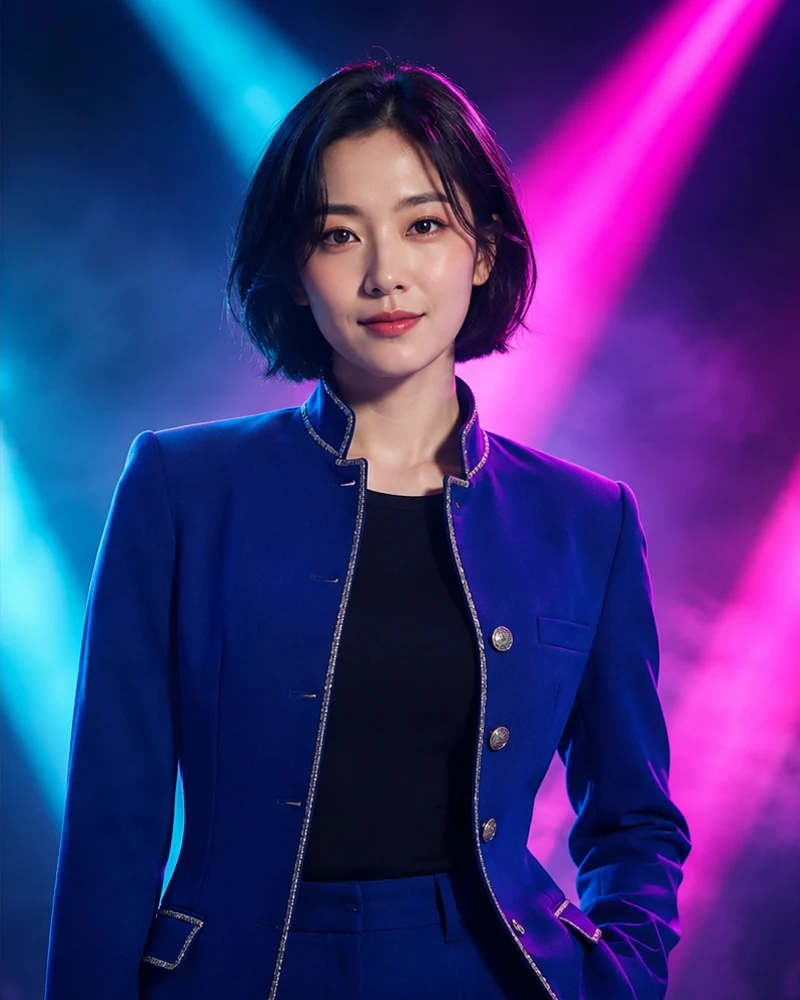
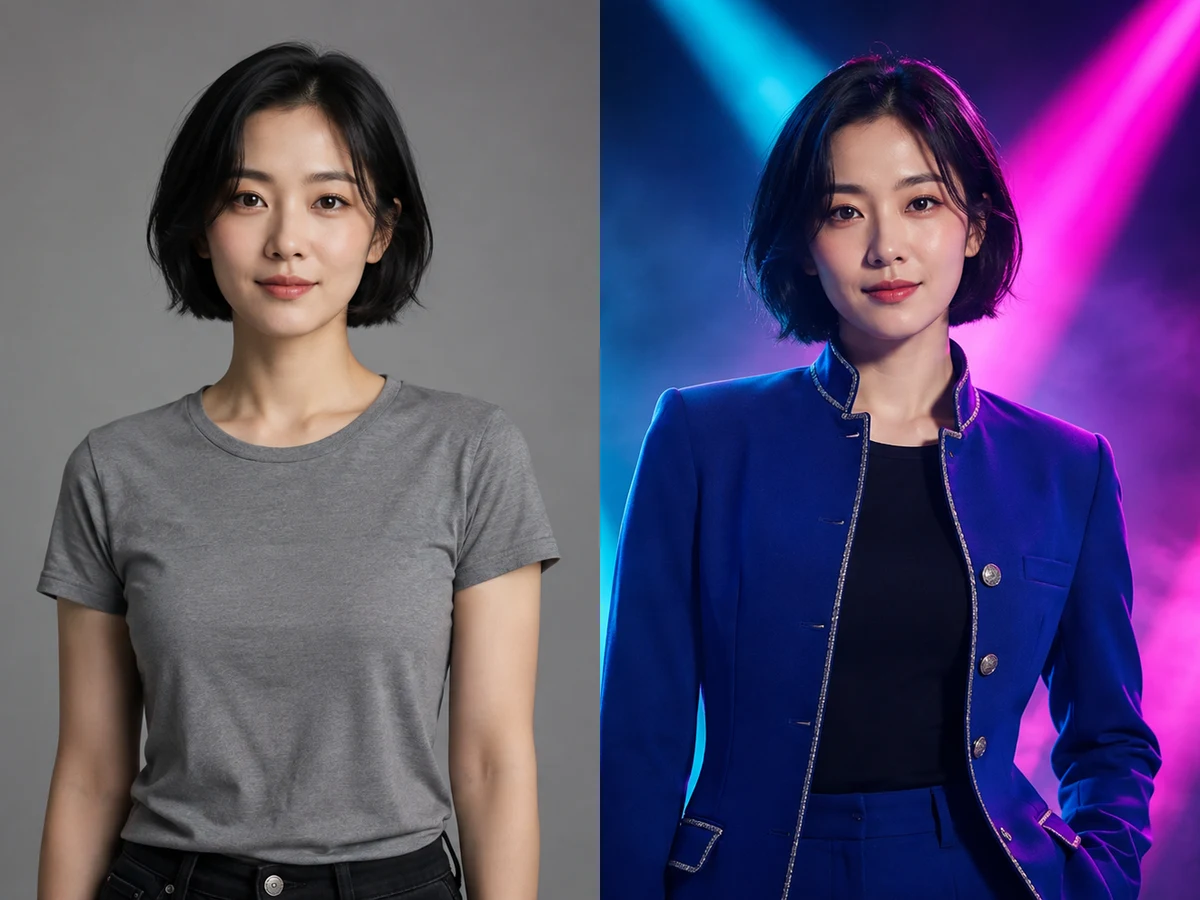
Original neon stage concept
Concept

Build a Fictional Idol Concept with a Clear Visual Direction

Start with a performer, not a famous name

An AI Kpop Idol Generator is most useful when you have a visual idea but no finished character portrait. Begin with a fictional adult performer and decide what the image needs to communicate: a calm solo introduction, a polished editorial feature, or an energetic stage concept. Describe an adult age, hairstyle, expression and a few distinctive features in ordinary language. You do not need to borrow an existing artist’s face or a group’s identity to make a convincing concept. Treat the performer as your own character and keep a short written description beside the images as you experiment.
Make the concept work as one image

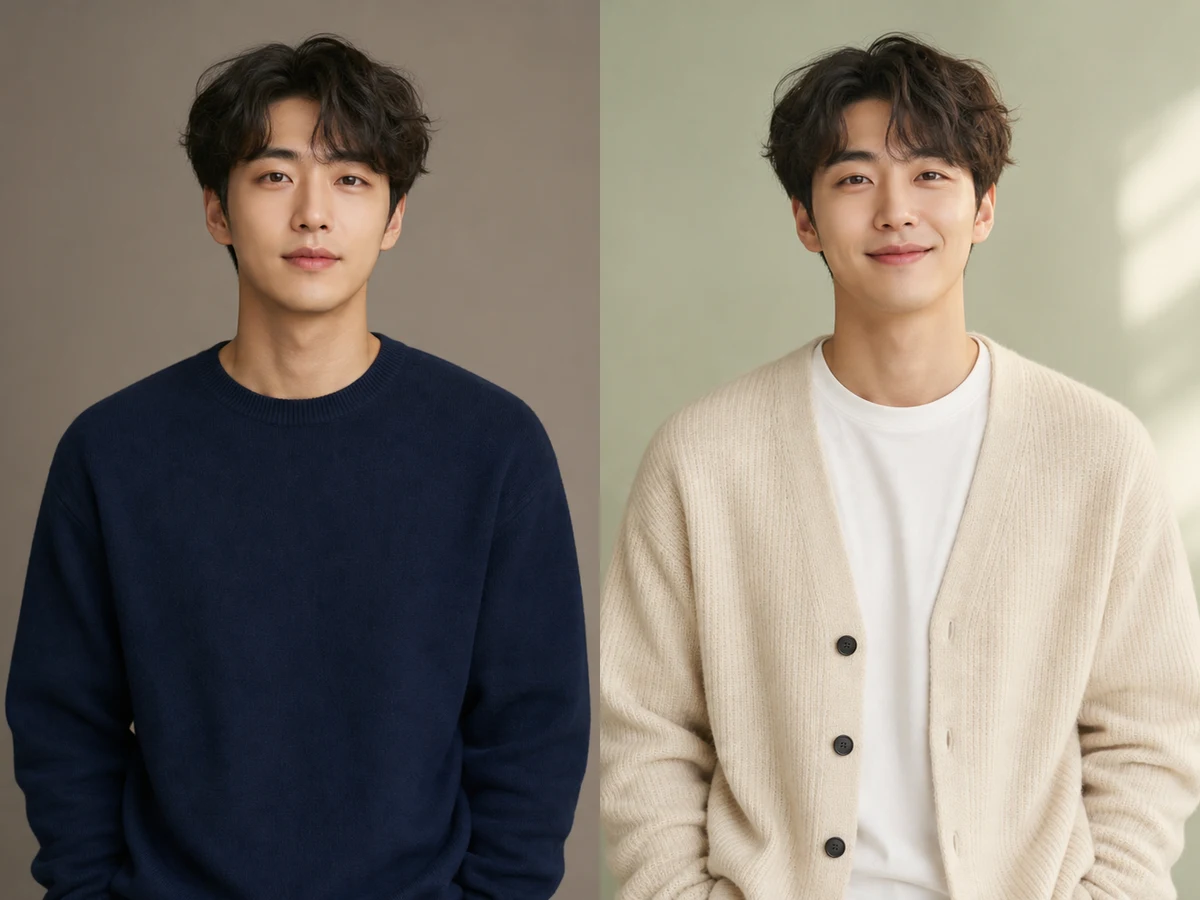
Choose one dominant palette, one lighting direction and one wardrobe silhouette. A cobalt jacket with cool stage light feels different from a cream cardigan photographed against a pale studio wall. When every detail competes for attention, the portrait can become noisy and the face loses its role as the focal point. Use the style cards as starting directions, then edit the visible prompt to add your own choices. The generator creates a still image; it does not write a song, choreograph a performance, animate a dance, or establish a real entertainment career.

Four Original Adult Concept Directions

AI-generated fictional adult examples. Choose the matching style card in the generator to load its editable prompt.

Neon Stage

cobalt tailored jacket over a black crewneck, cyan and magenta beams, light haze, calm confident waist-up pose

Choose This Style
Fictional adult reference and original concept comparison: Neon Stage

Soft Photocard

cream knit cardigan, pale sage studio background, diffused window light, gentle smile, shoulders-up composition

Choose This Style
Fictional adult reference and original concept comparison: Soft Photocard

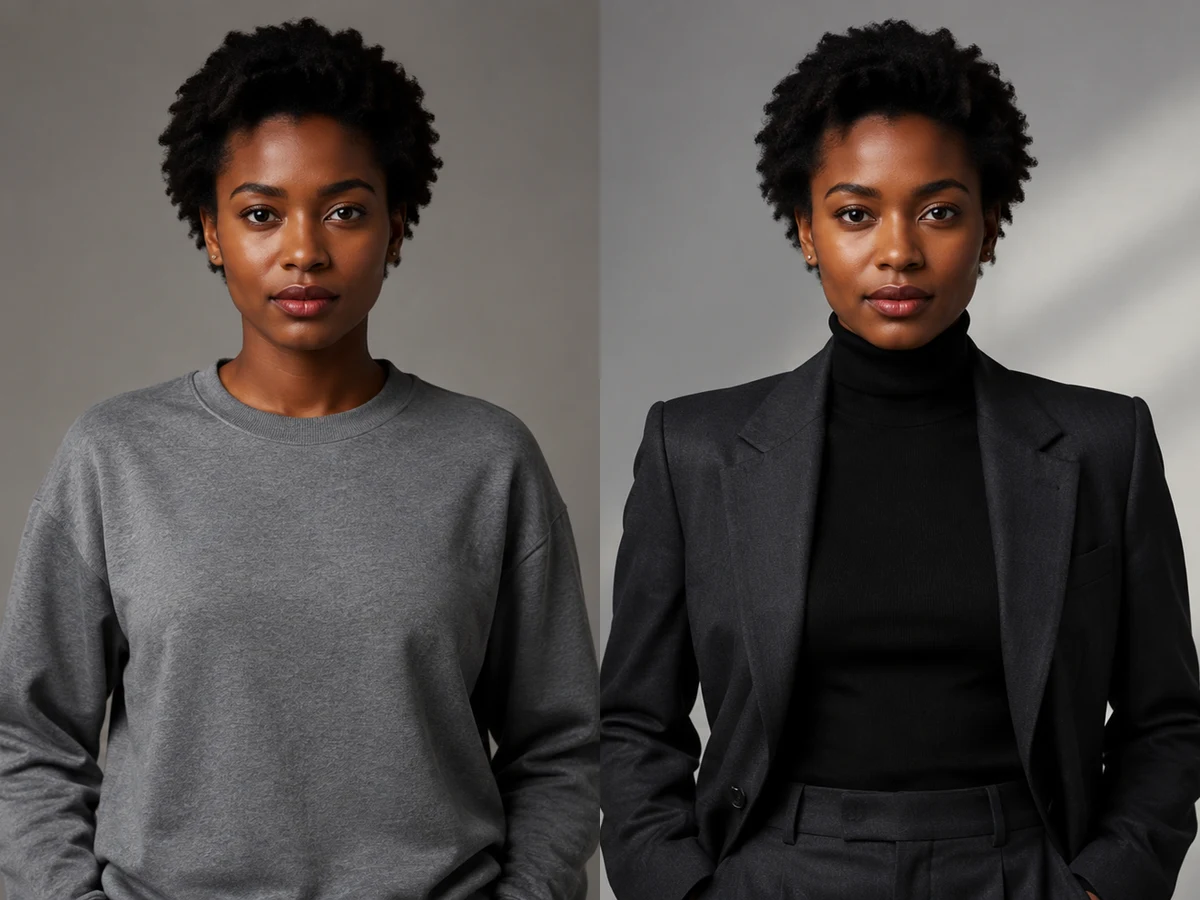
Monochrome Editorial

charcoal structured suit over a high-neck top, silver-gray background, sculptural side light, restrained monochrome grade

Choose This Style
Fictional adult reference and original concept comparison: Monochrome Editorial

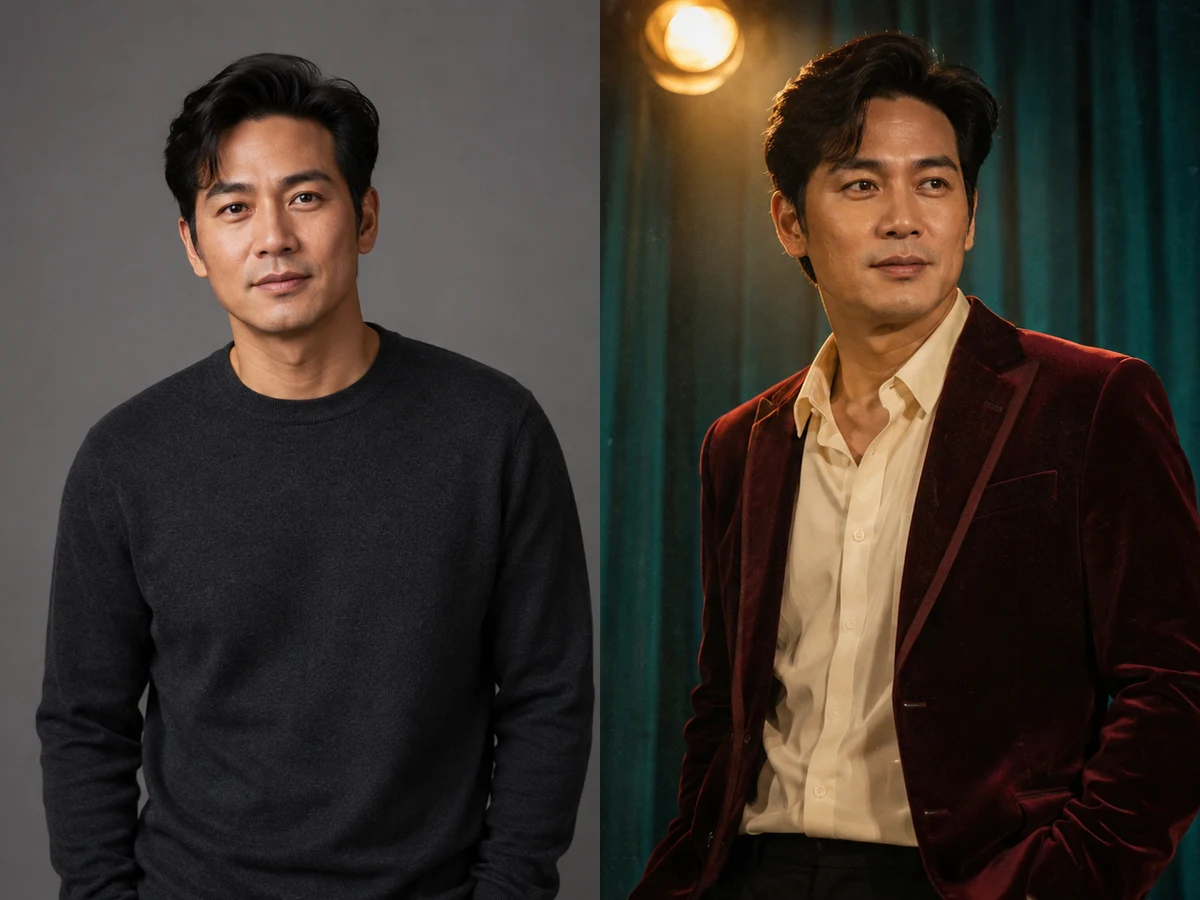
Retro Stage

burgundy velvet jacket over a fully covering ivory shirt, amber spotlights, teal curtain, subtle film grain, relaxed three-quarter pose

Choose This Style
Fictional adult reference and original concept comparison: Retro Stage

How to Create an Original K-pop Concept Portrait

1. Choose text or a fictional reference

Start from text when you want to invent a new performer. If you already have an authorized AI-generated adult character portrait, upload it as an optional visual reference, or select one of the fictional samples above. Use one face with clear eyes and a fully visible hairstyle. A neutral expression and even light make comparison easier. Avoid celebrity photos, screenshots, children, collages and heavily filtered images. Reference input can guide the result, but it does not guarantee exact identity preservation. Keep the original file so you can compare facial structure after generation.

2. Select a look and edit the brief

Pick Neon Stage, Soft Photocard, Monochrome Editorial or Retro Stage. Each preset supplies a different combination of wardrobe, background and light. Read the prompt before generating: replace the clothing color, adjust the mood, or specify a simple pose. Keep the adult-only and originality instructions. Select an output shape in the tool rather than relying on contradictory ratio words in the prompt. Sign in through the generator when you are ready, then review the settings and the current generation requirement displayed there before submitting the request.

3. Review the output before saving

Wait for the task to finish and open the completed image at a useful size. Check the whole head, eyes, hairline, hands, garment edges and background. Compare an uploaded fictional reference with the result instead of judging identity from a small thumbnail. If the clothing is right but the light is too strong, revise the light alone for the next attempt. Keep your preferred image and its prompt together. Use the account task history to revisit the completed task and available output; download a personal copy when you need to retain a chosen concept.

Write a Useful K-pop Idol Prompt

Subject and identity anchor

State that the subject is one fictional adult aged twenty-five or older. Add only the features that matter to the character: a short bob, close curls, a relaxed smile or a strong brow. With a fictional reference, ask to retain the adult face, skin tone and proportions. Do not ask the tool to change ethnicity, reduce age, copy a named celebrity, or manufacture a supposedly official portrait. Specific visual decisions make a more useful brief than lists of performers or entertainment companies.

Wardrobe, material and pose

Name a main garment and its texture, such as a structured wool jacket, cream knit cardigan or burgundy velvet blazer. Pair it with fully covering layers and a simple posture. A relaxed shoulder turn is usually easier to evaluate than a complicated dance position with crossed arms and fingers near the face. Keep jewelry restrained until the first version works. You can add one accessory in a later revision, then inspect its shape and how it sits against the body.

Light, lens and background

Describe what the light does: diffused window light for a soft card, a narrow side light for sculptural editorial shadows, or colored backlights for a stage atmosphere. Keep the face readable and ask for natural skin texture. A quiet background makes small social avatars easier to recognize. Include a waist-up or shoulders-up crop and request space above the hair. Avoid adding technical camera terms unless they support the result you actually want; a short coherent description is easier to revise.

A reusable brief structure

Use this order: fictional adult subject, concept, wardrobe, pose, background, lighting, framing, then exclusions. For example: one fictional adult performer aged twenty-seven, original retro concept, burgundy velvet jacket and ivory shirt, relaxed three-quarter pose, teal curtain, warm amber spotlight, waist-up portrait with the whole head visible. Finish by excluding celebrity likeness, official marks, text and distorted anatomy. This structure makes it clear which detail to change between attempts without rebuilding the entire concept from scratch.

Plan Photocards, Editorials and Stage Moodboards

Photocard and profile concepts

Choose a calm expression, a clear face and a simple background for a portrait that remains readable at small sizes. Start with the vertical shape when you want a card-like composition, or square for a social avatar. Leave room around the hair and shoulders for your later crop. The generated file is artwork, not a print-ready card template with bleed, trim marks or verified print dimensions. Before printing, inspect the actual pixel dimensions and make a proof using your printer’s layout requirements.

Editorial concept studies

Use one dominant material and a controlled lighting setup to explore a fictional performer’s visual identity. Compare a sharp tailored silhouette with soft knitwear while keeping the face and camera crop as similar as possible. A small set of deliberate alternatives is more useful than unrelated looks. Add captions or publication layout later in a design tool rather than asking the portrait generator to invent magazine names, cover lines or mastheads. Present the result as an original concept study, with no implication of a real publication or endorsement.

Stage planning and consistent sets

A stage concept image can help you discuss palette, atmosphere and wardrobe before developing a wider creative project. It does not prove that a physical outfit, lighting rig or venue will reproduce the image. For a small series, reuse the same fictional reference, adult description and wardrobe rules, then vary one background or light. Compare facial structure between every output. Separate generations may drift, and this page does not offer a guaranteed character lock, a full group lineup workflow or automatic multi-image consistency.

Fix the Details that Make a Portrait Feel Wrong

When the face or age drifts

Return to the clearest fictional adult source. Remove conflicting descriptions, keep the pose simple and explicitly preserve the adult facial structure. Avoid asking for a much younger appearance or excessive skin smoothing. Compare the eyes, nose, mouth and jaw rather than relying on hairstyle alone. If a result resembles a real celebrity, discard that version and revise the fictional character description. The examples demonstrate visual directions, not a promise that each attempt will match them or preserve every identity detail.

When styling overwhelms the portrait

Reduce the number of colors, ornaments and competing lights. Ask for one jacket, one background and a readable face. If hands look awkward, choose a waist-up posture with relaxed arms and keep the hands away from the face. For cropped hair, select a taller composition and request generous headroom. Open the full output again after each revision. A thumbnail can hide merged fingers, uneven eyes, floating accessories or impossible garment seams that become obvious in a saved image.

Three Practical Revisions from First Draft to Usable Concept

Keep the styling, change the atmosphere

Suppose the first stage portrait has the cobalt jacket and expression you wanted, but magenta light makes the face too dark. Keep the character description and wardrobe words. Replace only the lighting direction with soft cyan backlight and neutral front fill, then request readable natural skin. The two images now have a clear comparison goal. Changing the outfit, scene, lens and expression together would make it harder to tell which adjustment improved the result. Save the complete prompt from the version that works so the next revision starts from a deliberate baseline.

Adapt a stage concept for a photocard

To adapt a favorite fictional character into a card concept, reuse the authorized fictional adult reference and replace the wide stage with a simple studio. Keep the main garment and request a shoulders-up crop. Make the background quieter and leave space around the complete hairstyle. A photocard does not need an elaborate hand gesture: a slight shoulder turn and natural expression often remain clearer. Inspect both the full image and a reduced preview to confirm the eyes and expression read at both sizes, then add your own caption separately in a layout tool.

Organize a small set you can compare

Give saved candidates useful names and record the style, reference, shape and detail changed in each attempt. Select images for facial readability, coherent clothing, consistent light and originality, rather than brightness alone. For a rejected result, write one concrete reason, such as a floating earring or cropped hair. Address that issue in the next attempt. Keeping a few purposeful candidates makes later creative discussions easier than collecting a large folder of unrelated portraits without a clear reason to prefer one.

Choose the Right Portrait Workflow

Character Portrait Generator

Explore fictional fantasy and science-fiction roles.

Try Now

AI Outfit Generator

Plan complete clothing combinations around an occasion.

Try Now

Photo Effects

Browse broader photo transformations and style tools.

Try Now

AI Kpop Idol Generator FAQ

Can I create an idol without uploading a photo?

Yes. The default text workflow creates one fictional adult performer from your edited brief. A fictional adult reference is optional and useful when you want to develop an existing original character.

Can I become a particular real artist?

No. This page is for original fictional adult concepts. Do not name, imitate or upload real celebrities, copy official portraits, or describe generated work as an artist endorsement. Use broad stage and editorial styling instead.

Are these example people real?

No. The source portraits and styled examples are AI-generated fictional adults. They are illustrative concept assets, not photographs of actual performers or proof of a completed user task. Your result will depend on the input and settings.

Does this create music or dance videos?

This tool produces still portrait images. It does not generate audio, choreography, animated performances or a complete virtual group project. Use a separate video workflow if you want to explore motion afterward.

How do I know the generation requirement?

Check the live generator before submitting. It displays the current requirement for the selected settings. Availability and account access can vary; the page does not promise unlimited free generation or a fixed completion time.

Can I publish my fictional portrait?

Review the result, the rights to any uploaded reference and NanoPic’s applicable terms before use. Label it as an AI-generated fictional concept where viewers could mistake it for a real performer. Do not add official group marks or claim endorsement.

Create Your Fictional Adult Idol Concept

Start with one adult character, one coherent look and one clear portrait brief.