套餐最高可省 73%

1980 年代照片提示词
登录

1980 年代照片提示词

复制或编辑 1980 年代照片提示词,上传人像照片,即可在本页生成选定的年代风格。

上传照片*

644 / 2,400

复制保护
公开展示允许该结果出现在公开灵感展示区。

照片效果预览

图片

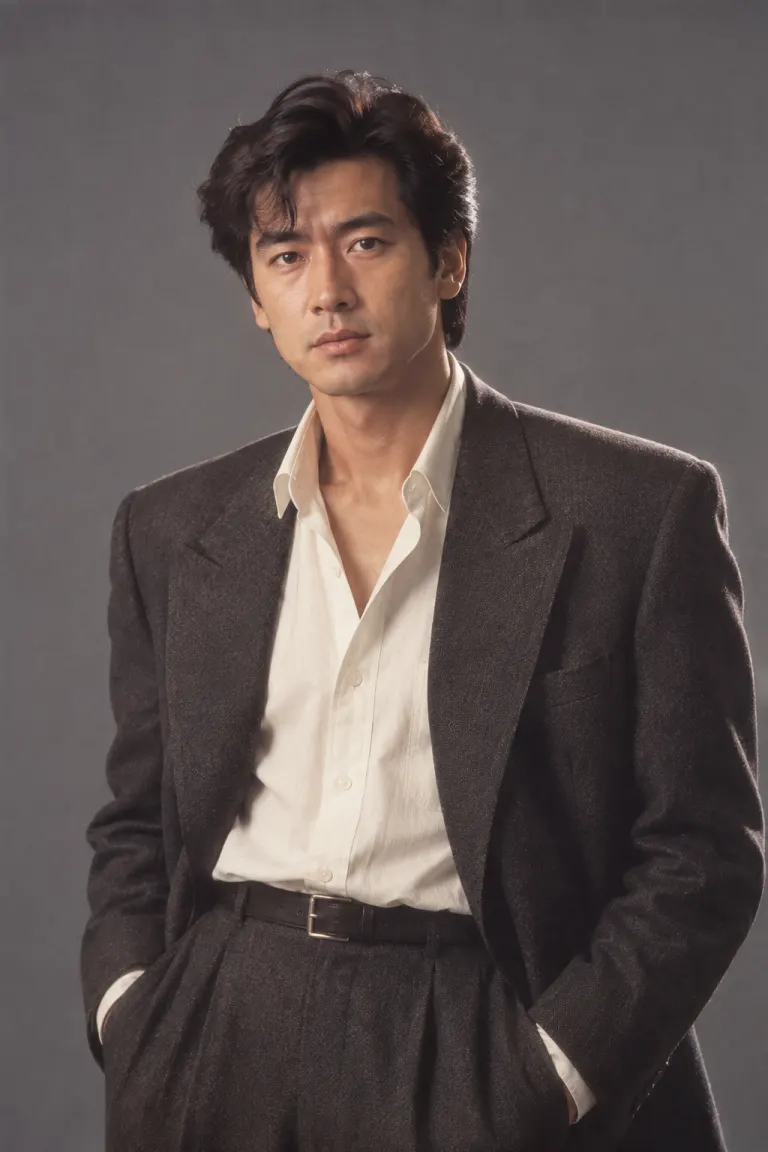
身着炭灰色挺括西装男性的80年代柔光影楼人像
AI生成主题示例 · 身着炭灰色挺括西装男性的80年代柔光影楼人像
身着合体外套女性与温暖电影感窗光
AI生成主题示例 · 身着合体外套女性与温暖电影感窗光

选择并复制提示词

点击「带入生成器」后可继续修改,再上传照片并生成。英文提示词可直接使用;生成会按界面显示消耗积分。

立体剪裁杂志肖像

Use the uploaded photograph as the identity reference. Keep the same recognizable person, visible age, skin tone, facial proportions and full head. Retain natural skin texture. Create a 1984 fashion editorial photograph. Use a charcoal shoulder-structured blazer, an ivory blouse or shirt, a restrained geometric earring if appropriate, and a slate seamless backdrop. Light with a large soft key and a subtle rim. Use medium-format detail with gentle print warmth; do not replace the face with a fashion model. No smartphones, smartwatches, contemporary branding, text, watermarks, extra people or collage panels. Render one photographic image.


雨季电影氛围

Use the uploaded photograph as the identity reference. Keep the same recognizable person, visible age, skin tone, facial proportions and full head. Retain natural skin texture. Create an original 1980s Indian cinema-inspired portrait on a shaded veranda after rain. Use a deep-teal draped silk outfit, small gold-tone accessories, warm side light, soft background greenery and restrained film halation. Preserve the person rather than imitating a named actor. Keep the face sharp. No smartphones, smartwatches, contemporary branding, text, watermarks, extra people or collage panels. Render one photographic image.

胶片校园肖像

Use the uploaded photograph as the identity reference. Keep the same recognizable person, visible age, skin tone, facial proportions and full head. Retain natural skin texture. Create a 1987 campus portrait of the same adult beside a brick library. Use a striped cotton shirt, a simple canvas shoulder bag and high-waisted trousers. Keep a natural stance. Use overcast daylight, muted red and navy colors and fine negative-film grain. No smartphones, smartwatches, contemporary branding, text, watermarks, extra people or collage panels. Render one photographic image.

直闪派对肖像

Use the uploaded photograph as the identity reference. Keep the same recognizable person, visible age, skin tone, facial proportions and full head. Retain natural skin texture. Create a 1988 indoor party portrait with a dark plum backdrop, an unbranded satin jacket and one simple metallic accessory. Use direct camera flash with a small shadow behind the shoulders and warm photographic print colors. Keep facial details readable without plastic smoothing. No smartphones, smartwatches, contemporary branding, text, watermarks, extra people or collage panels. Render one photographic image.

更多 AI 图片模型与特效

循环浏览站内全部其他 AI 图片模型与特效,点击卡片即可切换工具。

为具体肖像准备的写作工具

这些 1980 年代照片提示词适合希望自己决定肖像细节的用户。时尚半身照可以用于个人头像,校园场景可以制作怀旧生日照片,雨后廊台则适合电影氛围灵感板。只写年代还不足以定义画面:先选使用场景,再决定人物穿什么,最后说明照片的成像感觉。每张卡片都提供完整起始文本,生成前可以自由修改。

把提示词拆成六个清楚的部分

先说明以上传人物作为身份参考,再依次描述构图、服饰和场景,最后指定灯光方向与一种适度的胶片处理。这样的顺序方便理解每一次修改。例如,保留半身构图和石板灰背景,只把炭灰西装改成米色针织衫,同时保留面部身份要求。补充排除手机、现代标志和文字的指令可以减少干扰,但不能保证所有不需要的细节都会消失。

选择时尚结构感或电影氛围

时尚卡片组合了有结构的肩线、简洁背景和大面积柔光,重点在干净的轮廓;加入拥挤街道或强烈雨景会明显改变方向。电影卡片则用垂坠面料、绿植与暖侧光营造氛围,不要求模仿名演员。这些提示词描述的是不同视觉选择,不是历史影像记录。涉及具体文化的服饰时,请按照目标场景准确描述,并替换不适合参考人物或个人喜好的配饰。

有意识地选择校园日光或派对闪光

校园肖像适合自然站姿、棉质服装和安静建筑。普通图书馆外墙比拥挤学生人群更少干扰。派对肖像使用正面闪光与偏暗环境,让面料产生亮泽,并可能在肩后形成小块阴影。修改提示词时应在这些光线体系中选择一种,不要同时要求均匀阴天光、深夜阴影和柔和影棚光,否则目标会不明确。

选择能看清服饰区域的参考照片

请使用有权上传、面部清楚且头部完整的照片。服饰是重点时,胸部以上或半身照片更合适;裁剪过紧的自拍缺少肩膀与姿势信息。避免强美颜、遮住眼睛的墨镜,以及掩盖自然肤色的彩色灯光。这些提示词要求保留可识别身份,并不保证完全不变脸。本页最好先用单人照片;需要两人独立服饰安排时,可使用关联的情侣工具。

再次尝试前先修正冲突指令

如果结果太现代,请指出具体问题,例如移除手机、把标志换成素色面料或简化背景。面部过度磨皮时,要求自然皮肤纹理,并删除美颜修饰词。不要靠不断增加形容词解决所有问题。一次只修改一个变量,更容易比较效果;保留上一版文本,便于对照。每次重新生成都会按工具显示消耗积分,即使该次效果不符合个人偏好。

检查内容,而不只是复古色调

分享前请打开大图,对照原照片检查面部、年龄特征、肤色和发型,再检查外套结构是否合理、耳饰位置是否自然、手部形状是否正常,同时留意招牌或衣服上的意外文字。暖色调本身不足以形成可信效果,灯光、面料与背景需要一致。如果构图满意,只是配饰出错,可以先从提示词中删除配饰,不必重写整个场景。

提示词编辑与效果检查

80s 和 1980s 是不同风格吗?

它们指同一个年代。本页侧重可编辑的写作结构和四种肖像方案,关联的 80 年代生成器提供更快捷的起始转换。应按工作流程选择,而不是把两个名称理解为不同历史时期。

可以保留现在的发型吗?

可以,把发型描述改为保留原照片的发型、发际线和长度,并与服饰、背景指令分开。模型仍可能改变细节,因此应检查成品,不能认为写了要求就一定一致。

怎样复制卡片并在本页生成?

点击复制提示词会把卡片文本放入剪贴板,点击带入生成器会将它载入本页可编辑输入框。上传参考照片、修改文本、登录并查看显示的积分用量后再生成。复制文本本身不消耗生成积分。

探索相邻复古主题

80 年代 AI 照片生成器

上传照片,直接制作暖色调的 80 年代影棚肖像。下方提示词可自由编辑。

打开工具

80 年代情侣照片提示词

上传一张两人面部清楚的合照。复制情侣提示词或带入上方生成器,即可在本页生成双人复古照片。

打开工具

90 年代照片提示词

用一次性相机直闪、低调街头穿搭或极简影棚灯光制作不同的 90 年代效果。提示词可复制,也可在本页直接生成。

打开工具